> ## Documentation Index
> Fetch the complete documentation index at: https://docs.truu.ai/llms.txt
> Use this file to discover all available pages before exploring further.
# 2. Create Your Admin Groups
TOTAL access is controlled by Entra ID security groups.
**One group is required:** you must create a group named **"TOTAL-Admin"** (or your agreed equivalent). Every person in this group will have full administrative access to the TOTAL Threat Console.
**For each group you want to create:**
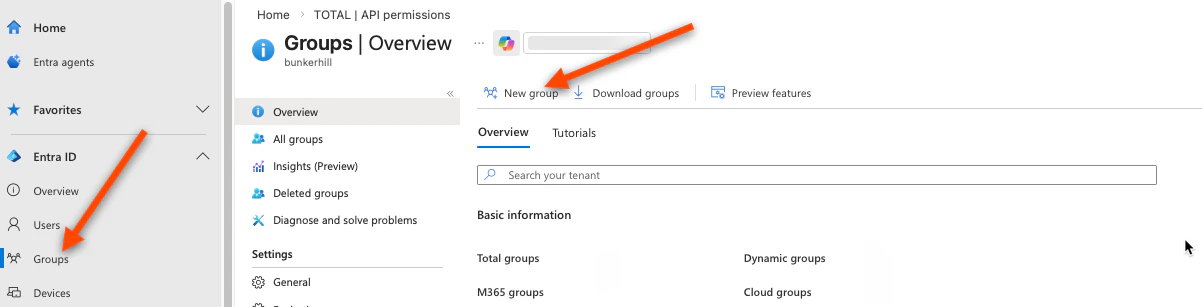
1. In the Azure Portal, go to **Microsoft Entra ID** → **Groups** → **New group**
 2. Set **Group type** to **Security**
3. Name it clearly, e.g. "TOTAL-Admin", "TOTAL-Analyst"
4. Add the people who should have that access level as **Members**
2. Set **Group type** to **Security**
3. Name it clearly, e.g. "TOTAL-Admin", "TOTAL-Analyst"
4. Add the people who should have that access level as **Members**
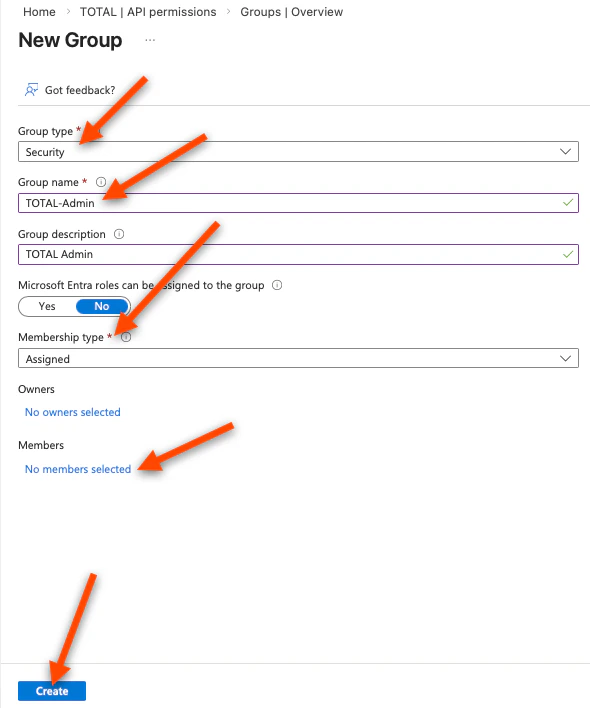 5. Click **Create**
6. After creation, click on the group → **Overview** → copy the **Object ID**
Collect all group Object IDs. You will enter these in the TOTAL Threat Console in the next step.
Once saved, the console will display your:
* **SCIM Tenant URL** — you will enter this in Azure in Part 3
* **SCIM Secret Token** — you will enter this in Azure in Part 3
5. Click **Create**
6. After creation, click on the group → **Overview** → copy the **Object ID**
Collect all group Object IDs. You will enter these in the TOTAL Threat Console in the next step.
Once saved, the console will display your:
* **SCIM Tenant URL** — you will enter this in Azure in Part 3
* **SCIM Secret Token** — you will enter this in Azure in Part 3