> ## Documentation Index
> Fetch the complete documentation index at: https://docs.truu.ai/llms.txt
> Use this file to discover all available pages before exploring further.

# Admin Assisted Enrollment

> This is a step-by-step guide as to how one utilizes TruU's Admin Console's Admin Assisted Enrollment.

**Admin Assisted Enrollment**

1. Log in to the "Admin Portal"
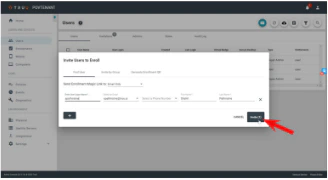
2. Click on **Users** in the left hand panel. Then, click the **blue mail icon** on the top of the page

<img src="https://mintcdn.com/truu-2/jJ0QGEHfTe0CfrEY/images/docs/a8cfe83b-31f5-4a65-a045-f9a5073b0415/1d368049-5274-459d-8ecc-a178a991abf6/1e0b21ce-ef93-4b98-879a-69b256d29688/images/ad102457-bd55-428e-8da4-041672bdd627.png?fit=max&auto=format&n=jJ0QGEHfTe0CfrEY&q=85&s=04c3955c75de3ce875664a8179683fb3" alt="" width="508" height="87" data-path="images/docs/a8cfe83b-31f5-4a65-a045-f9a5073b0415/1d368049-5274-459d-8ecc-a178a991abf6/1e0b21ce-ef93-4b98-879a-69b256d29688/images/ad102457-bd55-428e-8da4-041672bdd627.png" />

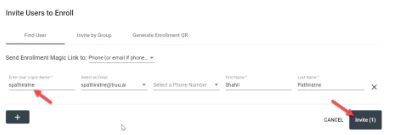
3. Enter the *User's Login Name* and then click **invite**
<img src="https://mintcdn.com/truu-2/jJ0QGEHfTe0CfrEY/images/docs/a8cfe83b-31f5-4a65-a045-f9a5073b0415/1d368049-5274-459d-8ecc-a178a991abf6/1e0b21ce-ef93-4b98-879a-69b256d29688/images/5ee60a20-c6cd-4ccc-9f46-6fcec1f1cfe5.png?fit=max&auto=format&n=jJ0QGEHfTe0CfrEY&q=85&s=0cc2c0f5e5a4b090679c80c2e7a3d225" alt="" width="393" height="135" data-path="images/docs/a8cfe83b-31f5-4a65-a045-f9a5073b0415/1d368049-5274-459d-8ecc-a178a991abf6/1e0b21ce-ef93-4b98-879a-69b256d29688/images/5ee60a20-c6cd-4ccc-9f46-6fcec1f1cfe5.png" />

OR

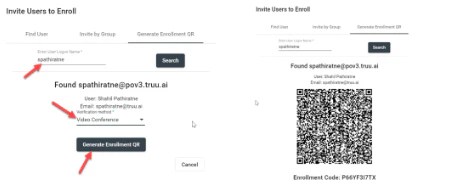
Click *Generate Enrollment QR* on the top of the page and then enter the *User's Login Name* and choose **verification method**
<img src="https://mintcdn.com/truu-2/jJ0QGEHfTe0CfrEY/images/docs/a8cfe83b-31f5-4a65-a045-f9a5073b0415/1d368049-5274-459d-8ecc-a178a991abf6/1e0b21ce-ef93-4b98-879a-69b256d29688/images/778502de-690f-4962-93d2-4658885fc7a6.png?fit=max&auto=format&n=jJ0QGEHfTe0CfrEY&q=85&s=884d6784749bff6e9cb8fa317eb499fc" alt="" width="452" height="192" data-path="images/docs/a8cfe83b-31f5-4a65-a045-f9a5073b0415/1d368049-5274-459d-8ecc-a178a991abf6/1e0b21ce-ef93-4b98-879a-69b256d29688/images/778502de-690f-4962-93d2-4658885fc7a6.png" />

**Admin Email Invite**

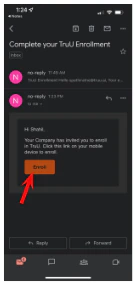
1. Open the email invite generated by your admin and click **Enroll**
<img src="https://mintcdn.com/truu-2/jJ0QGEHfTe0CfrEY/images/docs/a8cfe83b-31f5-4a65-a045-f9a5073b0415/1d368049-5274-459d-8ecc-a178a991abf6/1e0b21ce-ef93-4b98-879a-69b256d29688/images/e4cec372-030d-4a5a-9922-1db8bd741770.png?fit=max&auto=format&n=jJ0QGEHfTe0CfrEY&q=85&s=babe40735c5e066f2c69d298d2690786" width="328" height="180" data-path="images/docs/a8cfe83b-31f5-4a65-a045-f9a5073b0415/1d368049-5274-459d-8ecc-a178a991abf6/1e0b21ce-ef93-4b98-879a-69b256d29688/images/e4cec372-030d-4a5a-9922-1db8bd741770.png" />

<img src="https://mintcdn.com/truu-2/jJ0QGEHfTe0CfrEY/images/docs/a8cfe83b-31f5-4a65-a045-f9a5073b0415/1d368049-5274-459d-8ecc-a178a991abf6/1e0b21ce-ef93-4b98-879a-69b256d29688/images/adcc093a-a871-44c0-887e-c17a1a2c2333.png?fit=max&auto=format&n=jJ0QGEHfTe0CfrEY&q=85&s=be34e73b2f7b3f1506782b184469264b" width="135" height="284" data-path="images/docs/a8cfe83b-31f5-4a65-a045-f9a5073b0415/1d368049-5274-459d-8ecc-a178a991abf6/1e0b21ce-ef93-4b98-879a-69b256d29688/images/adcc093a-a871-44c0-887e-c17a1a2c2333.png" />

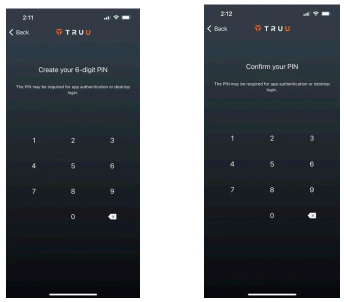
2. Create a 6-digit TruU PIN then confirm the PIN for the TruU App
<img src="https://mintcdn.com/truu-2/jJ0QGEHfTe0CfrEY/images/docs/a8cfe83b-31f5-4a65-a045-f9a5073b0415/1d368049-5274-459d-8ecc-a178a991abf6/1e0b21ce-ef93-4b98-879a-69b256d29688/images/f381daf1-541d-462d-bad6-14e99ff4807b.png?fit=max&auto=format&n=jJ0QGEHfTe0CfrEY&q=85&s=e83b45f1ce8b33fb77fc0bcf1a119b62" alt="" width="344" height="302" data-path="images/docs/a8cfe83b-31f5-4a65-a045-f9a5073b0415/1d368049-5274-459d-8ecc-a178a991abf6/1e0b21ce-ef93-4b98-879a-69b256d29688/images/f381daf1-541d-462d-bad6-14e99ff4807b.png" />

Please note:

* This PIN is specific to TruU and not used to unlock your phone
* The TruU PIN is required to unlock/login to the computer during offline mode (or when the mobile phone is not connected to the Internet and is operating on Bluetooth only)
* The PIN is also required and used for phones that do not Face ID or Fingerprint capabilities

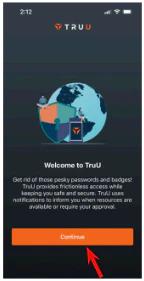
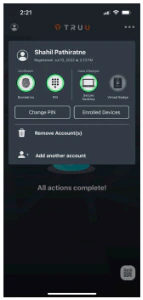
3. Press **Continue** and select **allow** to all the following prompts on the following screen. You can also confirm enrollment and information by clicking on the user icon in the top left corner of the homepage
<img src="https://mintcdn.com/truu-2/jJ0QGEHfTe0CfrEY/images/docs/a8cfe83b-31f5-4a65-a045-f9a5073b0415/1d368049-5274-459d-8ecc-a178a991abf6/1e0b21ce-ef93-4b98-879a-69b256d29688/images/46662367-3e47-4a31-bfe5-1efe8b07f8e2.png?fit=max&auto=format&n=jJ0QGEHfTe0CfrEY&q=85&s=78e50e112dfd1bbdc66e9a950f05ddb3" width="144" height="281" data-path="images/docs/a8cfe83b-31f5-4a65-a045-f9a5073b0415/1d368049-5274-459d-8ecc-a178a991abf6/1e0b21ce-ef93-4b98-879a-69b256d29688/images/46662367-3e47-4a31-bfe5-1efe8b07f8e2.png" />

<img src="https://mintcdn.com/truu-2/jJ0QGEHfTe0CfrEY/images/docs/a8cfe83b-31f5-4a65-a045-f9a5073b0415/1d368049-5274-459d-8ecc-a178a991abf6/1e0b21ce-ef93-4b98-879a-69b256d29688/images/b91769fb-4248-40bf-88e7-7214823743c0.png?fit=max&auto=format&n=jJ0QGEHfTe0CfrEY&q=85&s=6c9a98ba66a0765c0b0ca1029e7d742f" width="143" height="300" data-path="images/docs/a8cfe83b-31f5-4a65-a045-f9a5073b0415/1d368049-5274-459d-8ecc-a178a991abf6/1e0b21ce-ef93-4b98-879a-69b256d29688/images/b91769fb-4248-40bf-88e7-7214823743c0.png" />

**Admin Generated QR Code**

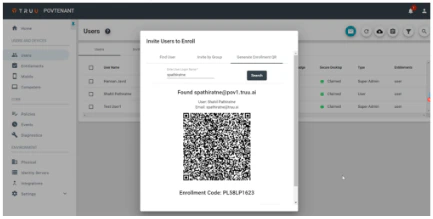
1. Admin generates an Enrollment QR code for the user after the user verifies identity via Zoom call
<img src="https://mintcdn.com/truu-2/jJ0QGEHfTe0CfrEY/images/docs/a8cfe83b-31f5-4a65-a045-f9a5073b0415/1d368049-5274-459d-8ecc-a178a991abf6/1e0b21ce-ef93-4b98-879a-69b256d29688/images/9cff063f-904b-4c7f-90b0-194a558b3e0b.png?fit=max&auto=format&n=jJ0QGEHfTe0CfrEY&q=85&s=efdc28253a71b681a61c6dfb79ff8640" alt="" width="433" height="219" data-path="images/docs/a8cfe83b-31f5-4a65-a045-f9a5073b0415/1d368049-5274-459d-8ecc-a178a991abf6/1e0b21ce-ef93-4b98-879a-69b256d29688/images/9cff063f-904b-4c7f-90b0-194a558b3e0b.png" />

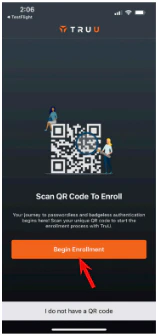
2. On your phone, open the "TruU Mobile App" and click **Begin Enrollment**
<img src="https://mintcdn.com/truu-2/jJ0QGEHfTe0CfrEY/images/docs/a8cfe83b-31f5-4a65-a045-f9a5073b0415/1d368049-5274-459d-8ecc-a178a991abf6/1e0b21ce-ef93-4b98-879a-69b256d29688/images/e8b64409-93b5-428b-8a6a-a199cc3958d0.png?fit=max&auto=format&n=jJ0QGEHfTe0CfrEY&q=85&s=356f7d75eecfb8a45f5164e25b6fa120" alt="" width="157" height="336" data-path="images/docs/a8cfe83b-31f5-4a65-a045-f9a5073b0415/1d368049-5274-459d-8ecc-a178a991abf6/1e0b21ce-ef93-4b98-879a-69b256d29688/images/e8b64409-93b5-428b-8a6a-a199cc3958d0.png" />

3. Scan the QR code on your computers browser using the "TruU Mobile App"
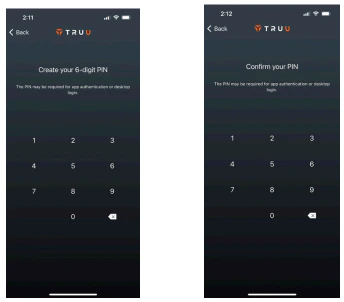
4. Create a 6-digit TruU PIN then confirm the PIN for the TruU App
<img src="https://mintcdn.com/truu-2/qCK1oWL4jNpZKJ8A/images/docs/a8cfe83b-31f5-4a65-a045-f9a5073b0415/1d368049-5274-459d-8ecc-a178a991abf6/1e0b21ce-ef93-4b98-879a-69b256d29688/images/2bce6b34-04bf-4792-9154-e6238659b586.png?fit=max&auto=format&n=qCK1oWL4jNpZKJ8A&q=85&s=261e3bfc2643935b5323838a097a2e94" alt="" width="344" height="302" data-path="images/docs/a8cfe83b-31f5-4a65-a045-f9a5073b0415/1d368049-5274-459d-8ecc-a178a991abf6/1e0b21ce-ef93-4b98-879a-69b256d29688/images/2bce6b34-04bf-4792-9154-e6238659b586.png" />

Please note:

* This PIN is specific to TruU and not used to unlock your phone
* The TruU PIN is required to unlock/login to the computer during offline mode (or when the mobile phone is not connected to the Internet and is operating on Bluetooth only)
* The PIN is also required and used for phones that do not Face ID or Fingerprint capabilities

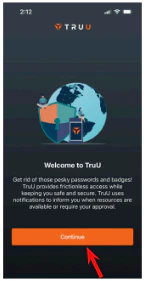
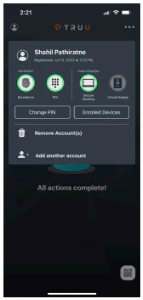
5. Press **Continue** and select **allow** to all the following prompts on the following screen. You can also confirm enrollment and information by clicking on the user icon in the top left corner of the homepage
<img src="https://mintcdn.com/truu-2/qCK1oWL4jNpZKJ8A/images/docs/a8cfe83b-31f5-4a65-a045-f9a5073b0415/1d368049-5274-459d-8ecc-a178a991abf6/1e0b21ce-ef93-4b98-879a-69b256d29688/images/1a5e73c7-161b-434a-b4b5-65540df71c95.png?fit=max&auto=format&n=qCK1oWL4jNpZKJ8A&q=85&s=2e1bd498aa57440d7f1dc5f75c322134" width="144" height="281" data-path="images/docs/a8cfe83b-31f5-4a65-a045-f9a5073b0415/1d368049-5274-459d-8ecc-a178a991abf6/1e0b21ce-ef93-4b98-879a-69b256d29688/images/1a5e73c7-161b-434a-b4b5-65540df71c95.png" />

<img src="https://mintcdn.com/truu-2/jJ0QGEHfTe0CfrEY/images/docs/a8cfe83b-31f5-4a65-a045-f9a5073b0415/1d368049-5274-459d-8ecc-a178a991abf6/1e0b21ce-ef93-4b98-879a-69b256d29688/images/df628ec3-d4a5-4439-8871-455a31d4ae95.png?fit=max&auto=format&n=jJ0QGEHfTe0CfrEY&q=85&s=1e0ecceb2238303284fe6500f13da385" width="143" height="300" data-path="images/docs/a8cfe83b-31f5-4a65-a045-f9a5073b0415/1d368049-5274-459d-8ecc-a178a991abf6/1e0b21ce-ef93-4b98-879a-69b256d29688/images/df628ec3-d4a5-4439-8871-455a31d4ae95.png" />

***

[Frontline Access 25.3.0 Release Notes](/docs/frontline-access-2530-release-notes)

[Admin Console Overview](/docs/admin-console-overview)