> ## Documentation Index
> Fetch the complete documentation index at: https://docs.truu.ai/llms.txt
> Use this file to discover all available pages before exploring further.

# Change PIN - macOS

> This guide provides a step-by-step tutorial on how to change your PIN on your Mac device enrolled with TruU.

1. Click on **TruU icon** on the top right of the Menu Bar

<img src="https://mintcdn.com/truu-2/qCK1oWL4jNpZKJ8A/images/docs/95e5114-image.png?fit=max&auto=format&n=qCK1oWL4jNpZKJ8A&q=85&s=1cef2f7b16878d327b805fcba532a21b" alt="" width="388" height="35" data-path="images/docs/95e5114-image.png" />

2. Click **Change PIN**
   <img src="https://mintcdn.com/truu-2/jMF4bYA9yOA_2TKv/images/docs/22644c656c0a1168e89873bdcc14ee07d338593bdb7e2f77d316bc8fb371b05b-image.png?fit=max&auto=format&n=jMF4bYA9yOA_2TKv&q=85&s=514675e020917c0c6f9ab5d0176a540b" alt="" width="366" height="380" data-path="images/docs/22644c656c0a1168e89873bdcc14ee07d338593bdb7e2f77d316bc8fb371b05b-image.png" />
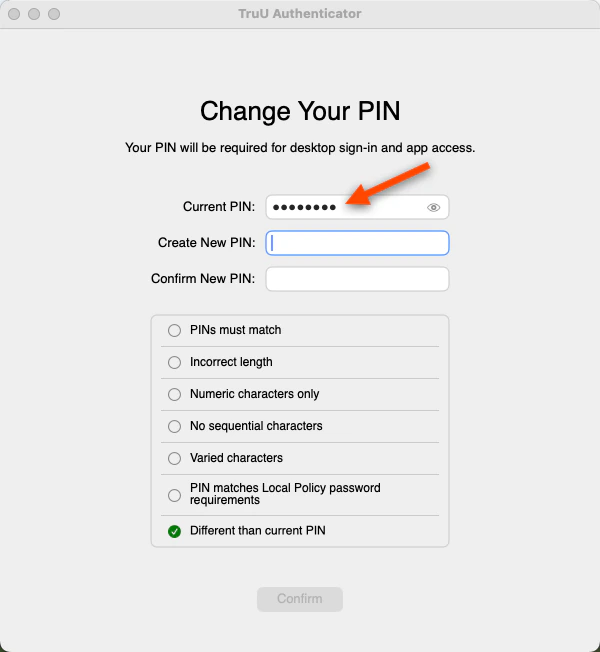
3. Enter your *Current PIN*
   <img src="https://mintcdn.com/truu-2/0zTsJHKKI2cGP3Gv/images/docs/ffdfa3211328fc6a7a6fc6255615ce8283513e87c00e5428ab3bb54c2f06f039-image.png?fit=max&auto=format&n=0zTsJHKKI2cGP3Gv&q=85&s=c67908834cd8421c023e502359a77b4c" alt="" width="600" height="652" data-path="images/docs/ffdfa3211328fc6a7a6fc6255615ce8283513e87c00e5428ab3bb54c2f06f039-image.png" />
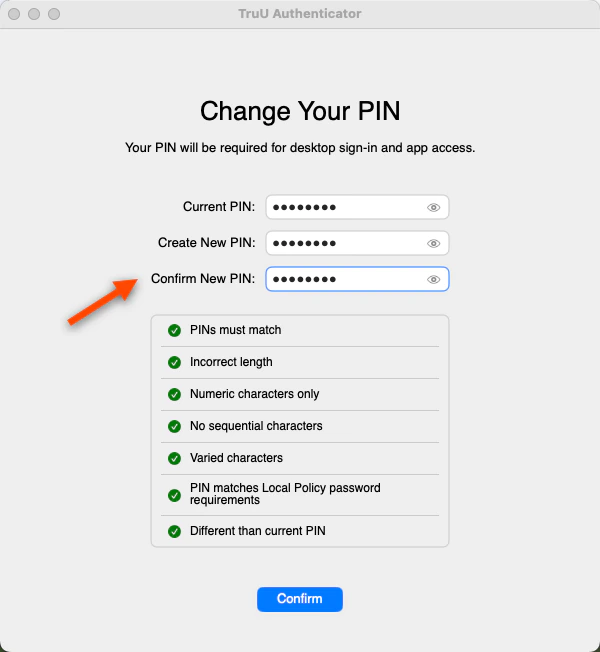
4. Create and Confirm a *New PIN*

<Info>
  ### Why do I see different PIN requirements?

  PIN requirement may differ as your organization will set the PIN policies.
</Info>

<img src="https://mintcdn.com/truu-2/L38yxuvvUa8uAW5I/images/docs/1daf552baf1aa6b4f6ae5429ece675e1d420074161ff7021f8315f96e0f645f2-image.png?fit=max&auto=format&n=L38yxuvvUa8uAW5I&q=85&s=30537a1cb91de432764b2eab7748a0d8" alt="" width="600" height="652" data-path="images/docs/1daf552baf1aa6b4f6ae5429ece675e1d420074161ff7021f8315f96e0f645f2-image.png" />

5. Click on the **blue arrow** to successfully change your PIN
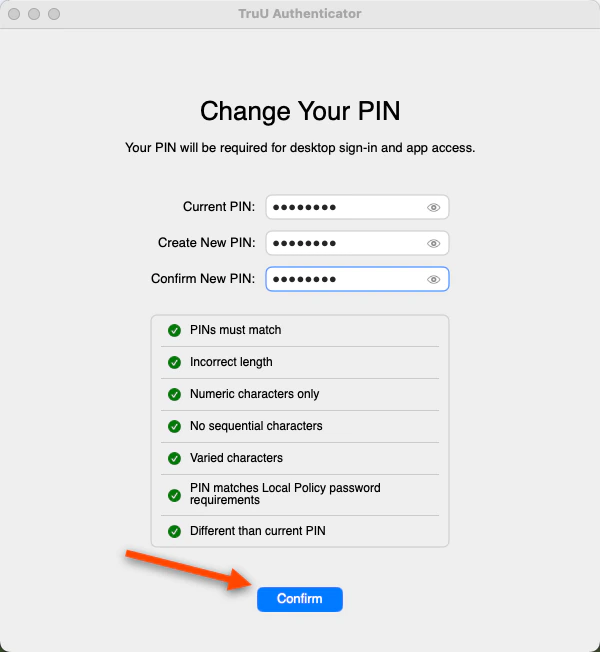
<img src="https://mintcdn.com/truu-2/E6hYbyLPrBHWbQ3m/images/docs/c3562eb733feccca767bc7e83f13691bf57ca014c36289d6c2e984d5588cc518-image.png?fit=max&auto=format&n=E6hYbyLPrBHWbQ3m&q=85&s=4465bbe84cbbdc332f92f6e7ead0b764" alt="" width="600" height="652" data-path="images/docs/c3562eb733feccca767bc7e83f13691bf57ca014c36289d6c2e984d5588cc518-image.png" />

<Check>
  ### Is this it?

  You did it! Lock your screen and try out your new TruU PIN.
</Check>

***

[Submitting Logs - Mac](/docs/submitting-logs-mac)

[Mobile](/docs/mobile)