> ## Documentation Index
> Fetch the complete documentation index at: https://docs.truu.ai/llms.txt
> Use this file to discover all available pages before exploring further.
# Change PIN - Shared Workstation
> This is a step-by-step guide as to how a frontline access employee can change their TruPIN
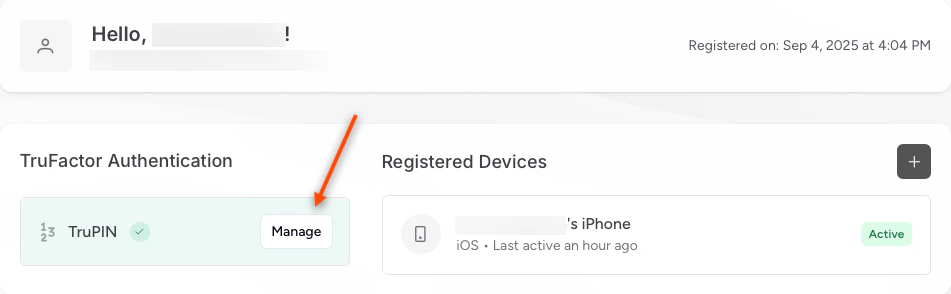
1. On the **User Portal**, click **Manage** to change your TruPIN
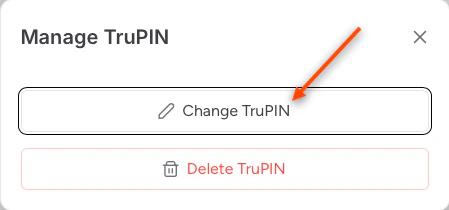
 2. Click **Change TruPIN**
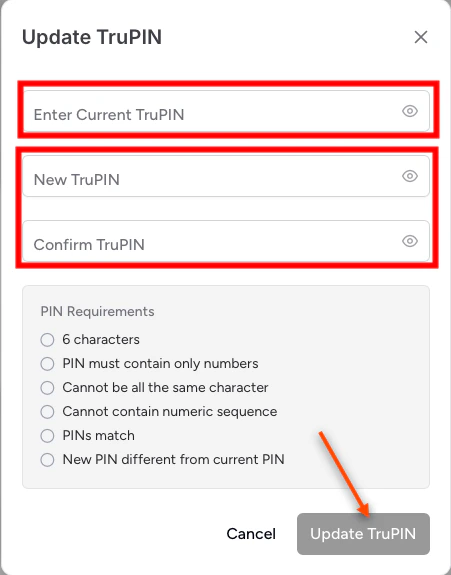
 3. Follow the instructions to update/change your TruPIN. Then, click **Update TruPIN**
 ***
[Submitting Logs - Shared Workstation](/docs/submitting-logs-shared-workstation)
[Upgrade TruU CA Adapter](/docs/upgrade-truu-ca-adapter)
***
[Submitting Logs - Shared Workstation](/docs/submitting-logs-shared-workstation)
[Upgrade TruU CA Adapter](/docs/upgrade-truu-ca-adapter)