> ## Documentation Index
> Fetch the complete documentation index at: https://docs.truu.ai/llms.txt
> Use this file to discover all available pages before exploring further.

# TruU Admin Portal SSO - Entra

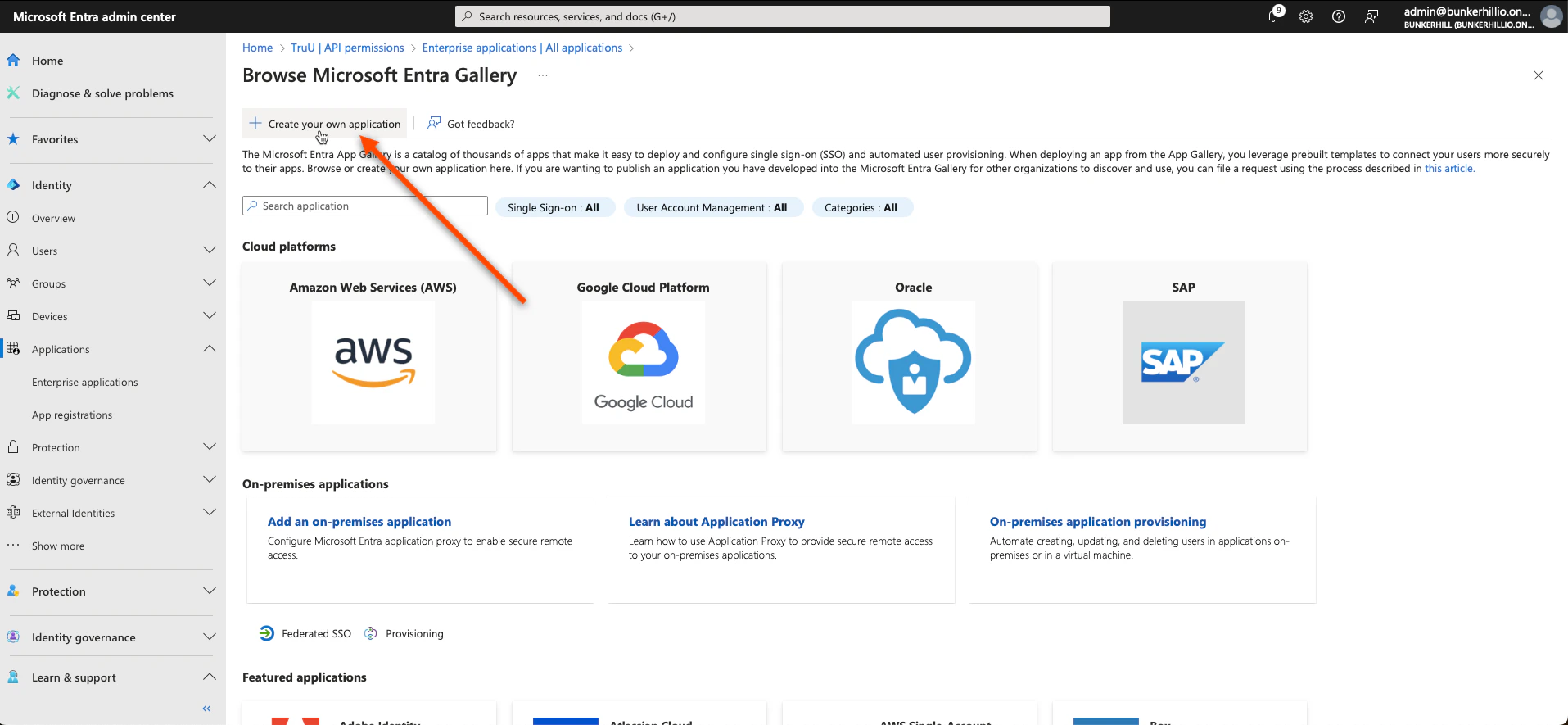
1. Navigate to the Entra ID admin center. Click **Enterprise Applications** under the *"Applications"* tab on and follow the picture prompted steps below
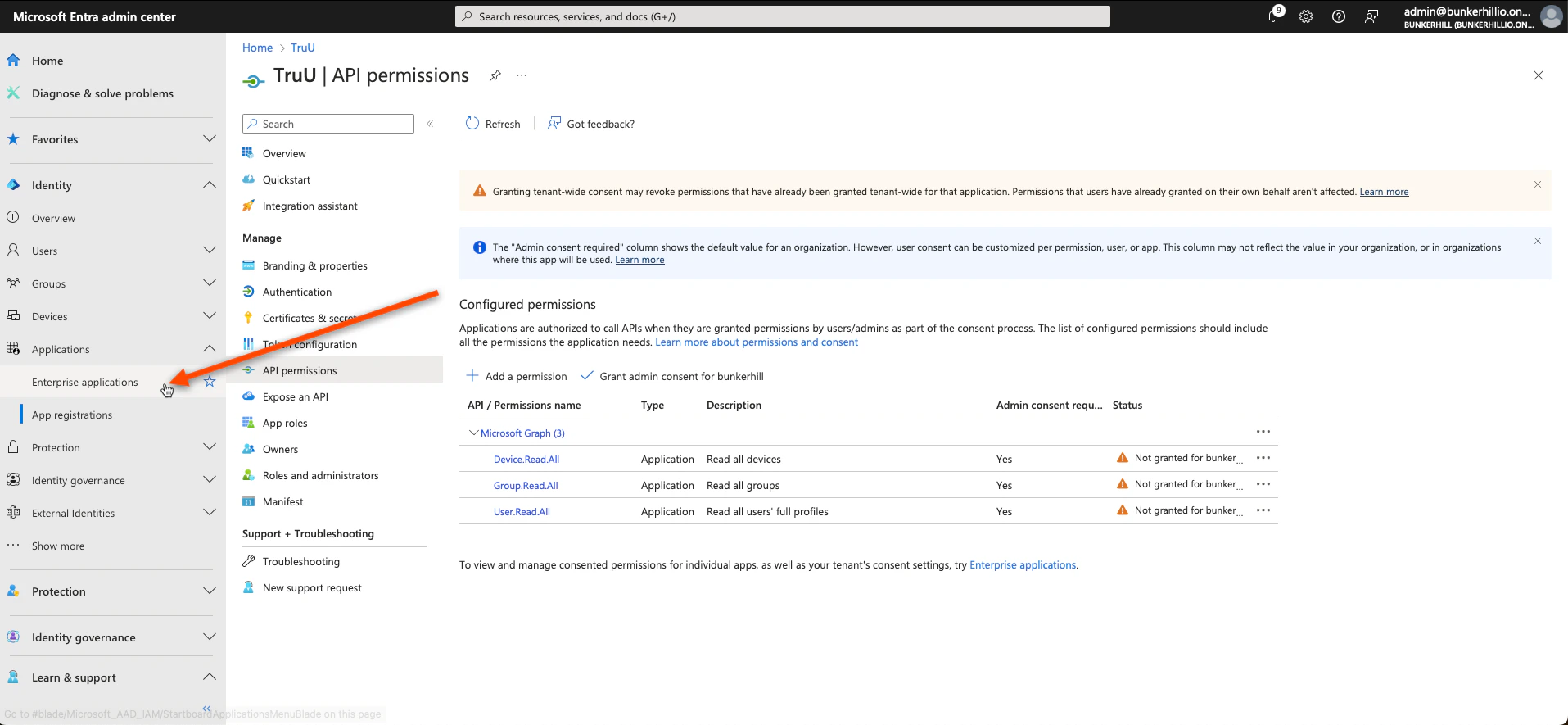
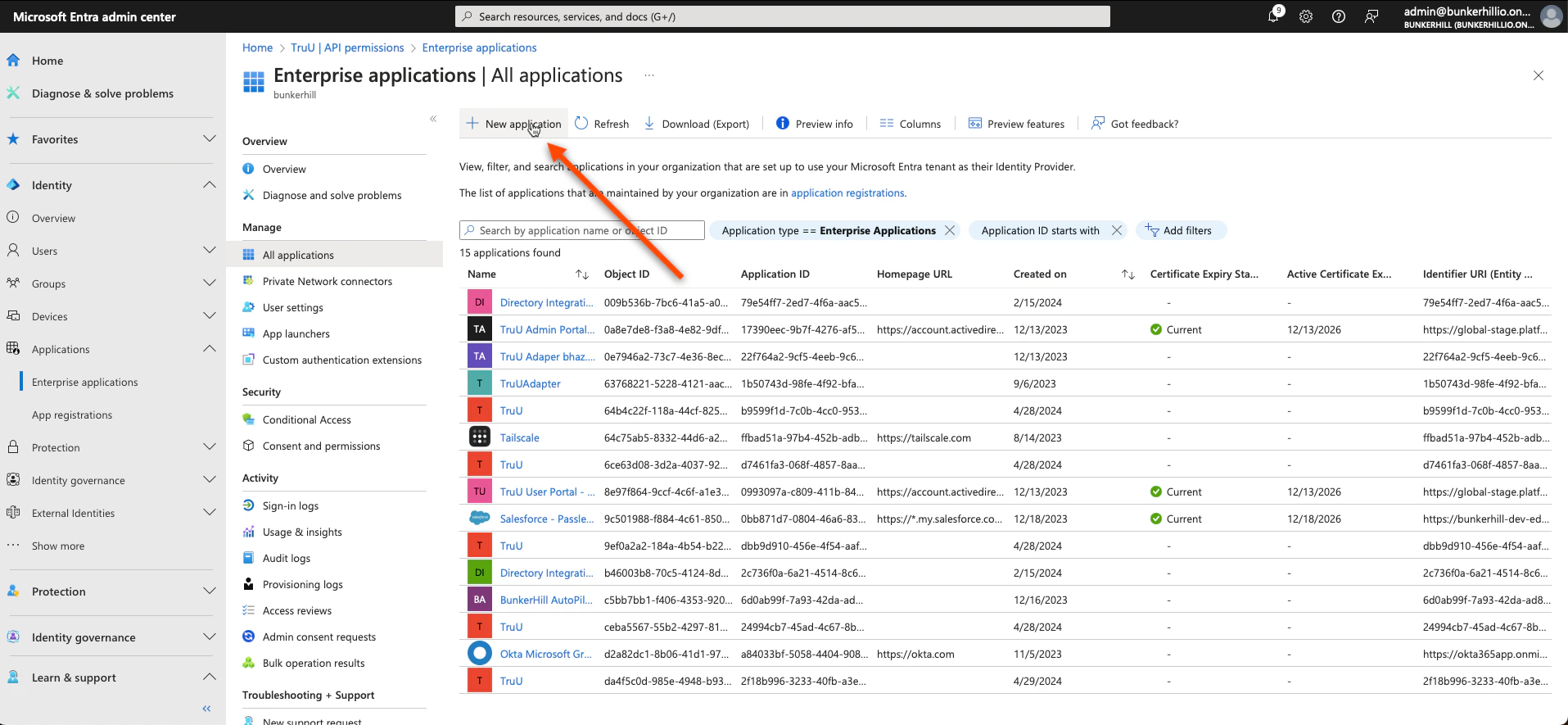
<img src="https://mintcdn.com/truu-2/jJ0QGEHfTe0CfrEY/images/docs/a8cfe83b-31f5-4a65-a045-f9a5073b0415/c86baeb9-9952-4d56-a9f2-607ab56d8048/de50b27f-4bd4-43fb-a188-527eff868b73/images/a3e8976c-069e-4371-b996-5e7f655f9cfd.png?fit=max&auto=format&n=jJ0QGEHfTe0CfrEY&q=85&s=9810d7987bb98bc01d93609448031e38" alt="" width="1915" height="885" data-path="images/docs/a8cfe83b-31f5-4a65-a045-f9a5073b0415/c86baeb9-9952-4d56-a9f2-607ab56d8048/de50b27f-4bd4-43fb-a188-527eff868b73/images/a3e8976c-069e-4371-b996-5e7f655f9cfd.png" />

<img src="https://mintcdn.com/truu-2/jJ0QGEHfTe0CfrEY/images/docs/a8cfe83b-31f5-4a65-a045-f9a5073b0415/c86baeb9-9952-4d56-a9f2-607ab56d8048/de50b27f-4bd4-43fb-a188-527eff868b73/images/54c69493-b5e3-42ad-886c-769c9e8ecbfe.png?fit=max&auto=format&n=jJ0QGEHfTe0CfrEY&q=85&s=2b093ea0c2a9c57580da8732aea12719" alt="" width="1915" height="885" data-path="images/docs/a8cfe83b-31f5-4a65-a045-f9a5073b0415/c86baeb9-9952-4d56-a9f2-607ab56d8048/de50b27f-4bd4-43fb-a188-527eff868b73/images/54c69493-b5e3-42ad-886c-769c9e8ecbfe.png" />

<img src="https://mintcdn.com/truu-2/jJ0QGEHfTe0CfrEY/images/docs/a8cfe83b-31f5-4a65-a045-f9a5073b0415/c86baeb9-9952-4d56-a9f2-607ab56d8048/de50b27f-4bd4-43fb-a188-527eff868b73/images/d212ca23-ead3-491f-b3d2-e5ea3bcef4ee.png?fit=max&auto=format&n=jJ0QGEHfTe0CfrEY&q=85&s=4e06746ea7455666fd2a4943eafca047" alt="" width="1915" height="885" data-path="images/docs/a8cfe83b-31f5-4a65-a045-f9a5073b0415/c86baeb9-9952-4d56-a9f2-607ab56d8048/de50b27f-4bd4-43fb-a188-527eff868b73/images/d212ca23-ead3-491f-b3d2-e5ea3bcef4ee.png" />

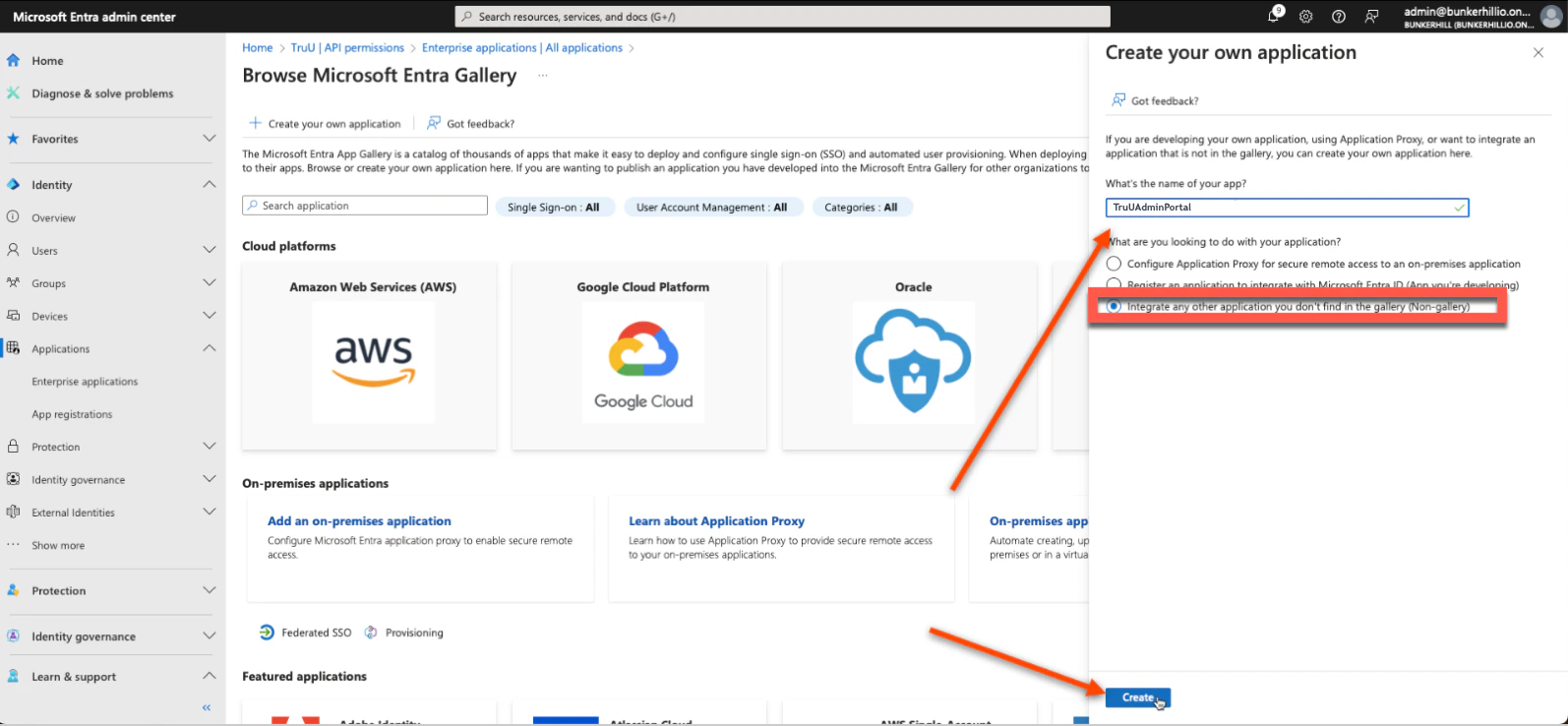
2. We will be creating two new applications: *TruUAdminPortal* and *TruUUserPortal*. Name the first one *TruUAdmin Portal*
<img src="https://mintcdn.com/truu-2/L38yxuvvUa8uAW5I/images/docs/13fffce-image.png?fit=max&auto=format&n=L38yxuvvUa8uAW5I&q=85&s=adca3a0e3a16bf265029007ab81a0fb0" alt="" width="1594" height="738" data-path="images/docs/13fffce-image.png" />

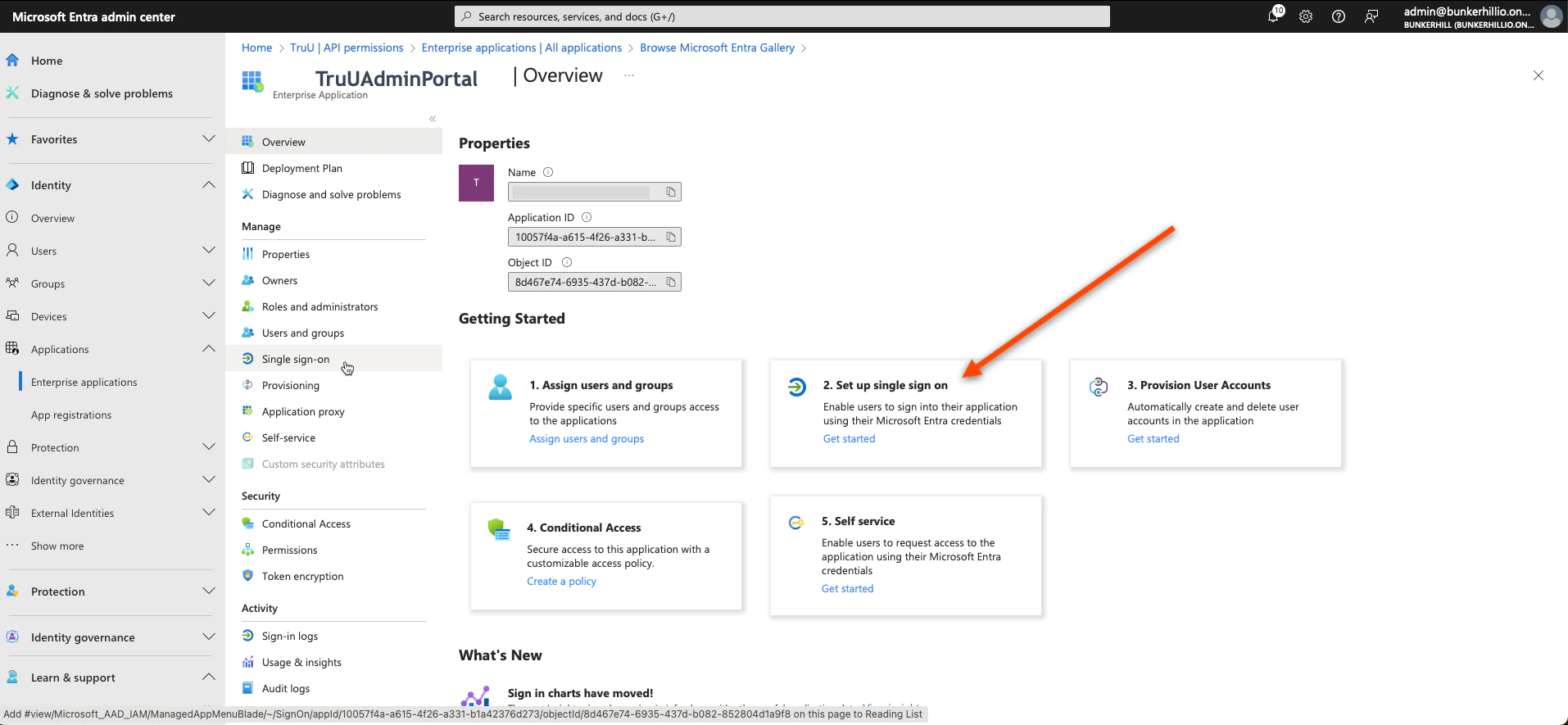
3. Select **Single Sign-on**

<img src="https://mintcdn.com/truu-2/jMF4bYA9yOA_2TKv/images/docs/3b5693c-image.png?fit=max&auto=format&n=jMF4bYA9yOA_2TKv&q=85&s=4ac87d10ff9812228a603dc8b28f0e9f" alt="" width="1914" height="885" data-path="images/docs/3b5693c-image.png" />

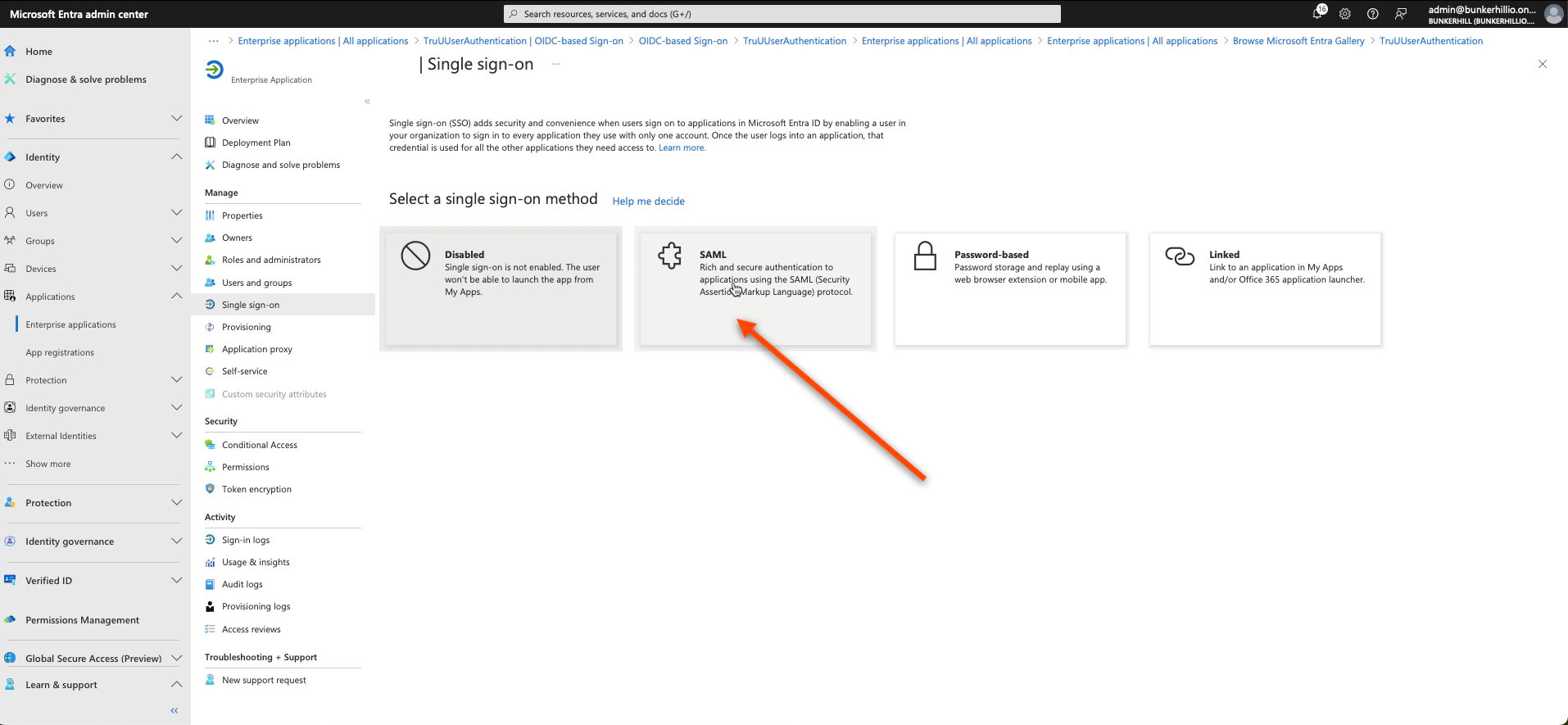
4. Select **SAML**

<img src="https://mintcdn.com/truu-2/jMF4bYA9yOA_2TKv/images/docs/29c8e01-image.png?fit=max&auto=format&n=jMF4bYA9yOA_2TKv&q=85&s=6d25a7525286bfb3f40db9093ff15733" alt="" width="1914" height="885" data-path="images/docs/29c8e01-image.png" />

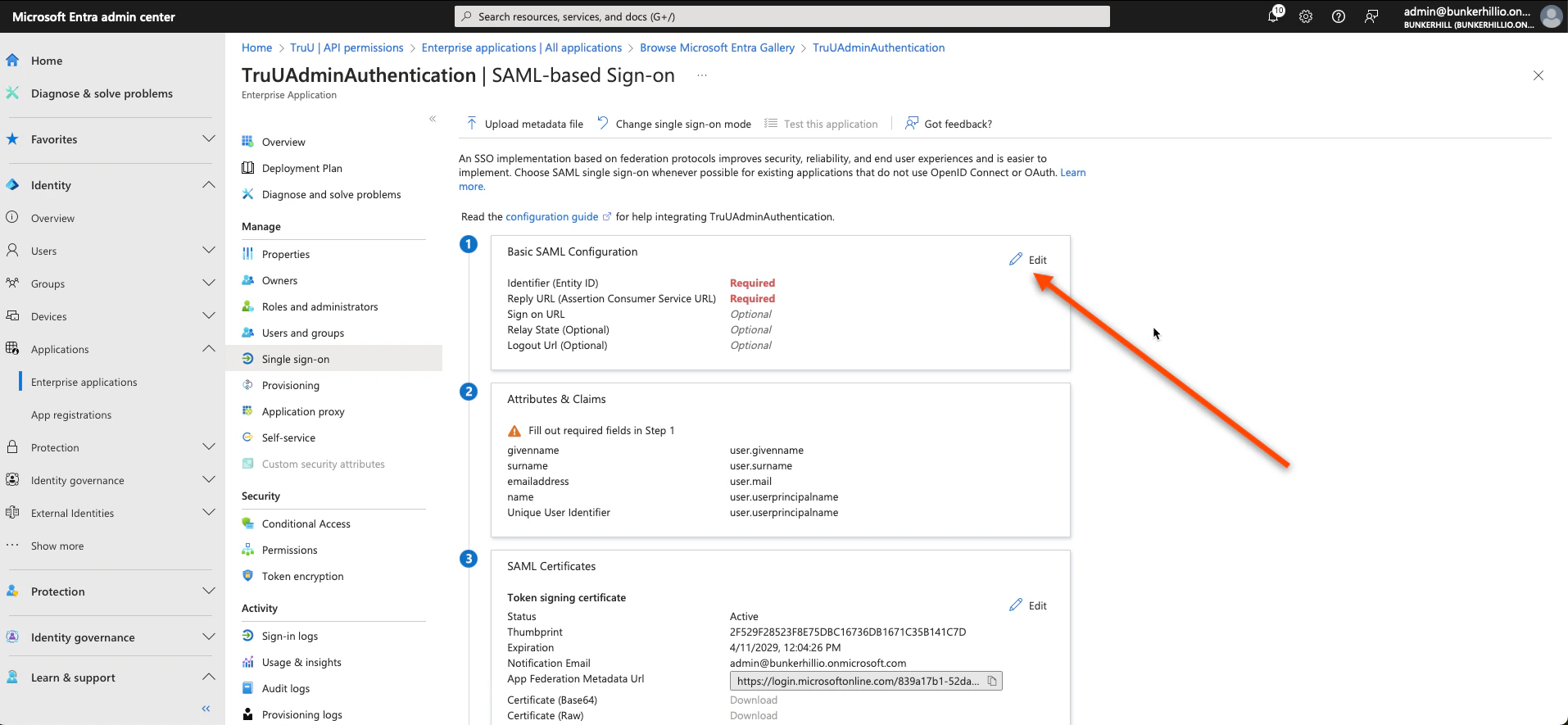
5. Click **Edit** on the first box

<img src="https://mintcdn.com/truu-2/jJ0QGEHfTe0CfrEY/images/docs/a8cfe83b-31f5-4a65-a045-f9a5073b0415/c86baeb9-9952-4d56-a9f2-607ab56d8048/de50b27f-4bd4-43fb-a188-527eff868b73/images/ba59de3b-0c44-4bbf-8c00-187364e41884.png?fit=max&auto=format&n=jJ0QGEHfTe0CfrEY&q=85&s=37dcaf43d241e820f21c9cf845ae33d3" alt="" width="1914" height="885" data-path="images/docs/a8cfe83b-31f5-4a65-a045-f9a5073b0415/c86baeb9-9952-4d56-a9f2-607ab56d8048/de50b27f-4bd4-43fb-a188-527eff868b73/images/ba59de3b-0c44-4bbf-8c00-187364e41884.png" />

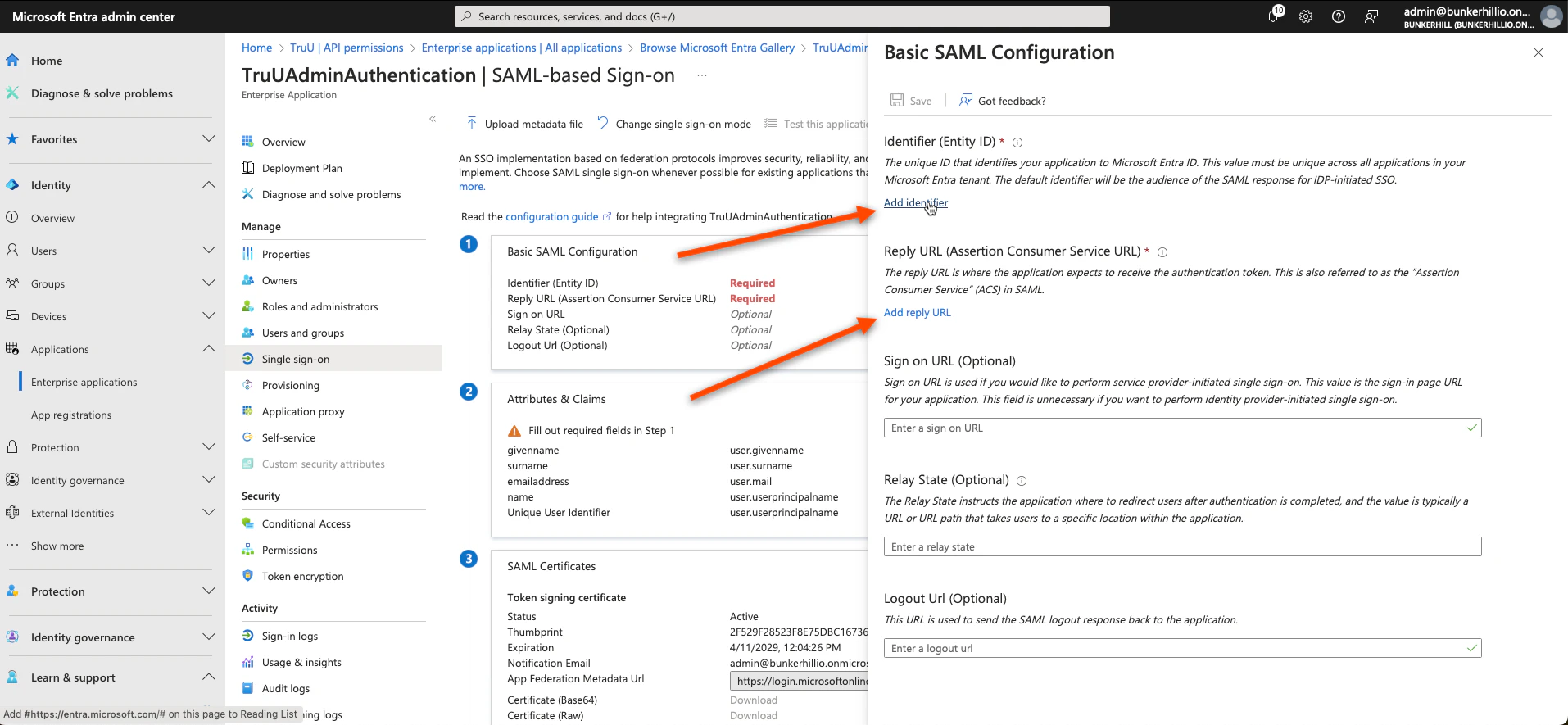
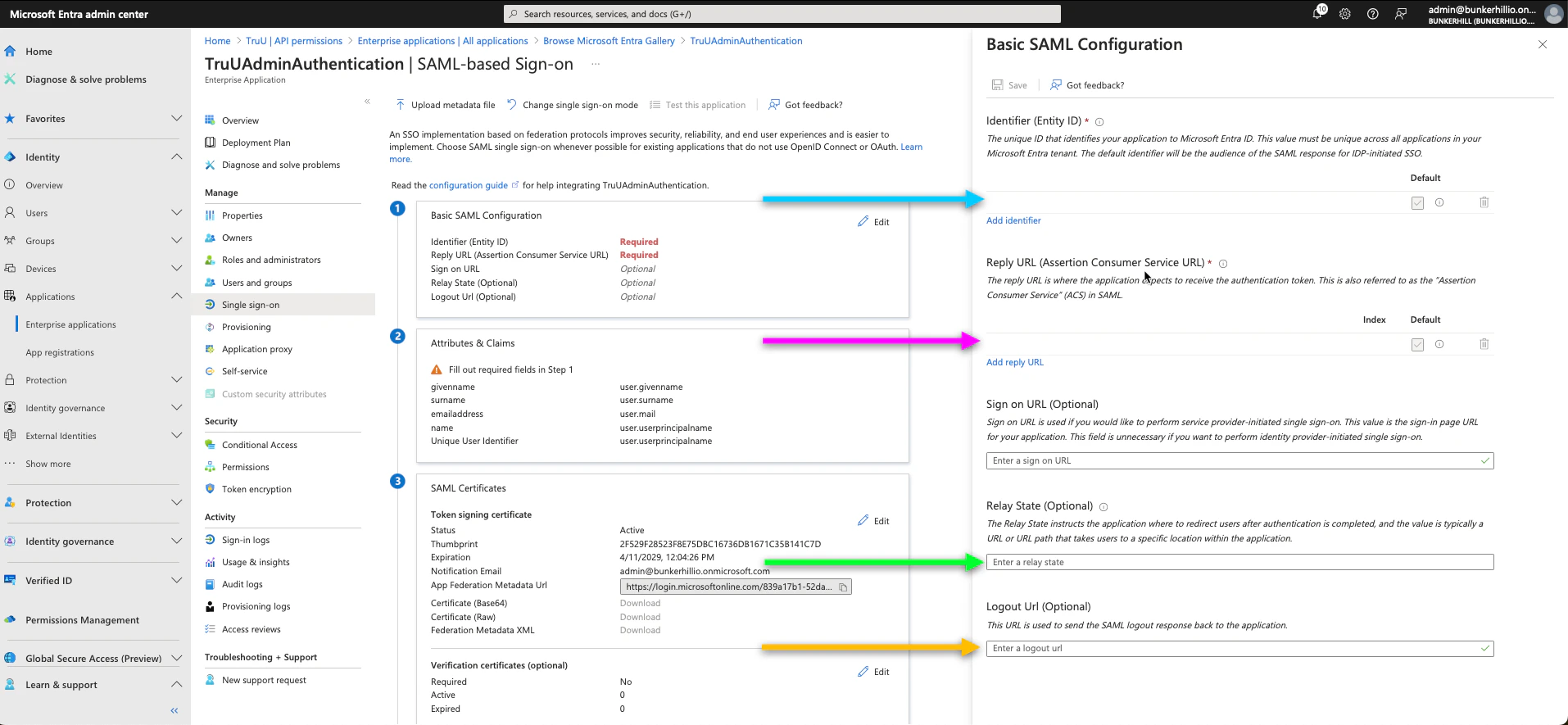
6. Click **Add Identifier** and **Add Reply URL** and follow the steps below to get the values you need
<img src="https://mintcdn.com/truu-2/jJ0QGEHfTe0CfrEY/images/docs/a8cfe83b-31f5-4a65-a045-f9a5073b0415/c86baeb9-9952-4d56-a9f2-607ab56d8048/de50b27f-4bd4-43fb-a188-527eff868b73/images/764253cf-5bbb-4480-8e0d-0be38ab19693.png?fit=max&auto=format&n=jJ0QGEHfTe0CfrEY&q=85&s=442205dcf74091aac7f4ba348ae44815" alt="" width="1914" height="885" data-path="images/docs/a8cfe83b-31f5-4a65-a045-f9a5073b0415/c86baeb9-9952-4d56-a9f2-607ab56d8048/de50b27f-4bd4-43fb-a188-527eff868b73/images/764253cf-5bbb-4480-8e0d-0be38ab19693.png" />

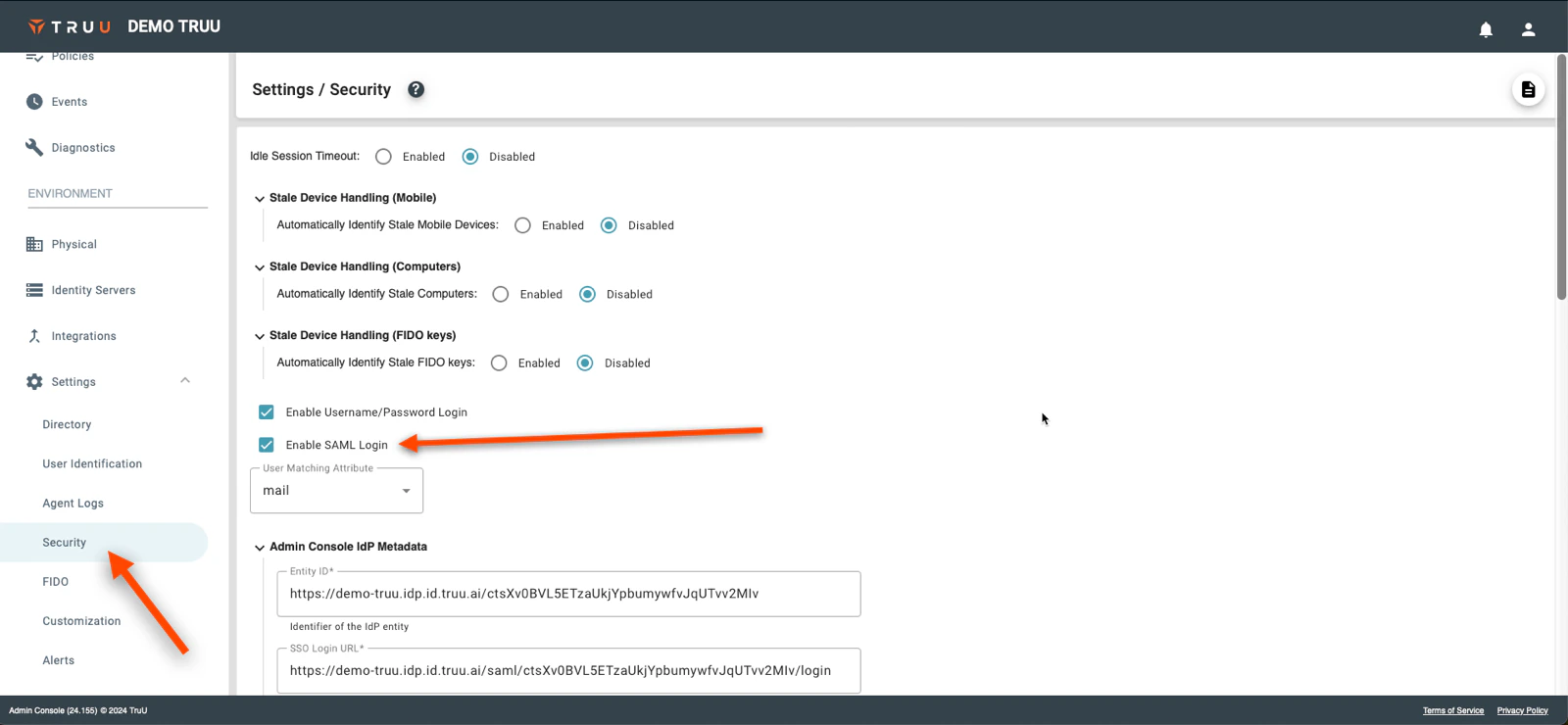
7. Return to the TruU Admin Console and navigate to the **"Settings" → "Security"** tabs under the "Environment" section and then select **Enable SAML Login**
<img src="https://mintcdn.com/truu-2/ehCBQgFdl_pQd0MN/images/docs/aeb52a4-image.png?fit=max&auto=format&n=ehCBQgFdl_pQd0MN&q=85&s=66182284c746ef054a29868aefe76dff" alt="" width="1600" height="740" data-path="images/docs/aeb52a4-image.png" />

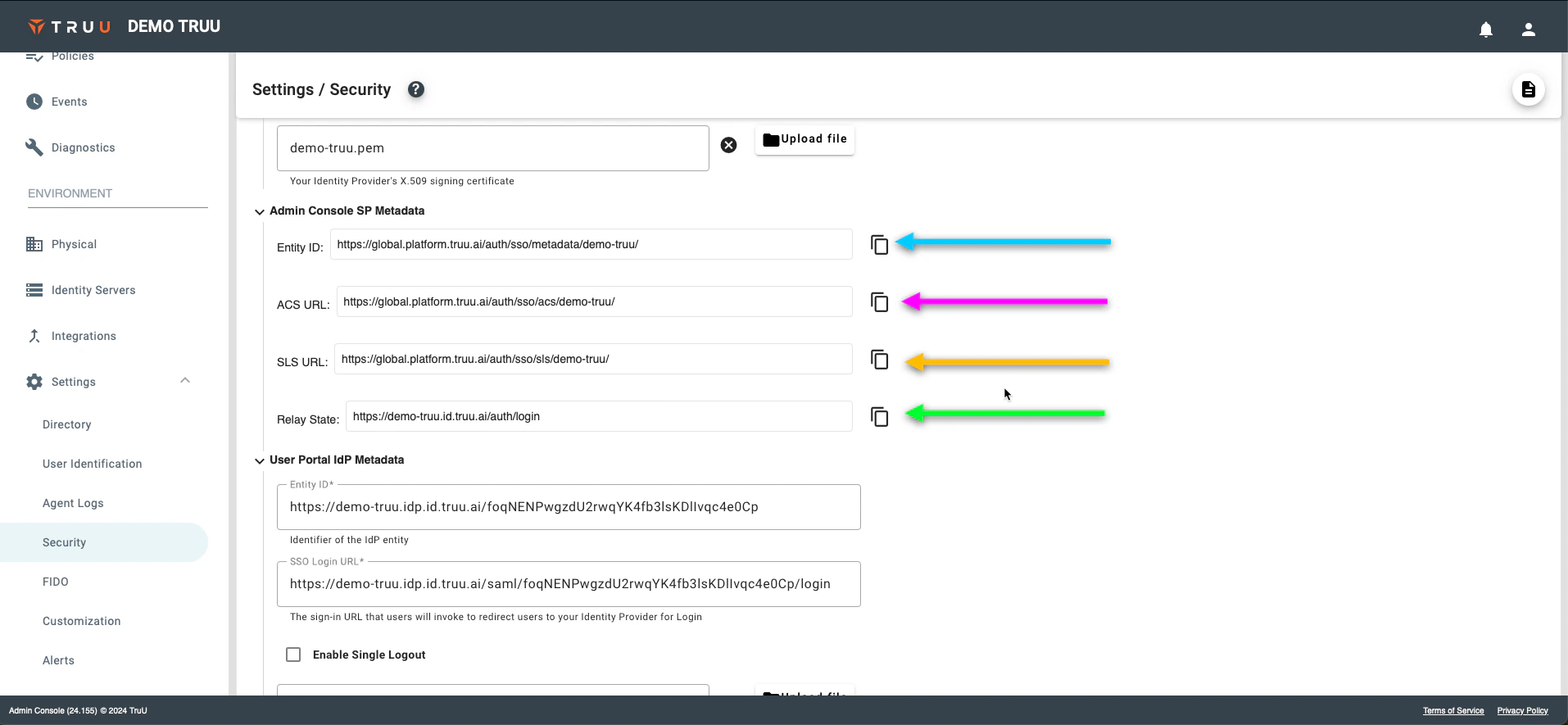
8. We are interested in the "Admin Console SP Metadata" links. Follow the pictures below to copy the required information to the Entra ID console
<img src="https://mintcdn.com/truu-2/jJ0QGEHfTe0CfrEY/images/docs/a8cfe83b-31f5-4a65-a045-f9a5073b0415/c86baeb9-9952-4d56-a9f2-607ab56d8048/de50b27f-4bd4-43fb-a188-527eff868b73/images/7912ccbd-3584-4a32-8387-2e8b7c0a1105.png?fit=max&auto=format&n=jJ0QGEHfTe0CfrEY&q=85&s=63d559fce62a4f9b451e500afbf4e61d" alt="" width="1914" height="885" data-path="images/docs/a8cfe83b-31f5-4a65-a045-f9a5073b0415/c86baeb9-9952-4d56-a9f2-607ab56d8048/de50b27f-4bd4-43fb-a188-527eff868b73/images/7912ccbd-3584-4a32-8387-2e8b7c0a1105.png" />

<img src="https://mintcdn.com/truu-2/jJ0QGEHfTe0CfrEY/images/docs/a8cfe83b-31f5-4a65-a045-f9a5073b0415/c86baeb9-9952-4d56-a9f2-607ab56d8048/de50b27f-4bd4-43fb-a188-527eff868b73/images/5729f406-7332-4a02-b77c-8eff532f7a7e.png?fit=max&auto=format&n=jJ0QGEHfTe0CfrEY&q=85&s=f4ce5de4936cd0180352b9a105a66909" alt="" width="1914" height="885" data-path="images/docs/a8cfe83b-31f5-4a65-a045-f9a5073b0415/c86baeb9-9952-4d56-a9f2-607ab56d8048/de50b27f-4bd4-43fb-a188-527eff868b73/images/5729f406-7332-4a02-b77c-8eff532f7a7e.png" />

9. Click **Save**
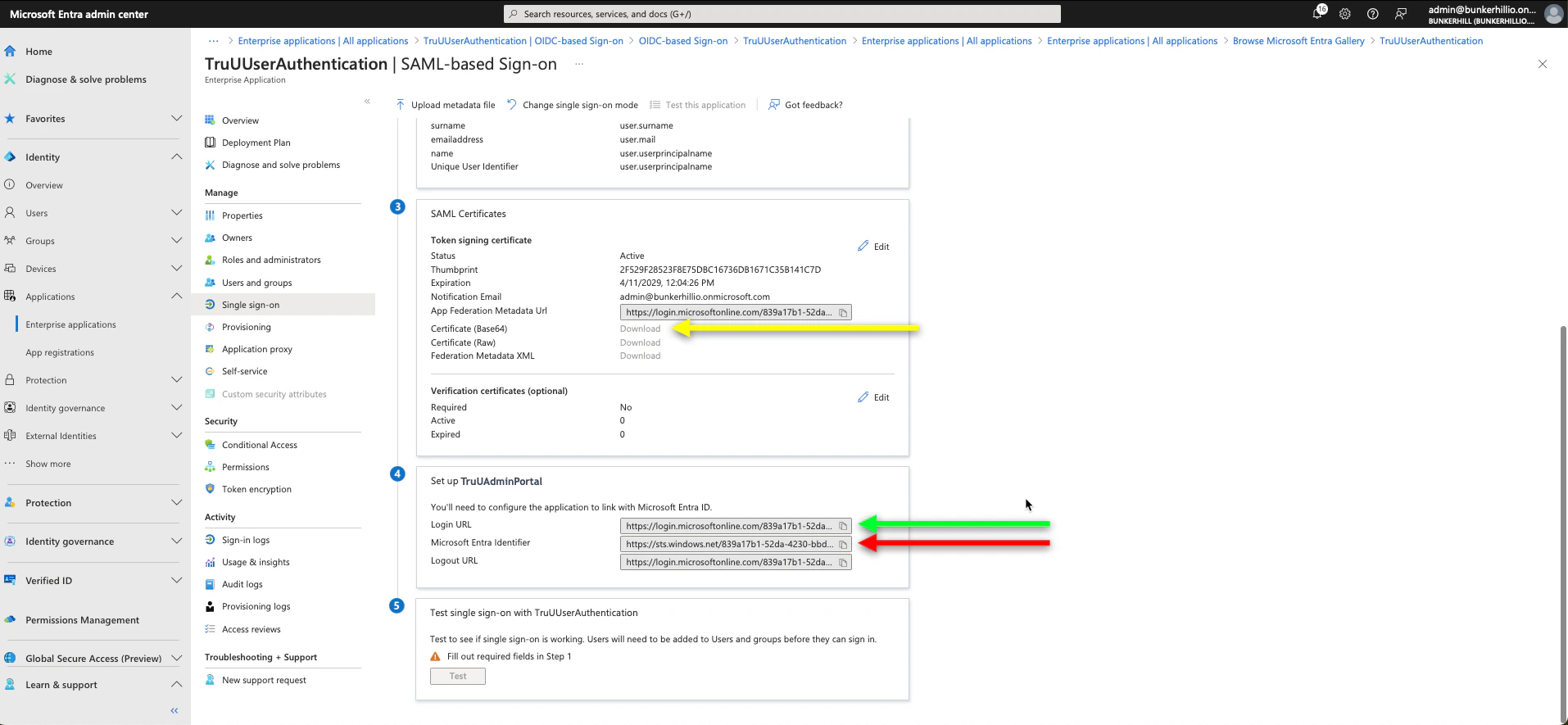
10. Scroll down on this same page to the 3rd and 4th boxes; as we need the Login URL, Microsoft Entra Identifier, and Certificate (Base64). Once all of these steps have been completed, you have now setup your TruU Admin Portal SSO.
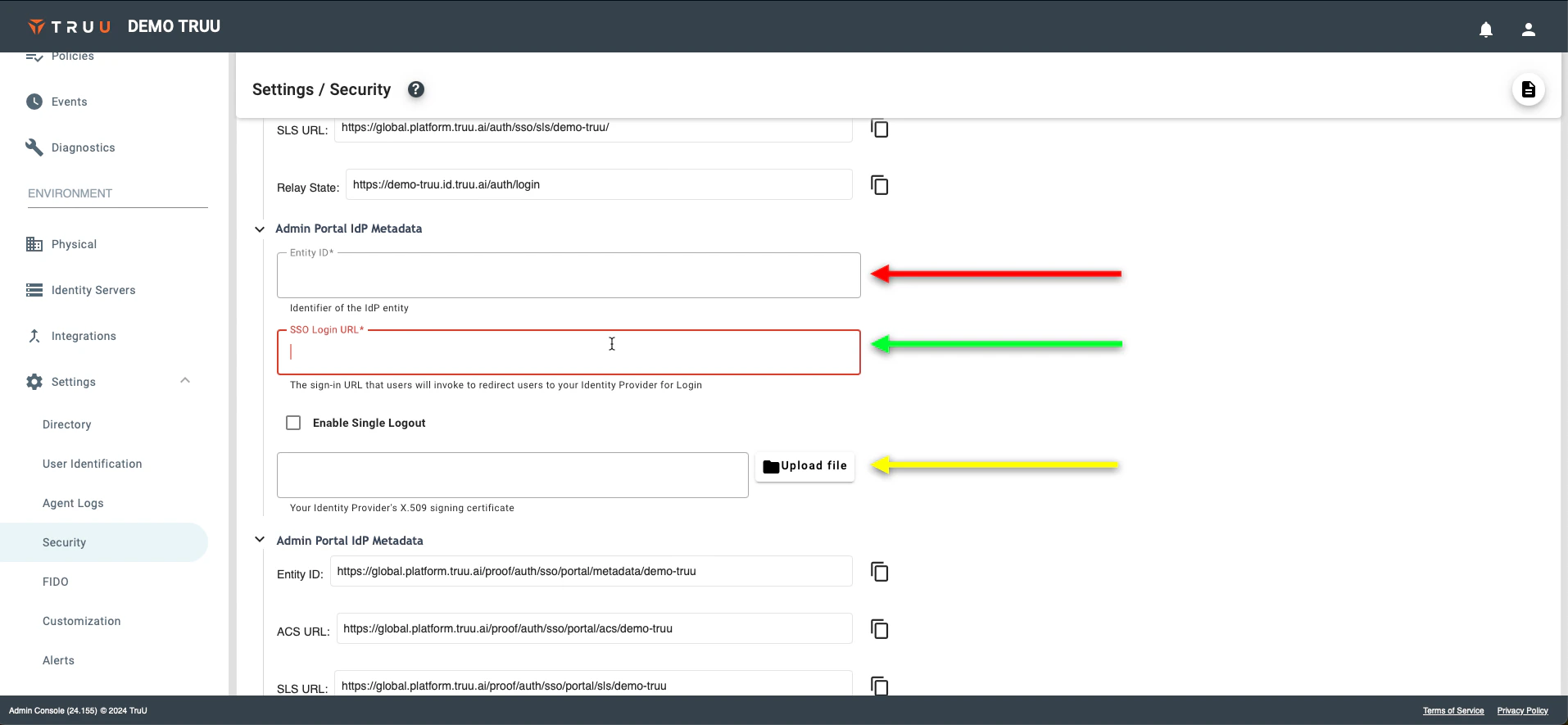
<img src="https://mintcdn.com/truu-2/rjjBxA7Z_Wk_-34G/images/docs/f09d04f-image.png?fit=max&auto=format&n=rjjBxA7Z_Wk_-34G&q=85&s=116af6f6ead8603b9e4a55bc9f881a7e" alt="" width="1914" height="885" data-path="images/docs/f09d04f-image.png" />

<img src="https://mintcdn.com/truu-2/ehCBQgFdl_pQd0MN/images/docs/aaba9b9-image.png?fit=max&auto=format&n=ehCBQgFdl_pQd0MN&q=85&s=060a71f9e76b56420e8b23cbf0b07c65" alt="" width="1914" height="885" data-path="images/docs/aaba9b9-image.png" />

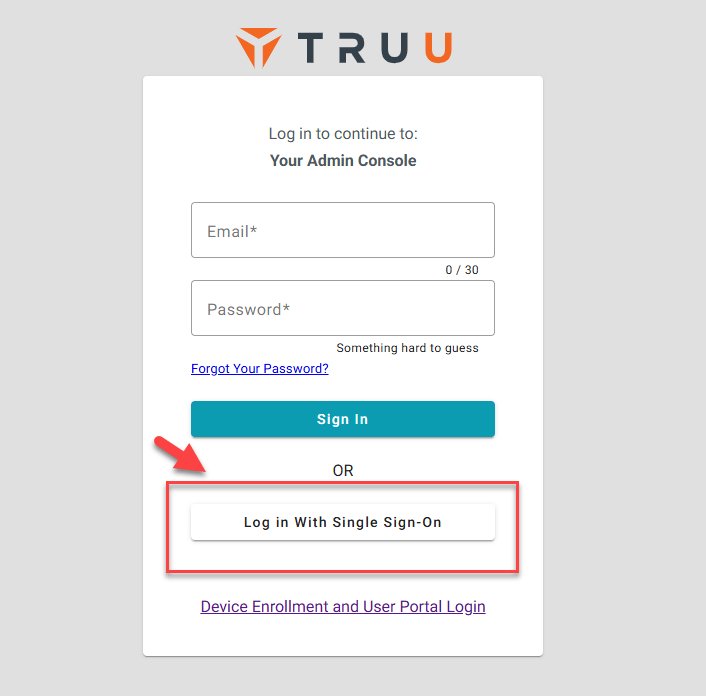
11. To test this, visit the TruU Admin Portal URL provided by your TruU CSR.  Once you visit the page, it will allow you to logon with Single Sign-On.
    <Frame>
      <img src="https://mintcdn.com/truu-2/sO1xvtsCGiqTCw9s/images/AdminPortal.png?fit=max&auto=format&n=sO1xvtsCGiqTCw9s&q=85&s=41d85f15eb150133905c6a160ecd3314" alt="Admin Portal" width="706" height="696" data-path="images/AdminPortal.png" />
    </Frame>

[User Portal SSO - Entra](/docs/tru-u-user-portal-sso-config-entra)