> ## Documentation Index
> Fetch the complete documentation index at: https://docs.truu.ai/llms.txt
> Use this file to discover all available pages before exploring further.

# Enroll your macOS

> This guide provides a step-by-step tutorial on how to Enroll your Mac device to TruU.

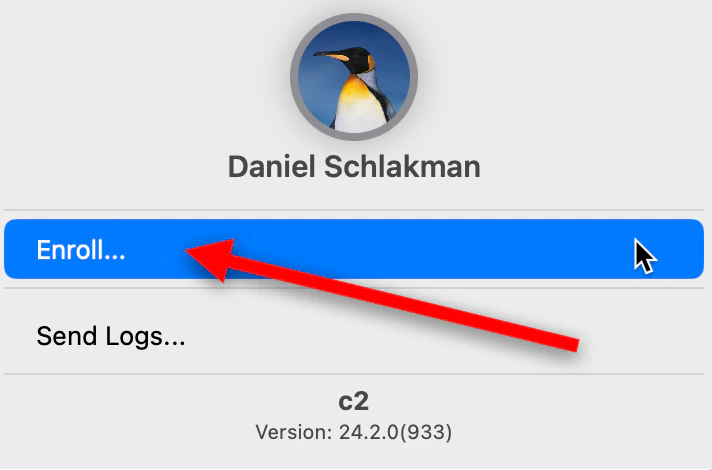
1. On your Mac, Click on the *TruU* icon on the top right of the Menu Bar (If TruU icon is not appearing and enrollment menu is not appearing, run the following command in terminal: `-R 777 /Library/TruU`)

<img src="https://mintcdn.com/truu-2/jJ0QGEHfTe0CfrEY/images/docs/a8cfe83b-31f5-4a65-a045-f9a5073b0415/d67e654e-7eca-4514-8a23-a7bb395c0b63/9020e7dd-a937-48b5-b408-ee8bb78a94f3/images/9b9c50ee-d580-46c3-9012-d1ac8123e332.png?fit=max&auto=format&n=jJ0QGEHfTe0CfrEY&q=85&s=02579e2d85a73e1a94dfd89f406640cd" alt="" width="952" height="48" data-path="images/docs/a8cfe83b-31f5-4a65-a045-f9a5073b0415/d67e654e-7eca-4514-8a23-a7bb395c0b63/9020e7dd-a937-48b5-b408-ee8bb78a94f3/images/9b9c50ee-d580-46c3-9012-d1ac8123e332.png" />

2. Click **Enroll**

<img src="https://mintcdn.com/truu-2/jJ0QGEHfTe0CfrEY/images/docs/a8cfe83b-31f5-4a65-a045-f9a5073b0415/d67e654e-7eca-4514-8a23-a7bb395c0b63/9020e7dd-a937-48b5-b408-ee8bb78a94f3/images/ebf37ec4-6160-4051-95a2-27895b7168b7.png?fit=max&auto=format&n=jJ0QGEHfTe0CfrEY&q=85&s=5725d45af7acf2debd15e2bf94486cec" alt="" width="712" height="470" data-path="images/docs/a8cfe83b-31f5-4a65-a045-f9a5073b0415/d67e654e-7eca-4514-8a23-a7bb395c0b63/9020e7dd-a937-48b5-b408-ee8bb78a94f3/images/ebf37ec4-6160-4051-95a2-27895b7168b7.png" />

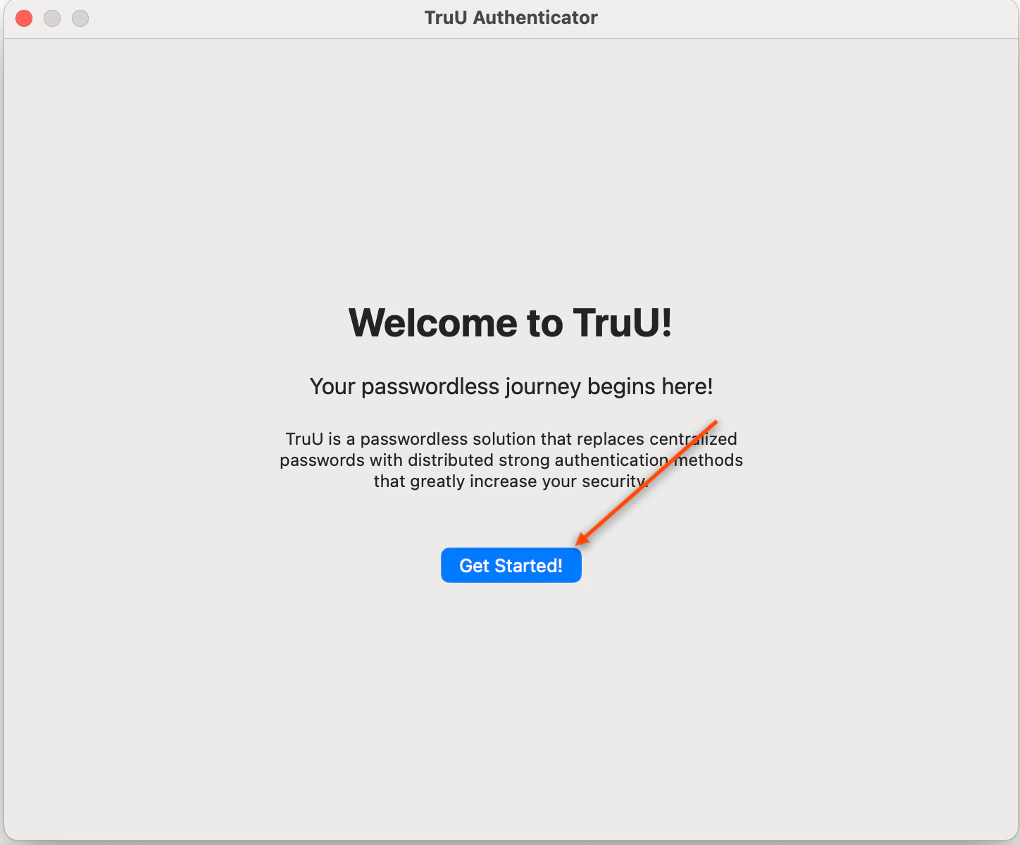
3. Click **Get Started**

<img src="https://mintcdn.com/truu-2/E6hYbyLPrBHWbQ3m/images/docs/d04b498ea4fe7fad10e1e23dd3cbaea45cac3cd9ccff2c788011d2304472c1d0-image.png?fit=max&auto=format&n=E6hYbyLPrBHWbQ3m&q=85&s=f32370ccf3d29ddfd5d6a0534535ad84" alt="" width="1020" height="845" data-path="images/docs/d04b498ea4fe7fad10e1e23dd3cbaea45cac3cd9ccff2c788011d2304472c1d0-image.png" />

4. Enter your *current password* for your workstation login to begin the enrollment process, then click **OK**

<img src="https://mintcdn.com/truu-2/E6hYbyLPrBHWbQ3m/images/docs/c1c6d6c-image.png?fit=max&auto=format&n=E6hYbyLPrBHWbQ3m&q=85&s=43e629bfc976d93ed851a5e5aa2ad98d" alt="" width="520" height="620" data-path="images/docs/c1c6d6c-image.png" />

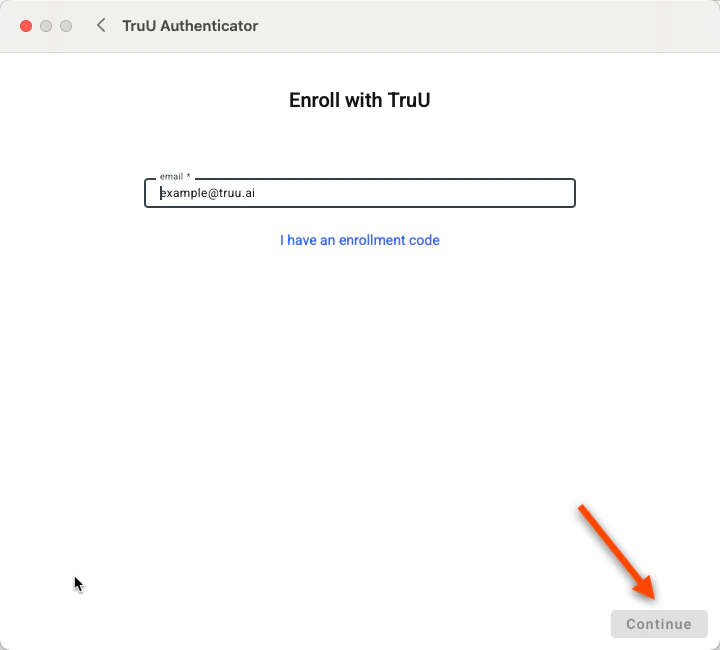
5. Enter your email, then click **Continue** <img src="https://mintcdn.com/truu-2/m22YLP0oXSNG0U3O/images/docs/7bb02ca30b0020fd18184e5f9de67bf4969b8572e2e8c7221648970b0a642ef2-image.png?fit=max&auto=format&n=m22YLP0oXSNG0U3O&q=85&s=23481e135598f6c4e4c375542b303d22" width="720" height="650" data-path="images/docs/7bb02ca30b0020fd18184e5f9de67bf4969b8572e2e8c7221648970b0a642ef2-image.png" />
**NOTE**: if your organization has set up a second Knowledge factor for User Identification, you will be prompted to input that identifier here. In this case, you see the user enrolling being prompted to enter their personal cell phone number as their identifier, then click **Submit**:
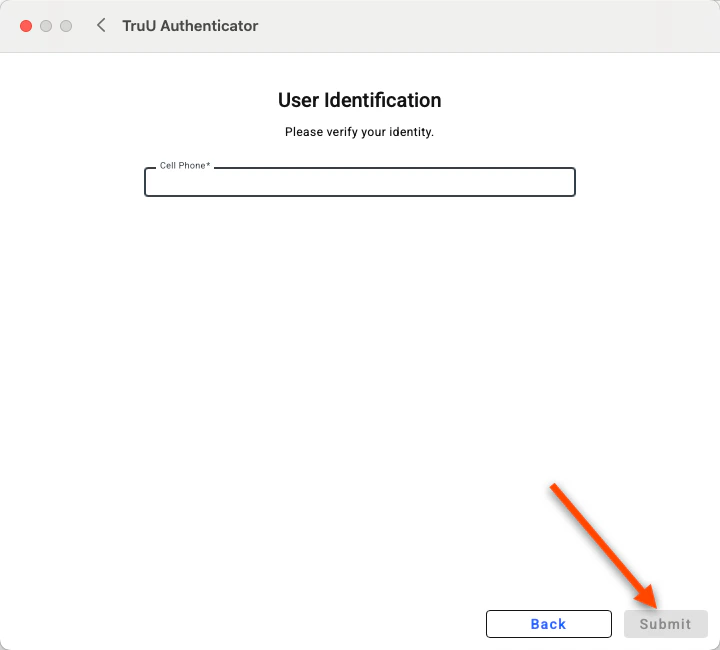
<img src="https://mintcdn.com/truu-2/E6hYbyLPrBHWbQ3m/images/docs/c827bf89e172a972a823311e962949bab7c18b050261f54e1b21194f6c66ef17-image.png?fit=max&auto=format&n=E6hYbyLPrBHWbQ3m&q=85&s=27d70b7bb44d7a4109e6ee6d2b9e8c4b" alt="" width="720" height="650" data-path="images/docs/c827bf89e172a972a823311e962949bab7c18b050261f54e1b21194f6c66ef17-image.png" />

6. Select either **your email** or **your phone number** to receive your enrollment code, then click **Send Enrollment Code** <img src="https://mintcdn.com/truu-2/E6hYbyLPrBHWbQ3m/images/docs/cbc96883f35032e884d5374968304e7eac09bf1382dd45b00d2a1b8809cf759e-image.png?fit=max&auto=format&n=E6hYbyLPrBHWbQ3m&q=85&s=c11766c1ae48059af83b4c81a8312c59" width="720" height="650" data-path="images/docs/cbc96883f35032e884d5374968304e7eac09bf1382dd45b00d2a1b8809cf759e-image.png" />
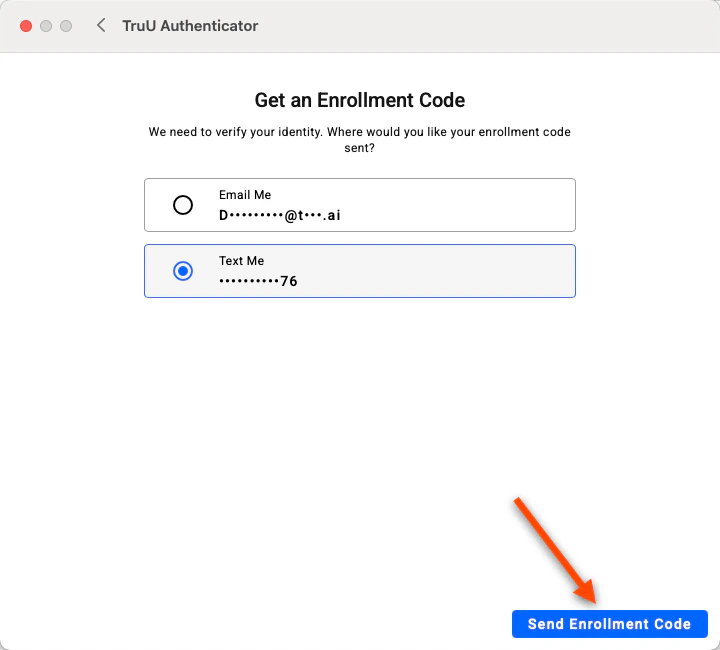
7. Check your email/phone for a message from TruU
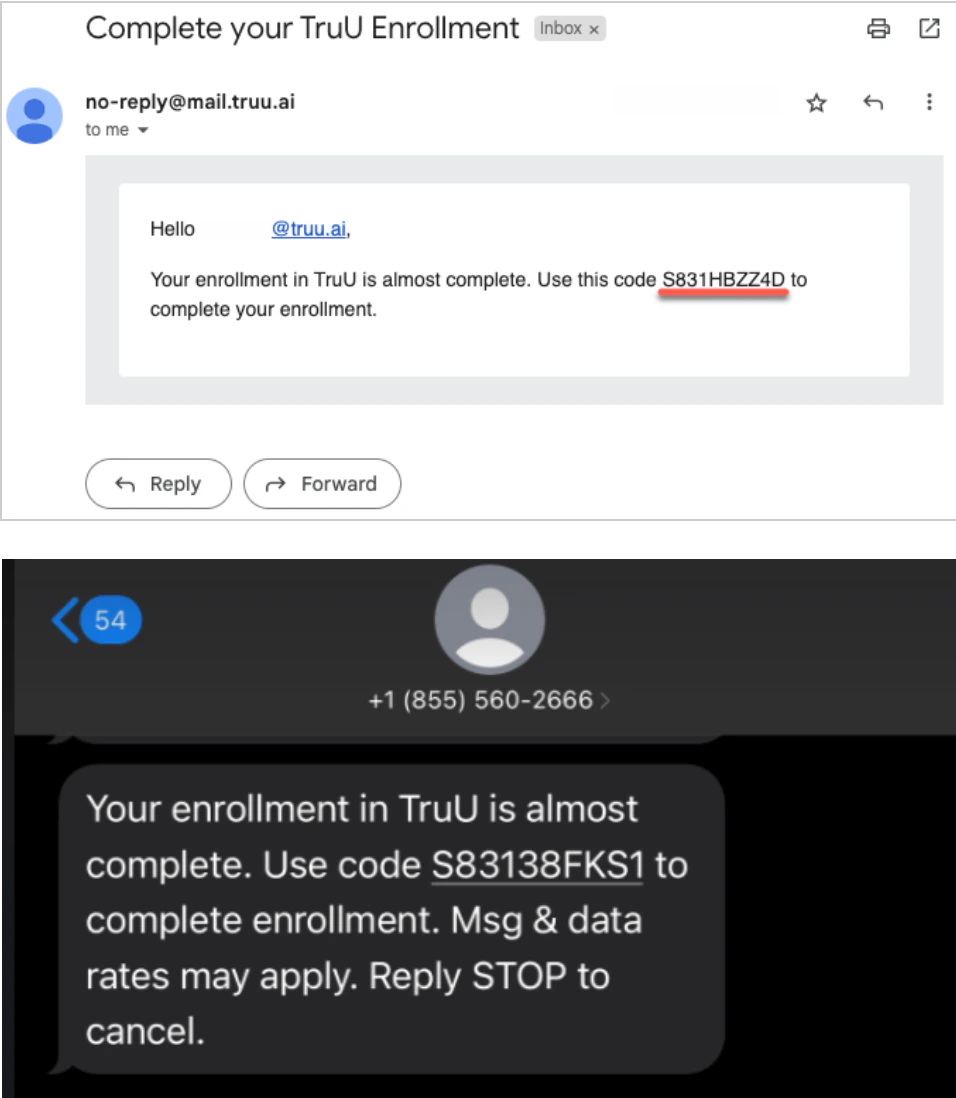
<img src="https://mintcdn.com/truu-2/jJ0QGEHfTe0CfrEY/images/docs/a8cfe83b-31f5-4a65-a045-f9a5073b0415/d67e654e-7eca-4514-8a23-a7bb395c0b63/9020e7dd-a937-48b5-b408-ee8bb78a94f3/images/501898df-de44-4089-a21b-bfc6babf0355.png?fit=max&auto=format&n=jJ0QGEHfTe0CfrEY&q=85&s=7f50d5c3c5f937fedfd6cd738e1169be" alt="" width="956" height="1098" data-path="images/docs/a8cfe83b-31f5-4a65-a045-f9a5073b0415/d67e654e-7eca-4514-8a23-a7bb395c0b63/9020e7dd-a937-48b5-b408-ee8bb78a94f3/images/501898df-de44-4089-a21b-bfc6babf0355.png" />

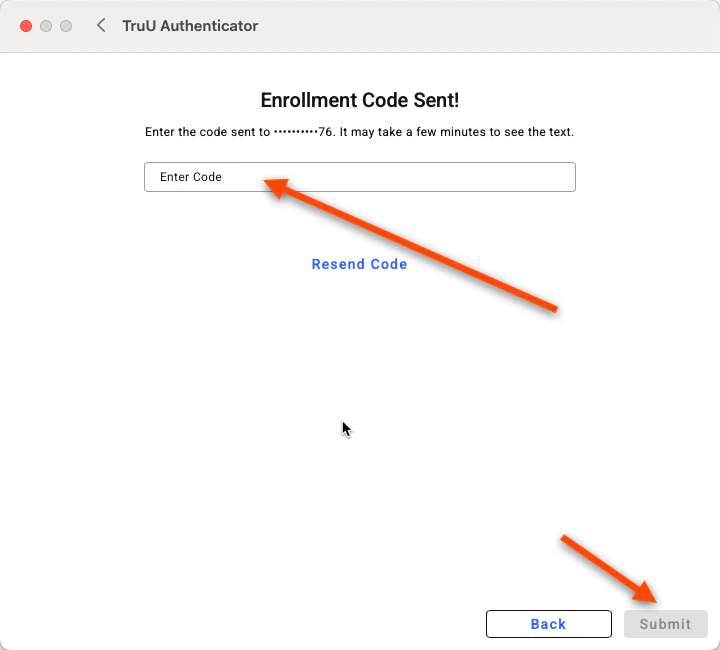
8. Enter the *enrollment code* sent to your email/text <img src="https://mintcdn.com/truu-2/qCK1oWL4jNpZKJ8A/images/docs/96b482ed60eae8799194e41566cc3130b31431c55a3ba6689a2ee3482775354c-image.png?fit=max&auto=format&n=qCK1oWL4jNpZKJ8A&q=85&s=91cfe33c5375bbe5b74624edafd3429a" width="720" height="650" data-path="images/docs/96b482ed60eae8799194e41566cc3130b31431c55a3ba6689a2ee3482775354c-image.png" />
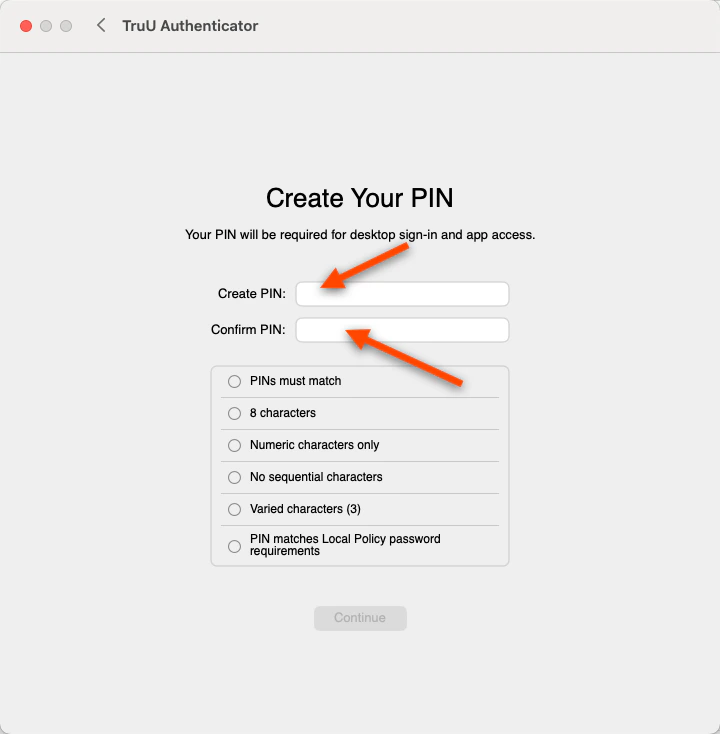
9. Create and Confirm your TruU PIN and Click the **Blue arrow** to continue <img src="https://mintcdn.com/truu-2/YlfY4z_3_-uDkBaP/images/docs/4e1d9059f31dbfbecad7c0da19d7c80a941fe417fdbf4c65991b8866625e05ea-image.png?fit=max&auto=format&n=YlfY4z_3_-uDkBaP&q=85&s=915079e1e689a5132749bb35a23a75a5" width="720" height="734" data-path="images/docs/4e1d9059f31dbfbecad7c0da19d7c80a941fe417fdbf4c65991b8866625e05ea-image.png" />
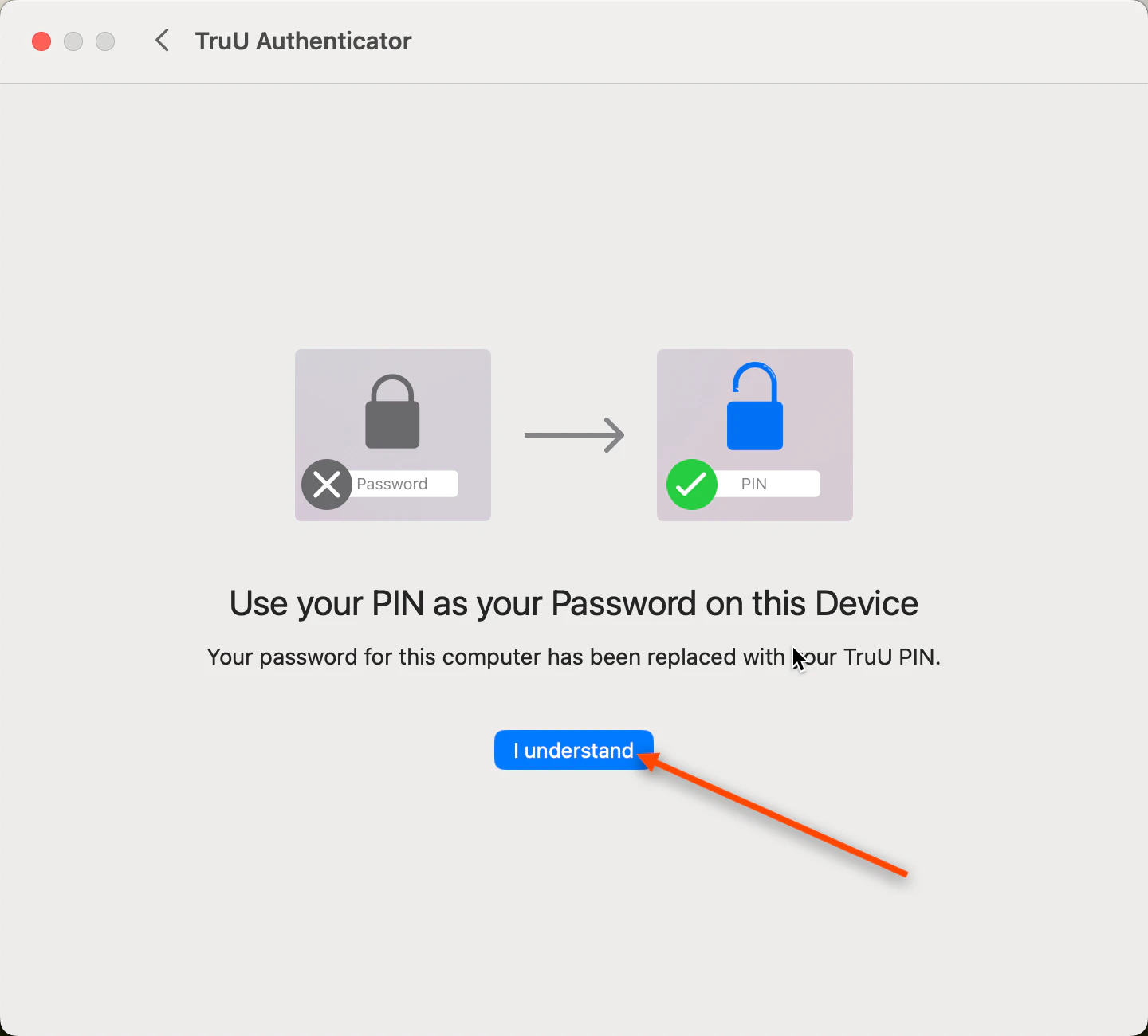
10. Click **I Understand** <img src="https://mintcdn.com/truu-2/E6hYbyLPrBHWbQ3m/images/docs/be8d679-image.png?fit=max&auto=format&n=E6hYbyLPrBHWbQ3m&q=85&s=630a04ae0c278e30a2066755f005a529" width="1440" height="1300" data-path="images/docs/be8d679-image.png" />
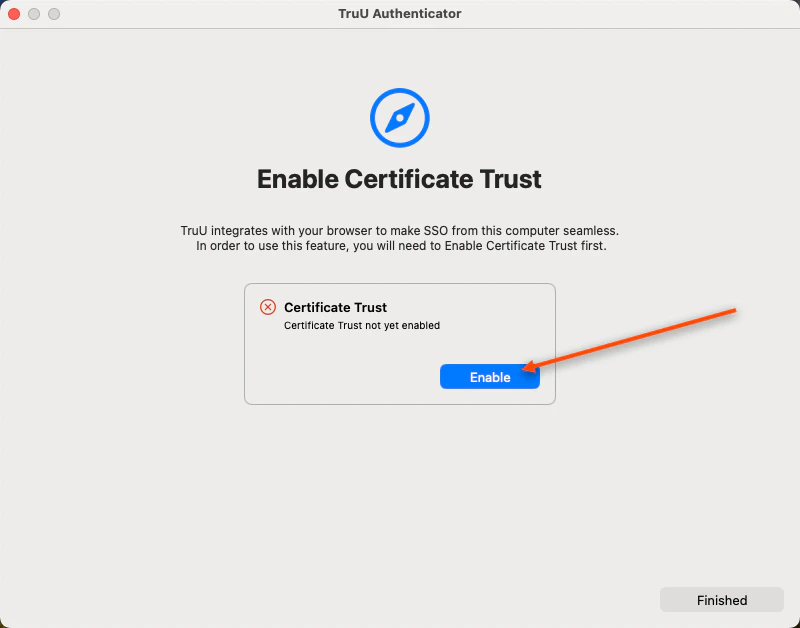
11. Select **Enable** to trust Safari's Certificate Trust <img src="https://mintcdn.com/truu-2/L38yxuvvUa8uAW5I/images/docs/0f5db1c-image.png?fit=max&auto=format&n=L38yxuvvUa8uAW5I&q=85&s=9f060c3ea1111bd22efaab2722edeee6" width="800" height="628" data-path="images/docs/0f5db1c-image.png" />
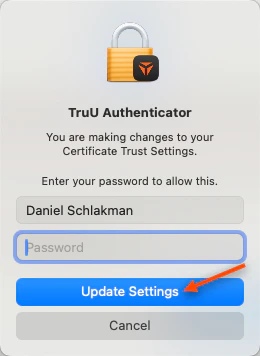
12. Enter your *PIN* to complete the enrollment process, then click **Update Settings** and **Finished** <img src="https://mintcdn.com/truu-2/E6hYbyLPrBHWbQ3m/images/docs/bb7958b-image.png?fit=max&auto=format&n=E6hYbyLPrBHWbQ3m&q=85&s=47008ac8bf384843ae94e68019dd423a" width="260" height="356" data-path="images/docs/bb7958b-image.png" />
***

[Admin Assisted Onboarding: Windows](/docs/admin-assisted-onboarding-windows)

[Mac Workstation Login](/docs/mac-workstation-login)