> ## Documentation Index
> Fetch the complete documentation index at: https://docs.truu.ai/llms.txt
> Use this file to discover all available pages before exploring further.
# Forgot PIN - Windows
> This guide provides a step-by-step tutorial on how to initiate the PIN recovery process on your AD joined Windows device.
**NOTE**: You must be in office or connected to VPN
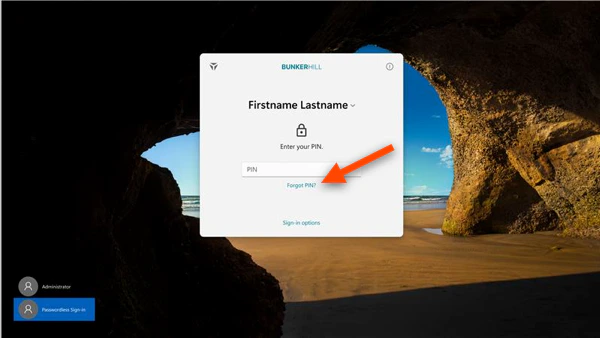
1. On the login screen, at the bottom of the TruU agent, click **Add User/Forgot TruU PIN**
 2. Click on **Get Started!** and start the TruU Enrollment Process
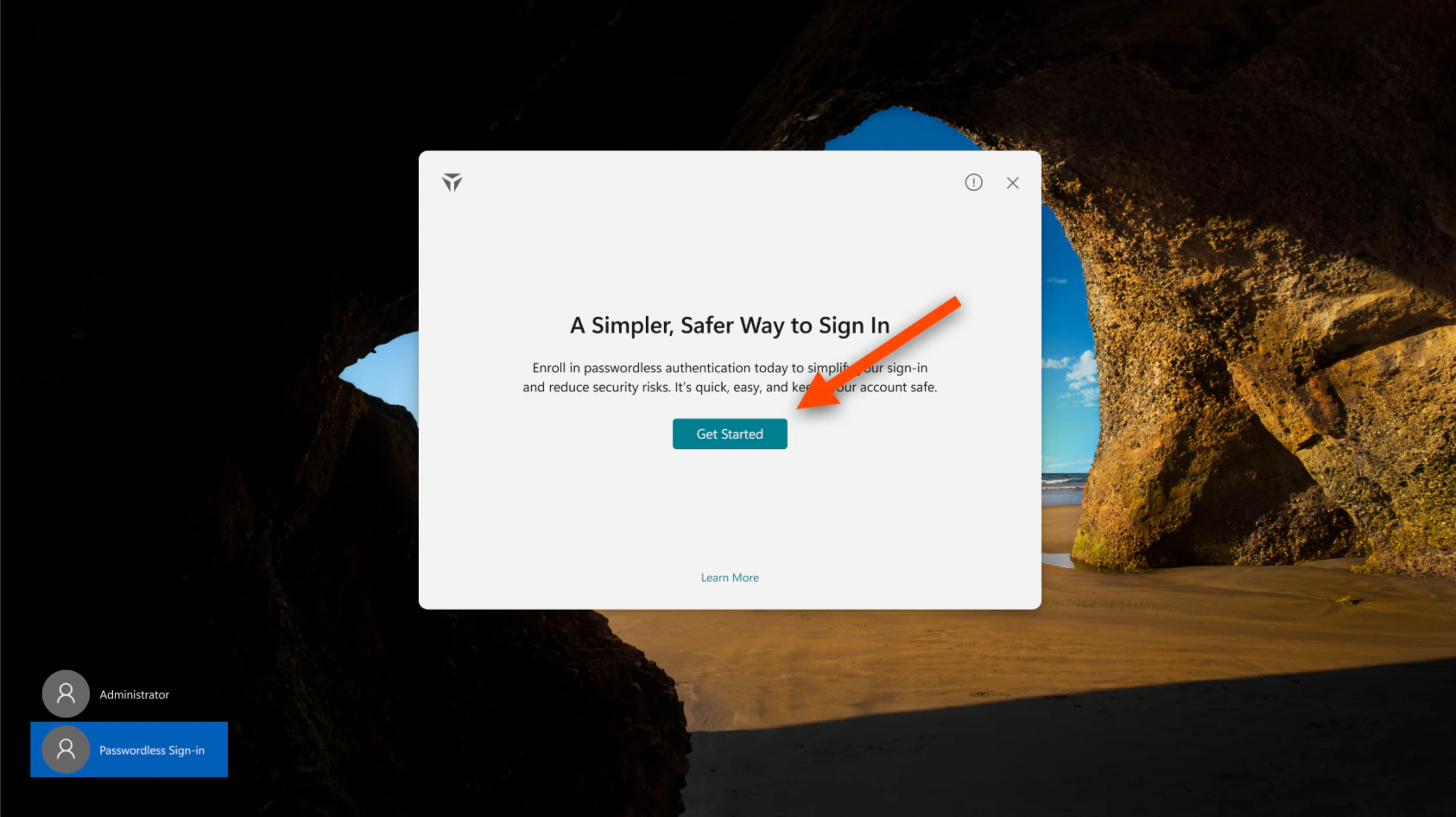 **NOTE**: From this point on, follow your ["Enroll you Windows"](https://docs.truu.ai/docs/windows-1) Guide
***
What’s Next
* [Windows Authenticator Forgot PIN recovery process VIDEO](https://truuai0.sharepoint.com/:v:/s/CustomersPrePostSales/ESnPX1f4E6pBqvZaKFNQO0MBb4Y0EA-Nk-p83ZdArm-T8g?e=w2jObQ\&xsdata=MDV8MDJ8RFNjaGxha21hbkB0cnV1LmFpfDI1YmQ4MTZjZGQwMjRkZmFjMjI1MDhkYzg5NzVhMjBhfGU2NmEwNDAxMmY4YTRiYWJhYWVmNmQ1NGFhNzJiZTgwfDB8MHw2Mzg1MzYzODU1Mzg3ODQ5MjV8VW5rbm93bnxUV0ZwYkdac2IzZDhleUpXSWpvaU1DNHdMakF3TURBaUxDSlFJam9pVjJsdU16SWlMQ0pCVGlJNklrMWhhV3dpTENKWFZDSTZNbjA9fDB8fHw%3d\&sdata=OElNakcyNEltdlg5cEdUcE5aL3B0RDNxbUpidXpqeWg3QU9rV0VZa3pBbz0%3d)
**NOTE**: From this point on, follow your ["Enroll you Windows"](https://docs.truu.ai/docs/windows-1) Guide
***
What’s Next
* [Windows Authenticator Forgot PIN recovery process VIDEO](https://truuai0.sharepoint.com/:v:/s/CustomersPrePostSales/ESnPX1f4E6pBqvZaKFNQO0MBb4Y0EA-Nk-p83ZdArm-T8g?e=w2jObQ\&xsdata=MDV8MDJ8RFNjaGxha21hbkB0cnV1LmFpfDI1YmQ4MTZjZGQwMjRkZmFjMjI1MDhkYzg5NzVhMjBhfGU2NmEwNDAxMmY4YTRiYWJhYWVmNmQ1NGFhNzJiZTgwfDB8MHw2Mzg1MzYzODU1Mzg3ODQ5MjV8VW5rbm93bnxUV0ZwYkdac2IzZDhleUpXSWpvaU1DNHdMakF3TURBaUxDSlFJam9pVjJsdU16SWlMQ0pCVGlJNklrMWhhV3dpTENKWFZDSTZNbjA9fDB8fHw%3d\&sdata=OElNakcyNEltdlg5cEdUcE5aL3B0RDNxbUpidXpqeWg3QU9rV0VZa3pBbz0%3d)