> ## Documentation Index
> Fetch the complete documentation index at: https://docs.truu.ai/llms.txt
> Use this file to discover all available pages before exploring further.
# Granting Service Account Permissions
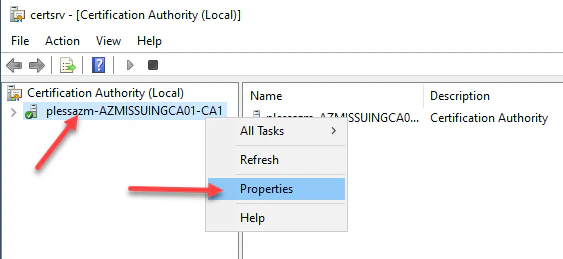
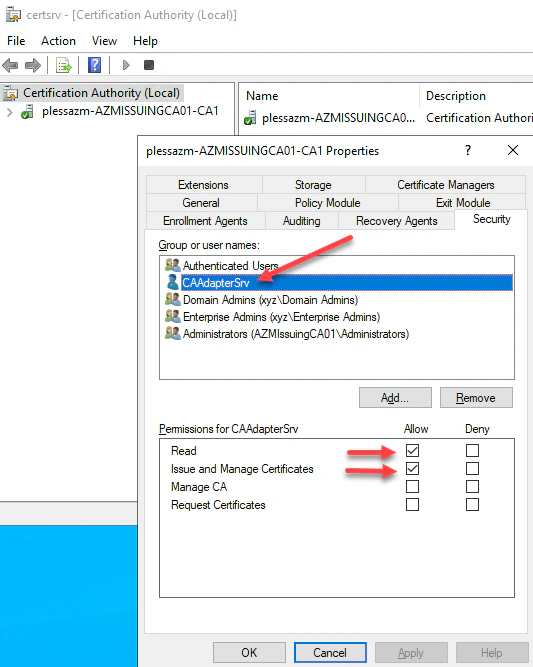
1. Log into the **Certificate Authority** and right-click the CA and select **Properties**then navigate to the **Security** menu. Add the same service account created above. Then select **Read** and **Issue and Manage Certificates** permissions, then click **Apply** and OK. This will delegate permissions to the services account to **Read** and **Issue and Manage Certificates** on behalf of users.
 ***
[Create Enrollment Agent Certificate](/docs/requesting-enrollment-agent-certificate)
[Add CA Adapter to TruU Admin Console](/docs/add-ca-adapter-to-truu-admin-console)
***
[Create Enrollment Agent Certificate](/docs/requesting-enrollment-agent-certificate)
[Add CA Adapter to TruU Admin Console](/docs/add-ca-adapter-to-truu-admin-console)