> ## Documentation Index
> Fetch the complete documentation index at: https://docs.truu.ai/llms.txt
> Use this file to discover all available pages before exploring further.

# Deploying TruU using JAMF

> Deploying TruU on a Mac Device using JAMF Pro is crucial for ensuring endpoint security and data management. This guide outlines step-by-step instructions to successfully deploy a The TruU Mac agent via JAMF Pro.

**JAMF Setup**

1. Log in to "Jamf Pro"

<img src="https://mintcdn.com/truu-2/ehCBQgFdl_pQd0MN/images/docs/a8cfe83b-31f5-4a65-a045-f9a5073b0415/e5fdfd4d-1e88-4073-850d-bf11ac73a926/2d828a39-4373-4aad-bb24-7b47dbe0ed41/images/f71ab22f-63c5-42e3-879e-0f74cac22ae6.png?fit=max&auto=format&n=ehCBQgFdl_pQd0MN&q=85&s=9a44a9cac9e7299c6a4a197e7d41dbb3" width="504" height="368" data-path="images/docs/a8cfe83b-31f5-4a65-a045-f9a5073b0415/e5fdfd4d-1e88-4073-850d-bf11ac73a926/2d828a39-4373-4aad-bb24-7b47dbe0ed41/images/f71ab22f-63c5-42e3-879e-0f74cac22ae6.png" /> 

2. Click **Computers** at the top of the page

<img src="https://mintcdn.com/truu-2/ehCBQgFdl_pQd0MN/images/docs/a8cfe83b-31f5-4a65-a045-f9a5073b0415/e5fdfd4d-1e88-4073-850d-bf11ac73a926/2d828a39-4373-4aad-bb24-7b47dbe0ed41/images/e6cee23e-0042-4b2f-853d-d3e49eff0542.png?fit=max&auto=format&n=ehCBQgFdl_pQd0MN&q=85&s=89a997858cb0f834b7c428db264ec37e" width="570" height="393" data-path="images/docs/a8cfe83b-31f5-4a65-a045-f9a5073b0415/e5fdfd4d-1e88-4073-850d-bf11ac73a926/2d828a39-4373-4aad-bb24-7b47dbe0ed41/images/e6cee23e-0042-4b2f-853d-d3e49eff0542.png" /> 

3. Click **Policies**

<img src="https://mintcdn.com/truu-2/ehCBQgFdl_pQd0MN/images/docs/a8cfe83b-31f5-4a65-a045-f9a5073b0415/e5fdfd4d-1e88-4073-850d-bf11ac73a926/2d828a39-4373-4aad-bb24-7b47dbe0ed41/images/41d1d4dc-d78f-4fd7-8022-56da1867c5b0.png?fit=max&auto=format&n=ehCBQgFdl_pQd0MN&q=85&s=2bed6938826c8cd26e598aac8010ae6c" width="277" height="421" data-path="images/docs/a8cfe83b-31f5-4a65-a045-f9a5073b0415/e5fdfd4d-1e88-4073-850d-bf11ac73a926/2d828a39-4373-4aad-bb24-7b47dbe0ed41/images/41d1d4dc-d78f-4fd7-8022-56da1867c5b0.png" /> 

4. Click **New**  

<img src="https://mintcdn.com/truu-2/ehCBQgFdl_pQd0MN/images/docs/a8cfe83b-31f5-4a65-a045-f9a5073b0415/e5fdfd4d-1e88-4073-850d-bf11ac73a926/2d828a39-4373-4aad-bb24-7b47dbe0ed41/images/06512665-c915-44e1-812b-cb59dc10e4e1.png?fit=max&auto=format&n=ehCBQgFdl_pQd0MN&q=85&s=b67570ce46468087924e016a02cfdaee" width="682" height="183" data-path="images/docs/a8cfe83b-31f5-4a65-a045-f9a5073b0415/e5fdfd4d-1e88-4073-850d-bf11ac73a926/2d828a39-4373-4aad-bb24-7b47dbe0ed41/images/06512665-c915-44e1-812b-cb59dc10e4e1.png" /> 

5. Use the General payload to configure basic settings for the policy, including the *trigger* and *execution frequency* 

<img src="https://mintcdn.com/truu-2/ehCBQgFdl_pQd0MN/images/docs/a8cfe83b-31f5-4a65-a045-f9a5073b0415/e5fdfd4d-1e88-4073-850d-bf11ac73a926/2d828a39-4373-4aad-bb24-7b47dbe0ed41/images/2702ac2a-7020-4225-8c31-8546d08300fc.png?fit=max&auto=format&n=ehCBQgFdl_pQd0MN&q=85&s=eade17fd6d39cd6b1cd8f3d4e15c7ddf" width="489" height="417" data-path="images/docs/a8cfe83b-31f5-4a65-a045-f9a5073b0415/e5fdfd4d-1e88-4073-850d-bf11ac73a926/2d828a39-4373-4aad-bb24-7b47dbe0ed41/images/2702ac2a-7020-4225-8c31-8546d08300fc.png" /> 

6. Select the **Packages payload** and click **Configure** 

<img src="https://mintcdn.com/truu-2/ehCBQgFdl_pQd0MN/images/docs/a8cfe83b-31f5-4a65-a045-f9a5073b0415/e5fdfd4d-1e88-4073-850d-bf11ac73a926/2d828a39-4373-4aad-bb24-7b47dbe0ed41/images/843e4614-405e-40f0-83c0-4e9ea0eb5415.png?fit=max&auto=format&n=ehCBQgFdl_pQd0MN&q=85&s=68efc1c5f2997a8385f5df76e596f805" width="519" height="329" data-path="images/docs/a8cfe83b-31f5-4a65-a045-f9a5073b0415/e5fdfd4d-1e88-4073-850d-bf11ac73a926/2d828a39-4373-4aad-bb24-7b47dbe0ed41/images/843e4614-405e-40f0-83c0-4e9ea0eb5415.png" /> 

7. Click **Packages Settings**  

<img src="https://mintcdn.com/truu-2/ehCBQgFdl_pQd0MN/images/docs/a8cfe83b-31f5-4a65-a045-f9a5073b0415/e5fdfd4d-1e88-4073-850d-bf11ac73a926/2d828a39-4373-4aad-bb24-7b47dbe0ed41/images/9032783d-5e60-4105-8f37-8b4802802df4.png?fit=max&auto=format&n=ehCBQgFdl_pQd0MN&q=85&s=993b139f7696e6c43ecdf3833ac82f79" width="624" height="196" data-path="images/docs/a8cfe83b-31f5-4a65-a045-f9a5073b0415/e5fdfd4d-1e88-4073-850d-bf11ac73a926/2d828a39-4373-4aad-bb24-7b47dbe0ed41/images/9032783d-5e60-4105-8f37-8b4802802df4.png" /> 

8. Click **New**  

<img src="https://mintcdn.com/truu-2/ehCBQgFdl_pQd0MN/images/docs/a8cfe83b-31f5-4a65-a045-f9a5073b0415/e5fdfd4d-1e88-4073-850d-bf11ac73a926/2d828a39-4373-4aad-bb24-7b47dbe0ed41/images/10167dec-e41b-42a7-b3b6-1dca9d4eaba8.png?fit=max&auto=format&n=ehCBQgFdl_pQd0MN&q=85&s=01ba62e9f3bafba25d1cb98a4674ae3e" width="624" height="179" data-path="images/docs/a8cfe83b-31f5-4a65-a045-f9a5073b0415/e5fdfd4d-1e88-4073-850d-bf11ac73a926/2d828a39-4373-4aad-bb24-7b47dbe0ed41/images/10167dec-e41b-42a7-b3b6-1dca9d4eaba8.png" /> 

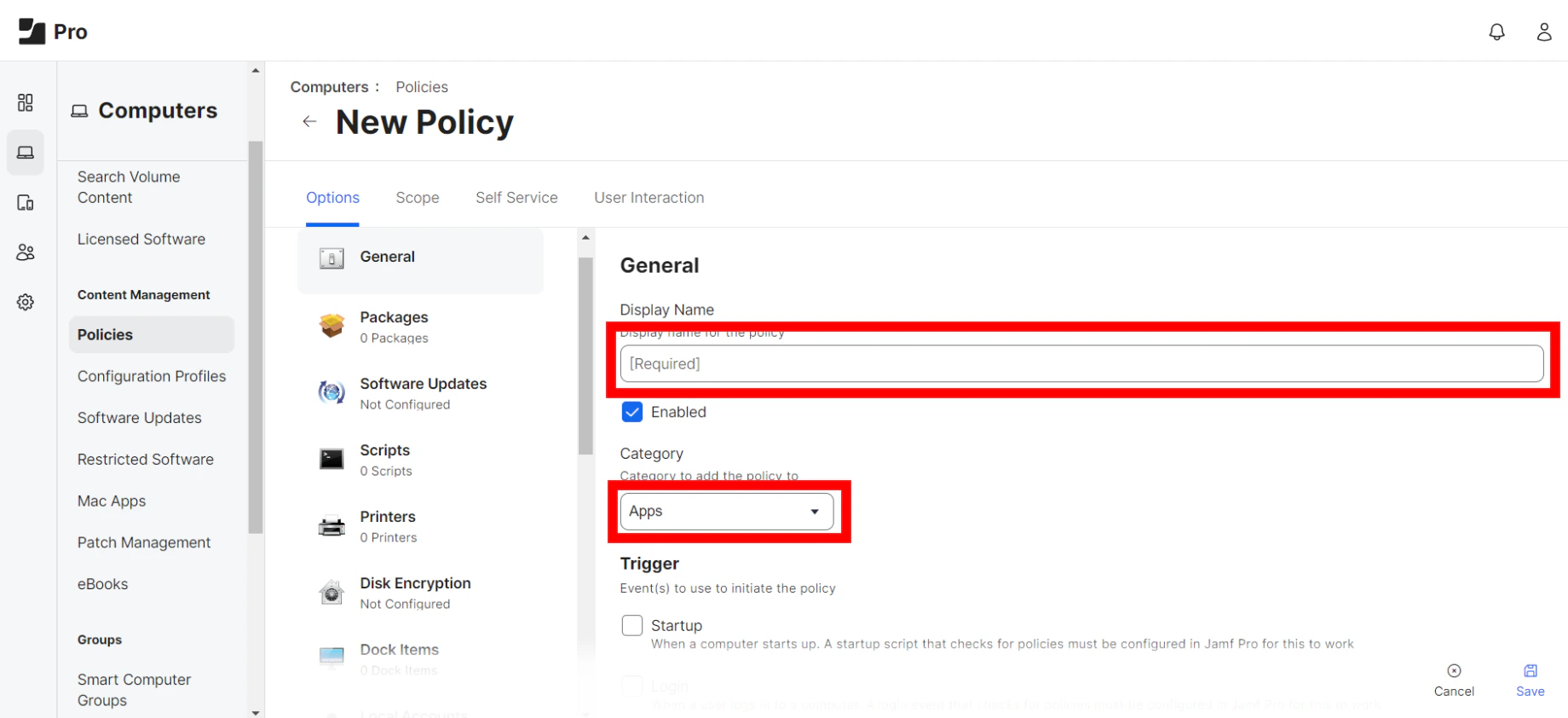
9. Add *Display Name* and Select **Apps Category**  
   <img src="https://mintcdn.com/truu-2/ehCBQgFdl_pQd0MN/images/docs/a8cfe83b-31f5-4a65-a045-f9a5073b0415/e5fdfd4d-1e88-4073-850d-bf11ac73a926/2d828a39-4373-4aad-bb24-7b47dbe0ed41/images/5463a15e-a4d8-47d5-8e77-77e76cd40be9.png?fit=max&auto=format&n=ehCBQgFdl_pQd0MN&q=85&s=3d42e62e7f4158f3de73c00492c02c3b" alt="" width="1840" height="842" data-path="images/docs/a8cfe83b-31f5-4a65-a045-f9a5073b0415/e5fdfd4d-1e88-4073-850d-bf11ac73a926/2d828a39-4373-4aad-bb24-7b47dbe0ed41/images/5463a15e-a4d8-47d5-8e77-77e76cd40be9.png" />

**NOTE**: The TruU installer package will always fall under apps due to business compliance and does not affect installation

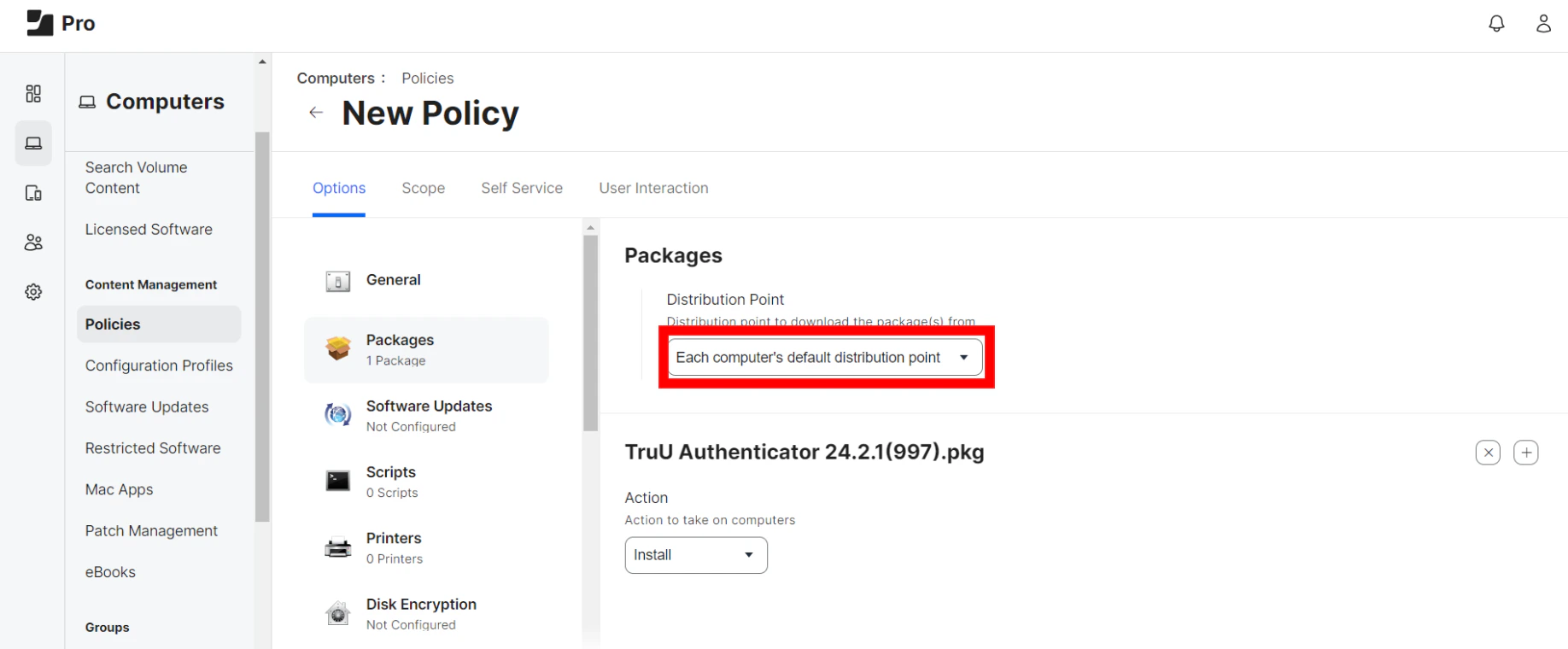
10. Click **Add** for the package you want to install. Then, choose **Install** from the Action pop-up menu 
11. Configure the settings for the package. Make sure to specify a distribution point for computers to download the package from. Then, use the Restart Options payload to configure settings for restarting computers
<img src="https://mintcdn.com/truu-2/ehCBQgFdl_pQd0MN/images/docs/a8cfe83b-31f5-4a65-a045-f9a5073b0415/e5fdfd4d-1e88-4073-850d-bf11ac73a926/2d828a39-4373-4aad-bb24-7b47dbe0ed41/images/51deab22-5976-46cf-bb24-3e5b8440bd3f.png?fit=max&auto=format&n=ehCBQgFdl_pQd0MN&q=85&s=6337fc56354361cb419c7d2d30310470" alt="" width="1836" height="760" data-path="images/docs/a8cfe83b-31f5-4a65-a045-f9a5073b0415/e5fdfd4d-1e88-4073-850d-bf11ac73a926/2d828a39-4373-4aad-bb24-7b47dbe0ed41/images/51deab22-5976-46cf-bb24-3e5b8440bd3f.png" />

***

[Manual Install TruU](/docs/manual-install-truu)

[TruU JAMF Pre-Stage Deployment using JAMF Setup Manager](/docs/truu-jamf-pre-stage-deployment-using-jamf-setup-manager)
