> ## Documentation Index
> Fetch the complete documentation index at: https://docs.truu.ai/llms.txt
> Use this file to discover all available pages before exploring further.
# MA 26.2 Release Notes
> We are pleased to announce the release of the TruU Mac Authenticator version 26.2.0 Please review this document in its entirety for details about the release, including known issues.
Date: July 10, 2026
## Highlights
* Faster, More Reliable Certificate-Based Login
* More Reliable Single Sign-On
* Clearer Account Lockout Experience
* More Complete Sign-In Activity in the Admin Console
* Bug Fixes
***
## Important: One-Time Certificate Trust Migration
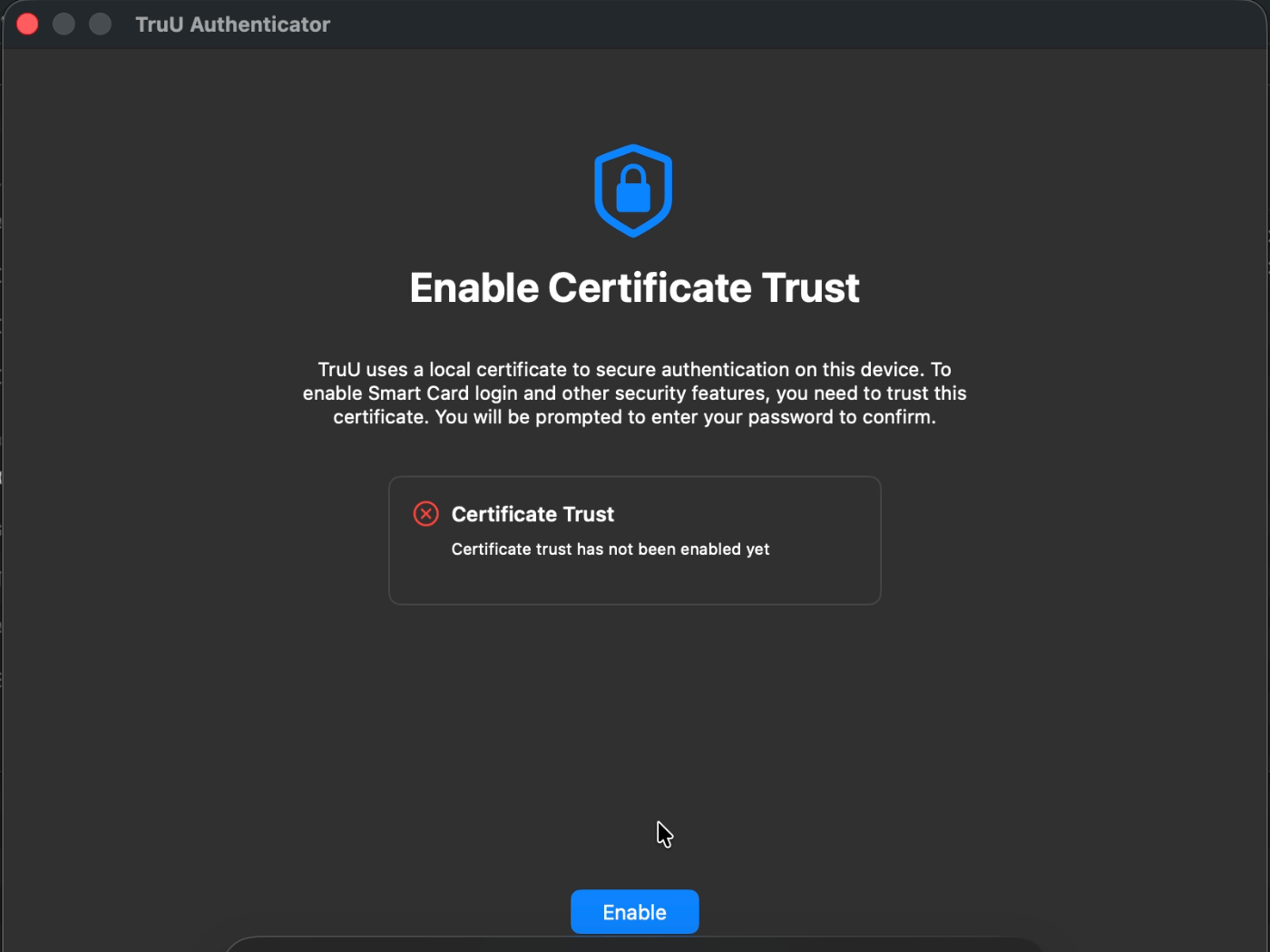
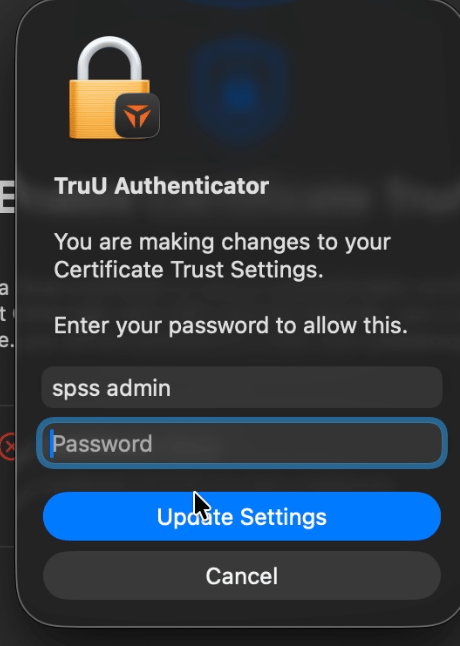
* As part of this release, if you are already enrolled with TruU, you will see a one-time screen prompting you to enable certificate trust. You will be asked to enter your PIN twice: once to trust the new certificate authority, and once to pair the smart card generated from it. This is a one-time step, and once it is complete you will not see it again. This migration moves you to a new, more robust certificate authority and helps TruU provide a more stable, reliable sign-in experience going forward.
 ## Enhancements
### Faster, More Reliable Certificate-Based Login
* Smart card and certificate-based sign-in is now backed by a certificate that lives and is managed locally on your Mac. Because it no longer depends on a round trip to the server to be issued or renewed, enrollment and login are quicker and far less likely to fail. The local certificate is renewed automatically and is never allowed to expire out from under you, so you should no longer hit "certificate trust could not be restored" dead ends. If you ever unenroll, the local certificate is cleaned up along with everything else.
* When you upgrade, your existing enrollment is migrated to the new local-certificate model automatically — there is nothing for you to redo. Your PIN keeps working as before.
* A smart card certificate is now only requested when a feature on your device actually requires one for external authentication. If your configuration does not require it, enrollment skips that step entirely and completes faster.
* For deployments that use short-lived cloud trust certificates, the certificate now refreshes well before it expires rather than waiting until the last moment, so you are far less likely to be interrupted by an expired-certificate prompt.
### More Reliable Single Sign-On
* Single sign-on to your browser and apps now recovers on its own. If the SSO service is not quite ready right after you log in, it keeps trying for a few minutes and starts working automatically once it is ready — you no longer have to restart the authenticator to get SSO going. This holds up across the situations that used to break it, including fresh enrollment, logging out and back in, fast user switching between accounts, and re-enrollment.
* If your device genuinely is not set up for SSO, the service now stays quietly idle instead of repeatedly prompting or erroring.
* When SSO is turned off in your configuration, it now stays off everywhere. Sign-on no longer continues to work in the background after being disabled.
### Clearer Account Lockout Experience
* When your account is temporarily locked after too many incorrect PIN attempts, you now see a clear message telling you so — including the exact time and date you can try again — on the macOS login screen, on the custom login screen, and during SSO. The PIN field is disabled while you are locked and re-enabled automatically once the lock period ends, so you are not left guessing or extending the lockout by continuing to try.
* The lockout date is now shown in a consistent MM/DD/YYYY format, and the lockout now correctly triggers at the configured number of attempts rather than locking early. A counting issue that could make a single wrong PIN register as two attempts on the lock screen has also been corrected.
### Wi-Fi Setup During Automated Enrollment
* You can now select and connect to a Wi-Fi network during enrollment in the Automated Device Enrollment flow, so a device with no wired connection can still get online and finish setting up.
### More Complete Sign-In Activity in the Admin Console
* Authentication activity is now reported far more completely and accurately to the Admin Console. Every PIN and biometric attempt, PIN changes, failed-attempt and lockout events, and device de-registrations are now recorded and attributed to the correct user. Duplicate events from a single sign-in have been eliminated, and events that previously went missing — such as PIN login attempts, PIN-change failures, and de-registrations triggered by a FileVault password recovery — now appear reliably.
### Accurate Account Details in the Menu
* The account name and details shown in the TruU menu now come directly from your directory, so they stay accurate and up to date with what your organization has on file.
### Automatic Recovery to an Admin Account on Error
* If the authenticator hits an error it cannot complete, it can now fall back to an administrator account so you have a reliable way to get into the device rather than being stuck.
***
## Bug Fixes
* Fixed several smart card pairing issues so PIN-based unlock keeps working as expected: the smart card now reinitializes correctly after the Mac wakes from sleep, stays paired after a PIN change, and pairs reliably after enrollment — preventing the lock screen from falling back to a password prompt.
* Fixed cases where a stale smart card PIN field continued to appear on the lock screen after a user had been unenrolled.
* Fixed certificate renewal and repair problems, including a renewal process that could get stuck in a rapid loop, repeated failures after enrollment, and a misleading "renewal failed" dialog that appeared even when renewal had succeeded.
* Fixed a loop in the certificate trust enable flow that could occur when the SSO agent was disabled.
* Fixed a daily certificate-trust reminder that showed a password field instead of a PIN field, where repeated failures could break PIN authentication.
* Fixed numerous enrollment failures and loops, including enrollment getting stuck on "Preparing your desktop" or "Profile Successfully Setup," looping "Try Again" errors in the Automated Device Enrollment flow, failures after repeated smart card cancellations or an incorrect PIN retry, and a token prompt that kept reappearing even after a valid PIN was entered.
* Fixed an issue where a failed enrollment could leave you signing in with your new PIN instead of your previous password, and a related case where the certificate trust prompt accepted the old password instead of the new PIN when the network was unavailable.
* Fixed app crashes during the certificate trust prompt and during the Automated Device Enrollment "Preparing Your desktop" step.
* Fixed an issue that allowed the authenticator to launch a second copy of itself at the same time.
* Fixed an issue where the app could block macOS Migration Assistant.
* Fixed lock screen flickering between PIN and password that could lead to a system freeze.
* Fixed single sign-on failures in specific situations, including Safari sign-in, the first attempt after the Mac woke from extended sleep, inconsistent Chrome behavior after toggling web SSO, and SSO that was unavailable for a period after Automated Device Enrollment.
* Fixed a stray TruU SSO helper icon that appeared in the menu bar after completing SSO.
* Fixed cases where a device was not removed from the enrolled list after the user unenrolled, and where unenrollment was not properly reflected back to the platform.
* Fixed an issue where a PIN change was applied even after you closed or dismissed the Change PIN window before it completed.
* Fixed a delay where device configuration was not retrieved until several minutes after enrollment.
* Fixed the PIN entry field not automatically receiving focus on the "Create Your PIN" screen, so you can start typing without clicking into it first.
* Fixed a "PIN incorrect" animation on the Get Started screen that kept replaying while you continued typing.
* Fixed confusing error messages when the internet was unavailable: enrollment and PIN submission now show a clear connectivity message and time out properly instead of leaving a spinner running, and a hotspot with no internet now reports a connectivity error rather than "Access Denied."
* Fixed a case where Kerberos tickets from a different domain could briefly be shown after switching tenants.
* Fixed a Wi-Fi password field on the login screen that stayed open after sleep/wake without a network selected, and added a loading indicator while the Wi-Fi list refreshes.
* Fixed an issue where you could not submit macOS logs even when authentication was otherwise working normally.
* Fixed the "Open Certificate Trust" option incorrectly remaining visible when the SSO agent was enabled.
* Fixed an account locking for one hour instead of the configured ten minutes after Automated Device Enrollment.
## Known Issues
## Enhancements
### Faster, More Reliable Certificate-Based Login
* Smart card and certificate-based sign-in is now backed by a certificate that lives and is managed locally on your Mac. Because it no longer depends on a round trip to the server to be issued or renewed, enrollment and login are quicker and far less likely to fail. The local certificate is renewed automatically and is never allowed to expire out from under you, so you should no longer hit "certificate trust could not be restored" dead ends. If you ever unenroll, the local certificate is cleaned up along with everything else.
* When you upgrade, your existing enrollment is migrated to the new local-certificate model automatically — there is nothing for you to redo. Your PIN keeps working as before.
* A smart card certificate is now only requested when a feature on your device actually requires one for external authentication. If your configuration does not require it, enrollment skips that step entirely and completes faster.
* For deployments that use short-lived cloud trust certificates, the certificate now refreshes well before it expires rather than waiting until the last moment, so you are far less likely to be interrupted by an expired-certificate prompt.
### More Reliable Single Sign-On
* Single sign-on to your browser and apps now recovers on its own. If the SSO service is not quite ready right after you log in, it keeps trying for a few minutes and starts working automatically once it is ready — you no longer have to restart the authenticator to get SSO going. This holds up across the situations that used to break it, including fresh enrollment, logging out and back in, fast user switching between accounts, and re-enrollment.
* If your device genuinely is not set up for SSO, the service now stays quietly idle instead of repeatedly prompting or erroring.
* When SSO is turned off in your configuration, it now stays off everywhere. Sign-on no longer continues to work in the background after being disabled.
### Clearer Account Lockout Experience
* When your account is temporarily locked after too many incorrect PIN attempts, you now see a clear message telling you so — including the exact time and date you can try again — on the macOS login screen, on the custom login screen, and during SSO. The PIN field is disabled while you are locked and re-enabled automatically once the lock period ends, so you are not left guessing or extending the lockout by continuing to try.
* The lockout date is now shown in a consistent MM/DD/YYYY format, and the lockout now correctly triggers at the configured number of attempts rather than locking early. A counting issue that could make a single wrong PIN register as two attempts on the lock screen has also been corrected.
### Wi-Fi Setup During Automated Enrollment
* You can now select and connect to a Wi-Fi network during enrollment in the Automated Device Enrollment flow, so a device with no wired connection can still get online and finish setting up.
### More Complete Sign-In Activity in the Admin Console
* Authentication activity is now reported far more completely and accurately to the Admin Console. Every PIN and biometric attempt, PIN changes, failed-attempt and lockout events, and device de-registrations are now recorded and attributed to the correct user. Duplicate events from a single sign-in have been eliminated, and events that previously went missing — such as PIN login attempts, PIN-change failures, and de-registrations triggered by a FileVault password recovery — now appear reliably.
### Accurate Account Details in the Menu
* The account name and details shown in the TruU menu now come directly from your directory, so they stay accurate and up to date with what your organization has on file.
### Automatic Recovery to an Admin Account on Error
* If the authenticator hits an error it cannot complete, it can now fall back to an administrator account so you have a reliable way to get into the device rather than being stuck.
***
## Bug Fixes
* Fixed several smart card pairing issues so PIN-based unlock keeps working as expected: the smart card now reinitializes correctly after the Mac wakes from sleep, stays paired after a PIN change, and pairs reliably after enrollment — preventing the lock screen from falling back to a password prompt.
* Fixed cases where a stale smart card PIN field continued to appear on the lock screen after a user had been unenrolled.
* Fixed certificate renewal and repair problems, including a renewal process that could get stuck in a rapid loop, repeated failures after enrollment, and a misleading "renewal failed" dialog that appeared even when renewal had succeeded.
* Fixed a loop in the certificate trust enable flow that could occur when the SSO agent was disabled.
* Fixed a daily certificate-trust reminder that showed a password field instead of a PIN field, where repeated failures could break PIN authentication.
* Fixed numerous enrollment failures and loops, including enrollment getting stuck on "Preparing your desktop" or "Profile Successfully Setup," looping "Try Again" errors in the Automated Device Enrollment flow, failures after repeated smart card cancellations or an incorrect PIN retry, and a token prompt that kept reappearing even after a valid PIN was entered.
* Fixed an issue where a failed enrollment could leave you signing in with your new PIN instead of your previous password, and a related case where the certificate trust prompt accepted the old password instead of the new PIN when the network was unavailable.
* Fixed app crashes during the certificate trust prompt and during the Automated Device Enrollment "Preparing Your desktop" step.
* Fixed an issue that allowed the authenticator to launch a second copy of itself at the same time.
* Fixed an issue where the app could block macOS Migration Assistant.
* Fixed lock screen flickering between PIN and password that could lead to a system freeze.
* Fixed single sign-on failures in specific situations, including Safari sign-in, the first attempt after the Mac woke from extended sleep, inconsistent Chrome behavior after toggling web SSO, and SSO that was unavailable for a period after Automated Device Enrollment.
* Fixed a stray TruU SSO helper icon that appeared in the menu bar after completing SSO.
* Fixed cases where a device was not removed from the enrolled list after the user unenrolled, and where unenrollment was not properly reflected back to the platform.
* Fixed an issue where a PIN change was applied even after you closed or dismissed the Change PIN window before it completed.
* Fixed a delay where device configuration was not retrieved until several minutes after enrollment.
* Fixed the PIN entry field not automatically receiving focus on the "Create Your PIN" screen, so you can start typing without clicking into it first.
* Fixed a "PIN incorrect" animation on the Get Started screen that kept replaying while you continued typing.
* Fixed confusing error messages when the internet was unavailable: enrollment and PIN submission now show a clear connectivity message and time out properly instead of leaving a spinner running, and a hotspot with no internet now reports a connectivity error rather than "Access Denied."
* Fixed a case where Kerberos tickets from a different domain could briefly be shown after switching tenants.
* Fixed a Wi-Fi password field on the login screen that stayed open after sleep/wake without a network selected, and added a loading indicator while the Wi-Fi list refreshes.
* Fixed an issue where you could not submit macOS logs even when authentication was otherwise working normally.
* Fixed the "Open Certificate Trust" option incorrectly remaining visible when the SSO agent was enabled.
* Fixed an account locking for one hour instead of the configured ten minutes after Automated Device Enrollment.
## Known Issues