> ## Documentation Index
> Fetch the complete documentation index at: https://docs.truu.ai/llms.txt
> Use this file to discover all available pages before exploring further.
# macOS FAQs
> Frequently asked Questions about TruU's macOS agent.
**Where can I find the TruU Authenticator application?**
* The TruU authenticator icon is on the top right menu bar of your Mac computer
 **Do I need to VPN connect to enroll with TruU on mac?**
* No, Mac PC does not require VPN connect to enroll with TruU
**Do I need config file to install mac authenticator?**
* Yes, you need a config file with the installer if you are trying to download the mac authenticator manually. Follow the [Manual Install - Mac Guide](https://docs.truu.ai/docs/windows-authenticator-installation-guide-copy)
**What are the pre-requisites specific to installing TruU on macOS**
* We generally recommend disabling any password synchronization tools
**How long does it take to get the enrollment code via email?**
You should receive the code within 2 minutes and if you don’t get the code, please click on resend
**What should I do if I have issues with TruU?**
Please follow the steps below:
1. Click on the TruU icon
**Do I need to VPN connect to enroll with TruU on mac?**
* No, Mac PC does not require VPN connect to enroll with TruU
**Do I need config file to install mac authenticator?**
* Yes, you need a config file with the installer if you are trying to download the mac authenticator manually. Follow the [Manual Install - Mac Guide](https://docs.truu.ai/docs/windows-authenticator-installation-guide-copy)
**What are the pre-requisites specific to installing TruU on macOS**
* We generally recommend disabling any password synchronization tools
**How long does it take to get the enrollment code via email?**
You should receive the code within 2 minutes and if you don’t get the code, please click on resend
**What should I do if I have issues with TruU?**
Please follow the steps below:
1. Click on the TruU icon
 2. Click *Send Logs*
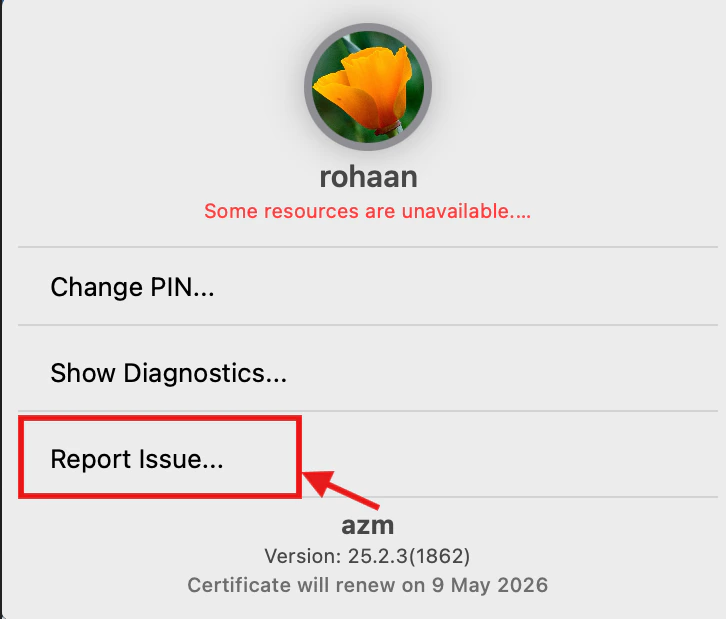 3. Important information to mention:
* Brief description of the issue
* Timestamp when the issue occurred
* Able to reproduce the issue
* Device information
* OS Version details
Or, follow the [Submitting Logs - Mac Guide](https://docs.truu.ai/docs/report-an-issue)
***
[Windows FAQs](/docs/windows-faqs)
[Mobile FAQs](/docs/mobile-faqs)
3. Important information to mention:
* Brief description of the issue
* Timestamp when the issue occurred
* Able to reproduce the issue
* Device information
* OS Version details
Or, follow the [Submitting Logs - Mac Guide](https://docs.truu.ai/docs/report-an-issue)
***
[Windows FAQs](/docs/windows-faqs)
[Mobile FAQs](/docs/mobile-faqs)