> ## Documentation Index
> Fetch the complete documentation index at: https://docs.truu.ai/llms.txt
> Use this file to discover all available pages before exploring further.
# macOS Local Account Creation Control for ADE
> This document provides guidance on configuring the Special Case Attribute to determine which global directory attribute will be used for creating local accounts on macOS during Automated Device Enrollment (ADE)
### Purpose
Configure which directory attribute is used to create local accounts on macOS during Automated Device Enrollment.
**Step 1:** Go to Settings > Directory > Global Attributes
**Step 2:** Click on the Gear icon to configure special case attributes
 **Step 3:** Choose the attribute you would like to use to create local accounts.
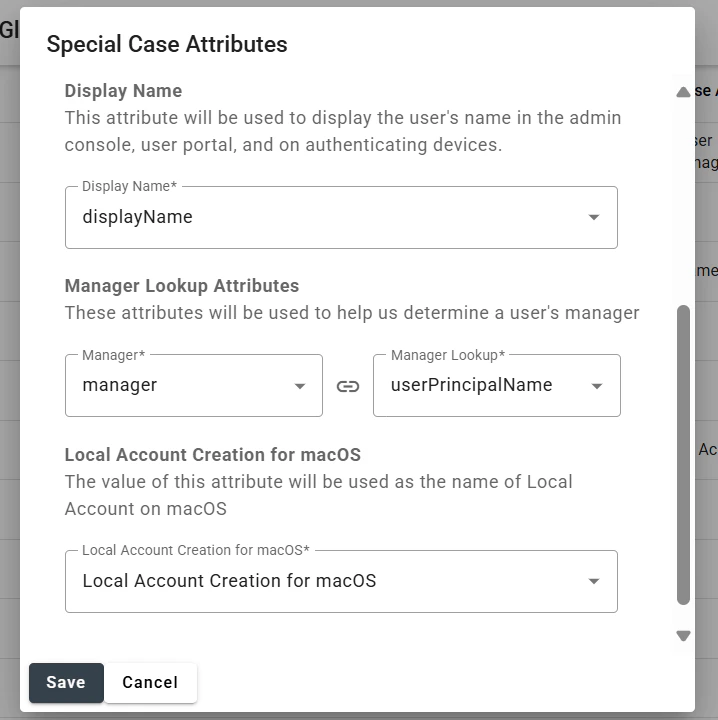 You can change the selected attribute anytime based on how you want the local accounts to be created or managed within your organization.
***
[User Management API Guide](/docs/user-management-api-guide)
[PIN Hammering](/docs/pin-hammering)
You can change the selected attribute anytime based on how you want the local accounts to be created or managed within your organization.
***
[User Management API Guide](/docs/user-management-api-guide)
[PIN Hammering](/docs/pin-hammering)