> ## Documentation Index
> Fetch the complete documentation index at: https://docs.truu.ai/llms.txt
> Use this file to discover all available pages before exploring further.
# Required System Permissions
> Upon installation of the Mac Authenticator, for full functionality these are the system setting permissions that TruU will need. If you are installing manually, you will have to set these manually. If you are pushing out via MDM, these system permissions can be automatically set by pushing out a configuration profile.
The following permissions are required for the Mac Authenticator to function properly:
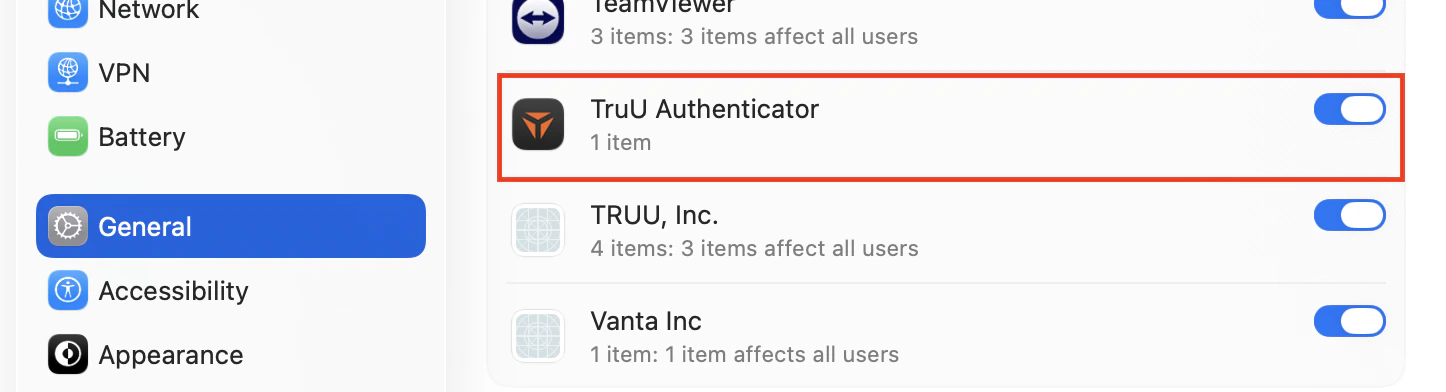
1. **Login Items**: This permission is enabled by default; however, you should verify that it remains turned on to ensure the application functions properly.
1. On your Mac, navigate to **Settings**>**General** > **Login Items & Extensions**, then enable **App Background Activity**.
2. If this setting is disabled, TruU will not function correctly.
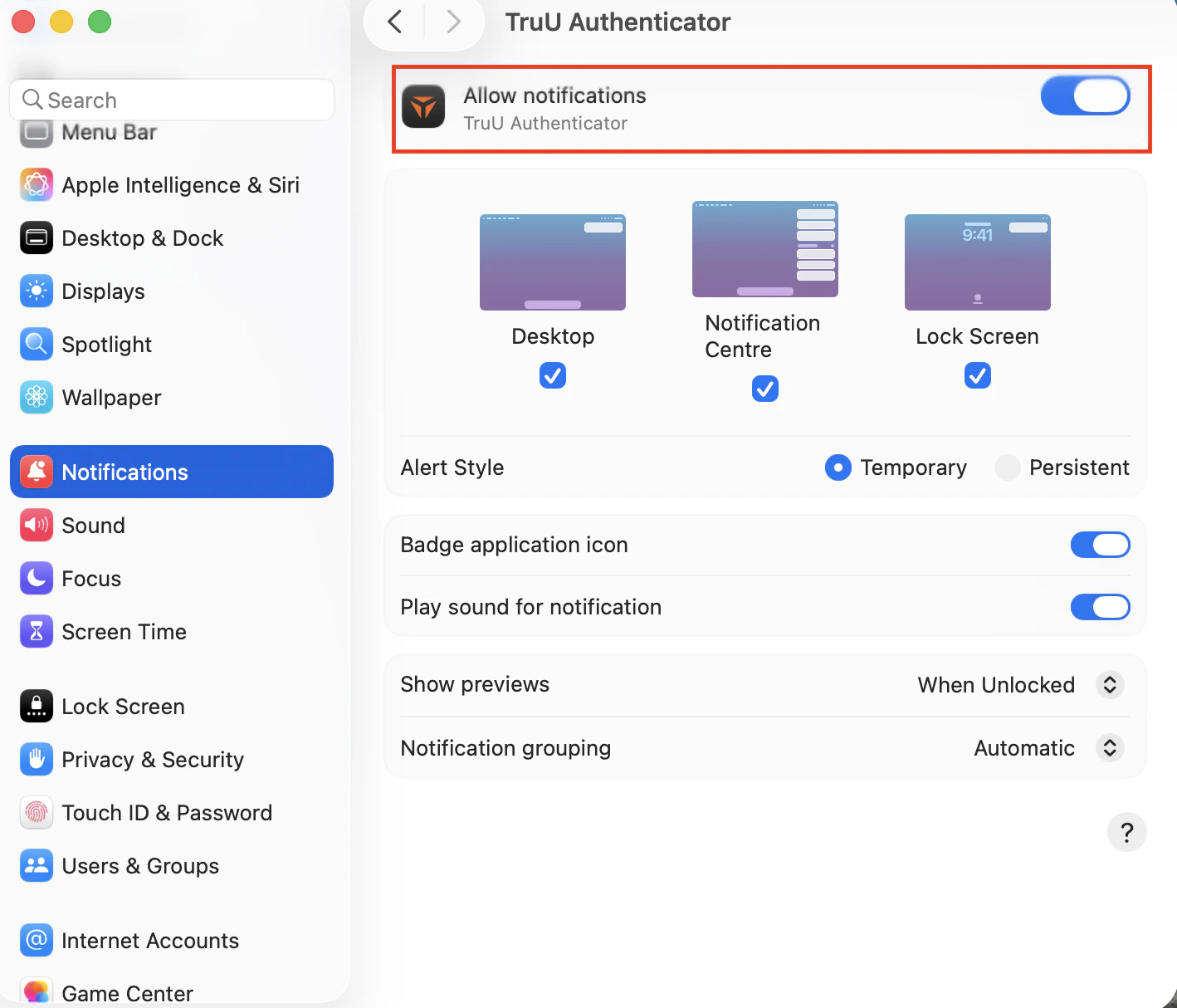
 2. **Notifications**: Users must allow notifications to stay informed during installation. After TruU is installed, a prompt will appear requesting permission to send notification alerts.
1. Navigate to **Settings**>**Notifications** > **Application Notifications**, then enable notifications for**TruU Authenticator**.
2. Notifications are used for enrollment reminders, unenrollment alerts, password change alerts, and other important updates.
2. **Notifications**: Users must allow notifications to stay informed during installation. After TruU is installed, a prompt will appear requesting permission to send notification alerts.
1. Navigate to **Settings**>**Notifications** > **Application Notifications**, then enable notifications for**TruU Authenticator**.
2. Notifications are used for enrollment reminders, unenrollment alerts, password change alerts, and other important updates.
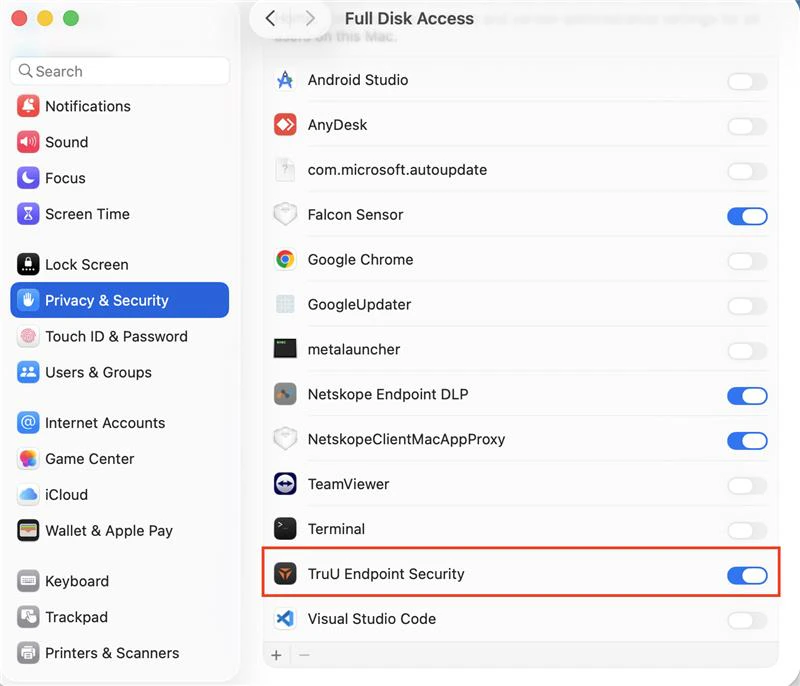
 3. **Full Disk Access**: This permission must be granted manually by the user to allow the client to monitor additional security events.
1. Navigate to **Settings**>**Privacy & Security** > **Full Disk Access**, then enable access for**TruU Endpoint Security**.
3. **Full Disk Access**: This permission must be granted manually by the user to allow the client to monitor additional security events.
1. Navigate to **Settings**>**Privacy & Security** > **Full Disk Access**, then enable access for**TruU Endpoint Security**.
 **NOTE**: All of these system settings can be automatically enabled by deploying the attached configuration file to your client devices.
```text theme={null}
PayloadDisplayName
TruU Authenticator Permissions
PayloadDescription
Grant needed permissions to TruU
PayloadIdentifier
ai.truu.mdm.config.permissions
PayloadOrganization
TruU, Inc.
PayloadRemovalDisallowed
PayloadType
Configuration
PayloadUUID
3A2DC905-72CC-496A-8CE1-BDF201BC7AD0
PayloadVersion
1
PayloadScope
System
PayloadContent
Rules
Comment
Prefix
RuleType
LabelPrefix
RuleValue
com.truu
Comment
Prefix #2
RuleType
LabelPrefix
RuleValue
ai.truu
Comment
Team ID
RuleType
TeamIdentifier
RuleValue
VGJPA2G633
PayloadDisplayName
Login Items Rules
PayloadDescription
Manage the Login Items for TruU Applications
PayloadIdentifier
ai.truu.mdm.config.loginitems
PayloadOrganization
TruU, Inc.
PayloadType
com.apple.servicemanagement
PayloadUUID
5E17086F-4599-405A-B7FE-7B9B142870AA
PayloadVersion
1
NotificationSettings
BundleIdentifier
com.truu.LoginHost
NotificationsEnabled
ShowInNotificationCenter
ShowInLockScreen
AlertType
1
BadgesEnabled
SoundsEnabled
GroupingType
0
CriticalAlertEnabled
PayloadDisplayName
Notifications
PayloadDescription
Manage the notification permission for TruU Applications
PayloadIdentifier
ai.truu.mdm.config.notifications
PayloadOrganization
TruU, Inc.
PayloadType
com.apple.notificationsettings
PayloadUUID
713E1FEA-50FA-4FB1-BC40-FF473B46705B
PayloadVersion
1
Services
SystemPolicySysAdminFiles
Identifier
ai.truu.TruUES
IdentifierType
bundleID
CodeRequirement
identifier "ai.truu.TruUES"
Allowed
Comment
Allows specified apps access to some files used by system administrators.
SystemPolicyAllFiles
Identifier
ai.truu.TruUES
IdentifierType
bundleID
CodeRequirement
identifier "ai.truu.TruUES"
Allowed
Comment
Allows specified apps access to data like Mail, Messages, Safari, Home, Time Machine backups, and certain administrative settings for all users on the Mac. Get the CodeRequirement with 'codesign -display -r - /usr/bin/mdutil'
PayloadDisplayName
Privacy Preferences Control
PayloadDescription
Manage TruU TCC
PayloadIdentifier
ai.truu.mdm.config.tcc
PayloadOrganization
TruU, Inc.
PayloadType
com.apple.TCC.configuration-profile-policy
PayloadUUID
9A7D1F18-46AF-4854-BEBC-9DEAB80150CF
PayloadVersion
1
```
The following guide walks you through uploading this configuration file to JAMF.: [Computer Configuration Profiles - JAMF Pro Documentation 11.1 6.0](https://learn.jamf.com/en-US/bundle/jamf-pro-documentation-current/page/Computer_Configuration_Profiles.html#ariaid-title5)
***
[PAM Adapter Setup Guide](/docs/pam-adapter-setup-guide)
[MA Configuration Options](/docs/ma-configuration-options)
**NOTE**: All of these system settings can be automatically enabled by deploying the attached configuration file to your client devices.
```text theme={null}
PayloadDisplayName
TruU Authenticator Permissions
PayloadDescription
Grant needed permissions to TruU
PayloadIdentifier
ai.truu.mdm.config.permissions
PayloadOrganization
TruU, Inc.
PayloadRemovalDisallowed
PayloadType
Configuration
PayloadUUID
3A2DC905-72CC-496A-8CE1-BDF201BC7AD0
PayloadVersion
1
PayloadScope
System
PayloadContent
Rules
Comment
Prefix
RuleType
LabelPrefix
RuleValue
com.truu
Comment
Prefix #2
RuleType
LabelPrefix
RuleValue
ai.truu
Comment
Team ID
RuleType
TeamIdentifier
RuleValue
VGJPA2G633
PayloadDisplayName
Login Items Rules
PayloadDescription
Manage the Login Items for TruU Applications
PayloadIdentifier
ai.truu.mdm.config.loginitems
PayloadOrganization
TruU, Inc.
PayloadType
com.apple.servicemanagement
PayloadUUID
5E17086F-4599-405A-B7FE-7B9B142870AA
PayloadVersion
1
NotificationSettings
BundleIdentifier
com.truu.LoginHost
NotificationsEnabled
ShowInNotificationCenter
ShowInLockScreen
AlertType
1
BadgesEnabled
SoundsEnabled
GroupingType
0
CriticalAlertEnabled
PayloadDisplayName
Notifications
PayloadDescription
Manage the notification permission for TruU Applications
PayloadIdentifier
ai.truu.mdm.config.notifications
PayloadOrganization
TruU, Inc.
PayloadType
com.apple.notificationsettings
PayloadUUID
713E1FEA-50FA-4FB1-BC40-FF473B46705B
PayloadVersion
1
Services
SystemPolicySysAdminFiles
Identifier
ai.truu.TruUES
IdentifierType
bundleID
CodeRequirement
identifier "ai.truu.TruUES"
Allowed
Comment
Allows specified apps access to some files used by system administrators.
SystemPolicyAllFiles
Identifier
ai.truu.TruUES
IdentifierType
bundleID
CodeRequirement
identifier "ai.truu.TruUES"
Allowed
Comment
Allows specified apps access to data like Mail, Messages, Safari, Home, Time Machine backups, and certain administrative settings for all users on the Mac. Get the CodeRequirement with 'codesign -display -r - /usr/bin/mdutil'
PayloadDisplayName
Privacy Preferences Control
PayloadDescription
Manage TruU TCC
PayloadIdentifier
ai.truu.mdm.config.tcc
PayloadOrganization
TruU, Inc.
PayloadType
com.apple.TCC.configuration-profile-policy
PayloadUUID
9A7D1F18-46AF-4854-BEBC-9DEAB80150CF
PayloadVersion
1
```
The following guide walks you through uploading this configuration file to JAMF.: [Computer Configuration Profiles - JAMF Pro Documentation 11.1 6.0](https://learn.jamf.com/en-US/bundle/jamf-pro-documentation-current/page/Computer_Configuration_Profiles.html#ariaid-title5)
***
[PAM Adapter Setup Guide](/docs/pam-adapter-setup-guide)
[MA Configuration Options](/docs/ma-configuration-options)