> ## Documentation Index
> Fetch the complete documentation index at: https://docs.truu.ai/llms.txt
> Use this file to discover all available pages before exploring further.
# S3 Event Logging Adapter Setup Guide
> This guide provides a detailed walkthrough on how to configure the TruU S3 Event Logging Adapter. This adapter allows TruU to export events from the TruU Admin Console to an AWS S3 bucket. Administrators can then import these events into their event monitoring systems, such as Splunk, for centralized monitoring, alerting, and reporting.
## Creating a TruU S3 Event Logging Adapter
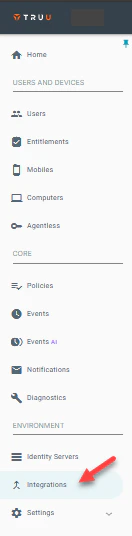
**Step 1:** Log into the TruU Admin Console and navigate to the "Integrations" tab.
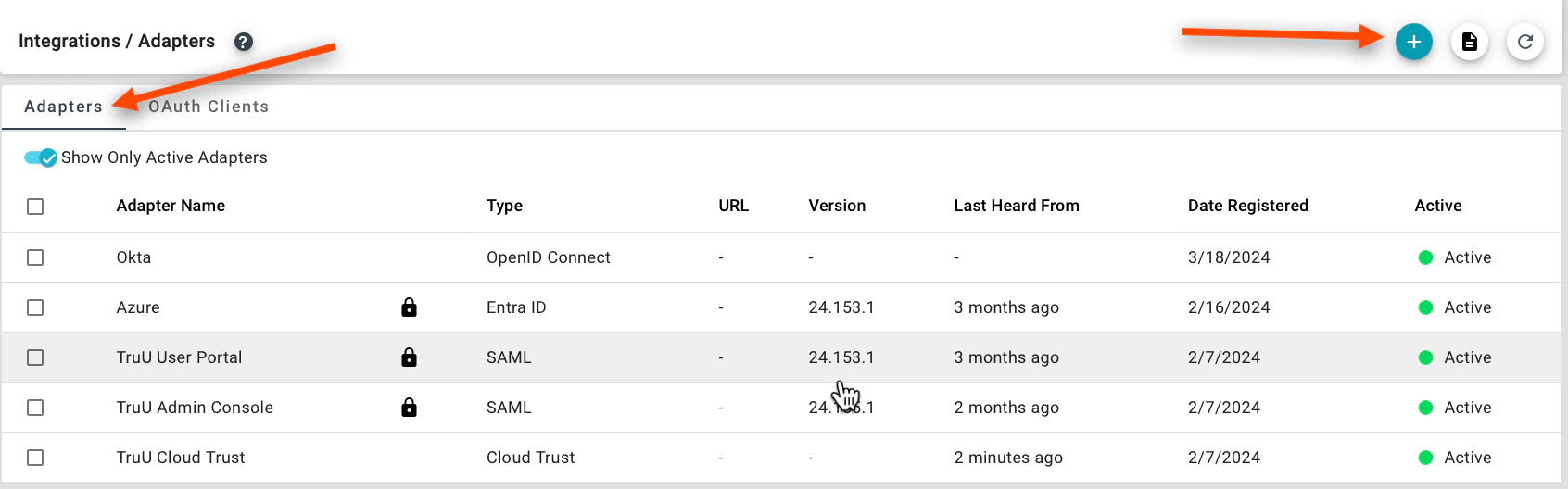
 **Step 2:** Navigate to the **Adapters** tab and click **(+)** to create a new TruU adapter.
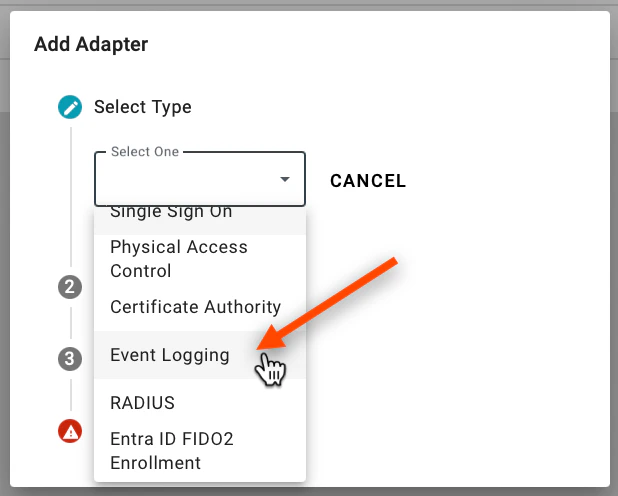
 **Step 3:** Select the **Event Logging** adapter and choose the **Event Logging** adapter type from the dropdown menu.
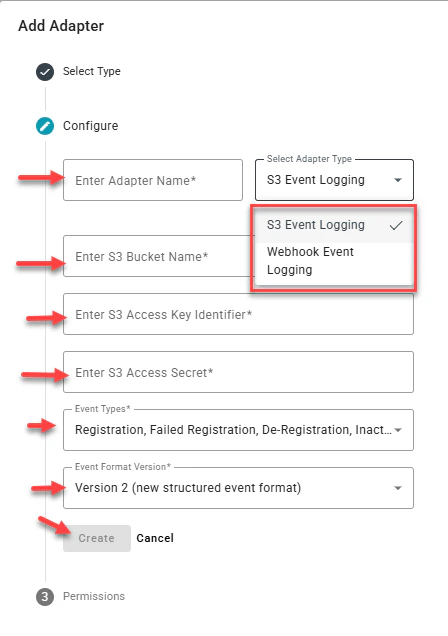
 **Step 4:** For AWS S3, select S3 Event Logging from the Select Adapter Type Drop down. Enter *a name for the adapter, the bucket name, access key identifier, and access secret from your AWS administrator console*. Select the event types to export to your infrastructure and click **Create** to add a new event logging adapter instance.
 Please note:
* The AWS service account configured for the adapter must have write permissions to the AWS S3 bucket.
* The AWS S3 access key and secret are encrypted and stored in Amazon’s Hardware Security Module (HSM).
* TruU exports events every 15 minutes. If an error occurs during an export, a notification message is displayed in the TruU management console. An error message will also be displayed if there is no event data for TruU to export.
* When the adapter is initially deployed, TruU will export events from the previous 7 days from which the adapter was first deployed.
## Managing TruU S3 Event Logging Adapters
**Step 1:** To edit an existing TruU S3 Event Logging Adapter in your TruU Admin Console, click on the adapter instance. You're then able to edit the adapter name, edit S3 bucket name, update S2 access key, update S3 access secret, and/or toggle the adapter from **Active** to **Inactive**.
The adapter **Version**, when the adapter was **Last Heard From**, and the **Date Registered** are also available for each adapter from the **Integration** > **Adapter** menu. Use these parameters to monitor the operation of your adapters.
## Event Logging Structure
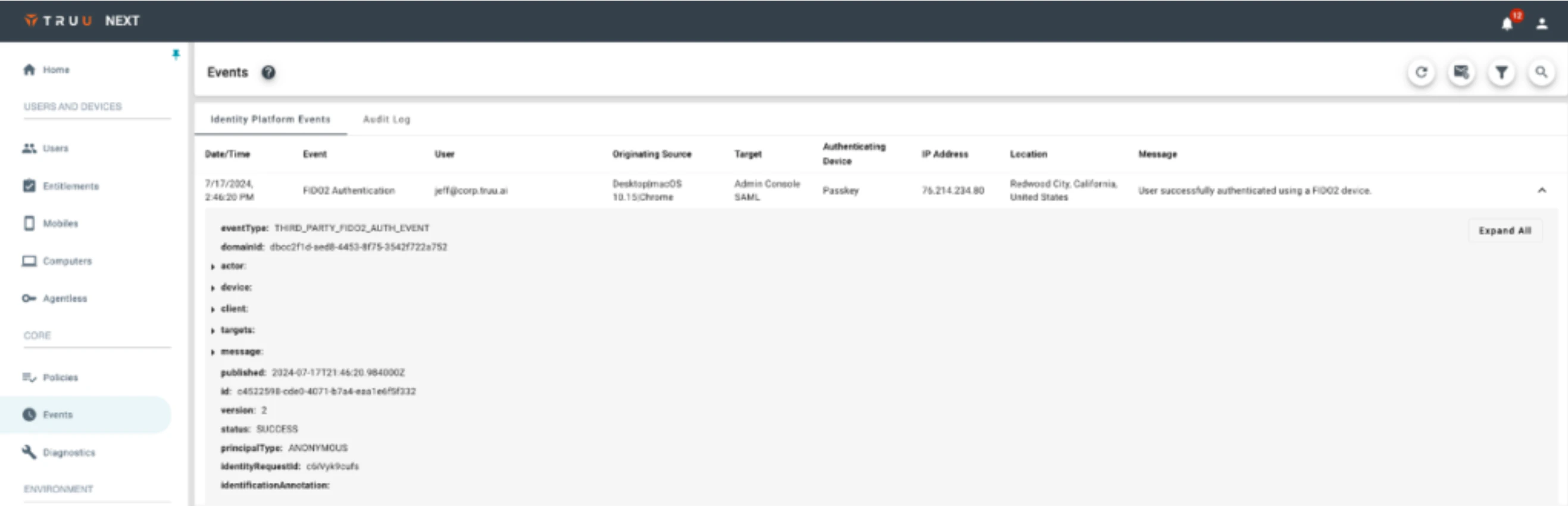
The expanded view of the data in the Events table now consists of the following elements:
1. Basic information about the event (e.g. Type, Domain ID, when the even was published, etc.).
2. **Actor:** this is a new data object that represents the user (and expands to provide additional information about the user).
3. **Device:** this is a new data object that represents the hardware used by the actor (and expands to provide additional information about the device.)
4. **Client:** this is a new data object that represents the client (TruU Agent, App or browser) used by the actor (and expands to provide additional information about the client).
5. **Targets:** this is a new data object that represents the targets (e.g., the resource the user was trying to access) used by the actor (and expands to provide additional information about the target).
6. **Message:** this is the message included for the event.
Please note:
* The AWS service account configured for the adapter must have write permissions to the AWS S3 bucket.
* The AWS S3 access key and secret are encrypted and stored in Amazon’s Hardware Security Module (HSM).
* TruU exports events every 15 minutes. If an error occurs during an export, a notification message is displayed in the TruU management console. An error message will also be displayed if there is no event data for TruU to export.
* When the adapter is initially deployed, TruU will export events from the previous 7 days from which the adapter was first deployed.
## Managing TruU S3 Event Logging Adapters
**Step 1:** To edit an existing TruU S3 Event Logging Adapter in your TruU Admin Console, click on the adapter instance. You're then able to edit the adapter name, edit S3 bucket name, update S2 access key, update S3 access secret, and/or toggle the adapter from **Active** to **Inactive**.
The adapter **Version**, when the adapter was **Last Heard From**, and the **Date Registered** are also available for each adapter from the **Integration** > **Adapter** menu. Use these parameters to monitor the operation of your adapters.
## Event Logging Structure
The expanded view of the data in the Events table now consists of the following elements:
1. Basic information about the event (e.g. Type, Domain ID, when the even was published, etc.).
2. **Actor:** this is a new data object that represents the user (and expands to provide additional information about the user).
3. **Device:** this is a new data object that represents the hardware used by the actor (and expands to provide additional information about the device.)
4. **Client:** this is a new data object that represents the client (TruU Agent, App or browser) used by the actor (and expands to provide additional information about the client).
5. **Targets:** this is a new data object that represents the targets (e.g., the resource the user was trying to access) used by the actor (and expands to provide additional information about the target).
6. **Message:** this is the message included for the event.
 In addition, when extracting the Event data (either by sending a report from the Events page, or through one of the Event Logging Adapters), the format of the data now includes the expanded data that is available in the Events table.
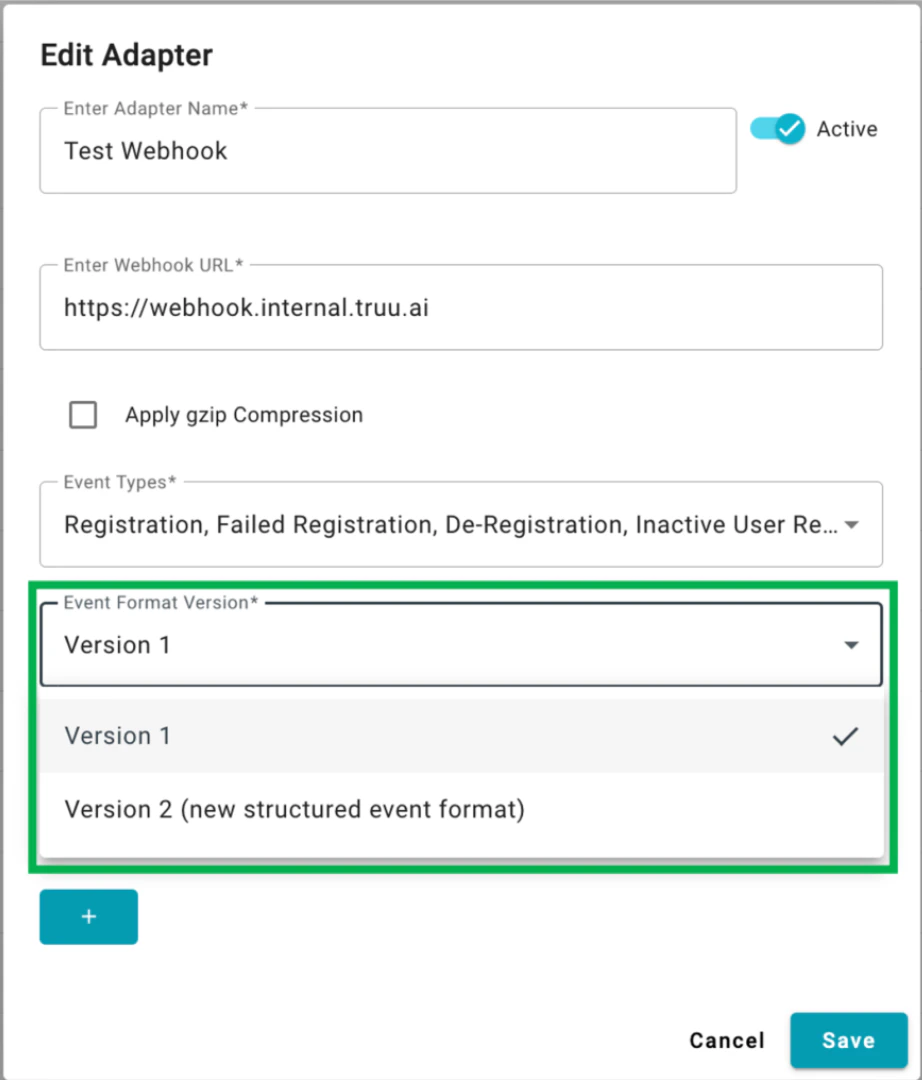
NOTE: To ensure backwards compatibility if customers have built automated processing of the data, we have not changed the data structure for existing Event Logging adapters. However, customers can change that by editing the existing Adapters and choosing the “Version 2 (new structured event format)”. New adapters added in the future will only support the Version 2 format.
In addition, when extracting the Event data (either by sending a report from the Events page, or through one of the Event Logging Adapters), the format of the data now includes the expanded data that is available in the Events table.
NOTE: To ensure backwards compatibility if customers have built automated processing of the data, we have not changed the data structure for existing Event Logging adapters. However, customers can change that by editing the existing Adapters and choosing the “Version 2 (new structured event format)”. New adapters added in the future will only support the Version 2 format.
 ***
[PACS Adapter](/docs/self-managed-pacs-adapter)
[Webhook Event Logging Adapter Setup Guide](/docs/copy-of-s3-event-logging-adapter-setup-guide)
***
[PACS Adapter](/docs/self-managed-pacs-adapter)
[Webhook Event Logging Adapter Setup Guide](/docs/copy-of-s3-event-logging-adapter-setup-guide)