> ## Documentation Index
> Fetch the complete documentation index at: https://docs.truu.ai/llms.txt
> Use this file to discover all available pages before exploring further.
# Configure the Self-Service Password Reset URL for WA
> The Windows Authenticator can be configured to direct users to a Self-Service password reset link url in WA version 25.3.2 or higher version.
1. Login with the TruU Passwordless Sign-in.
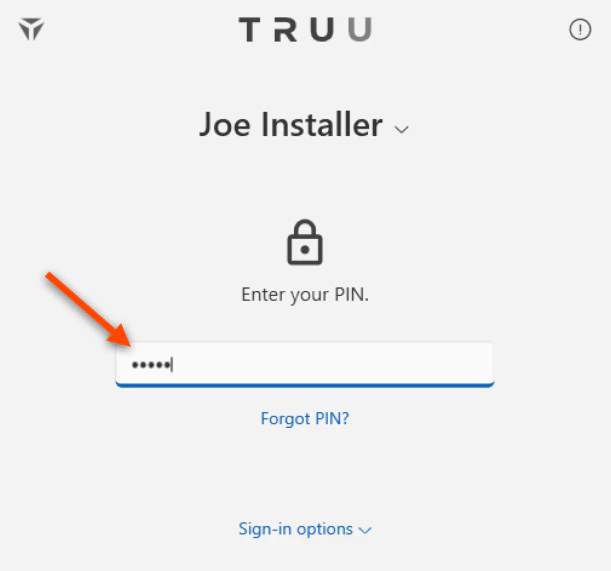
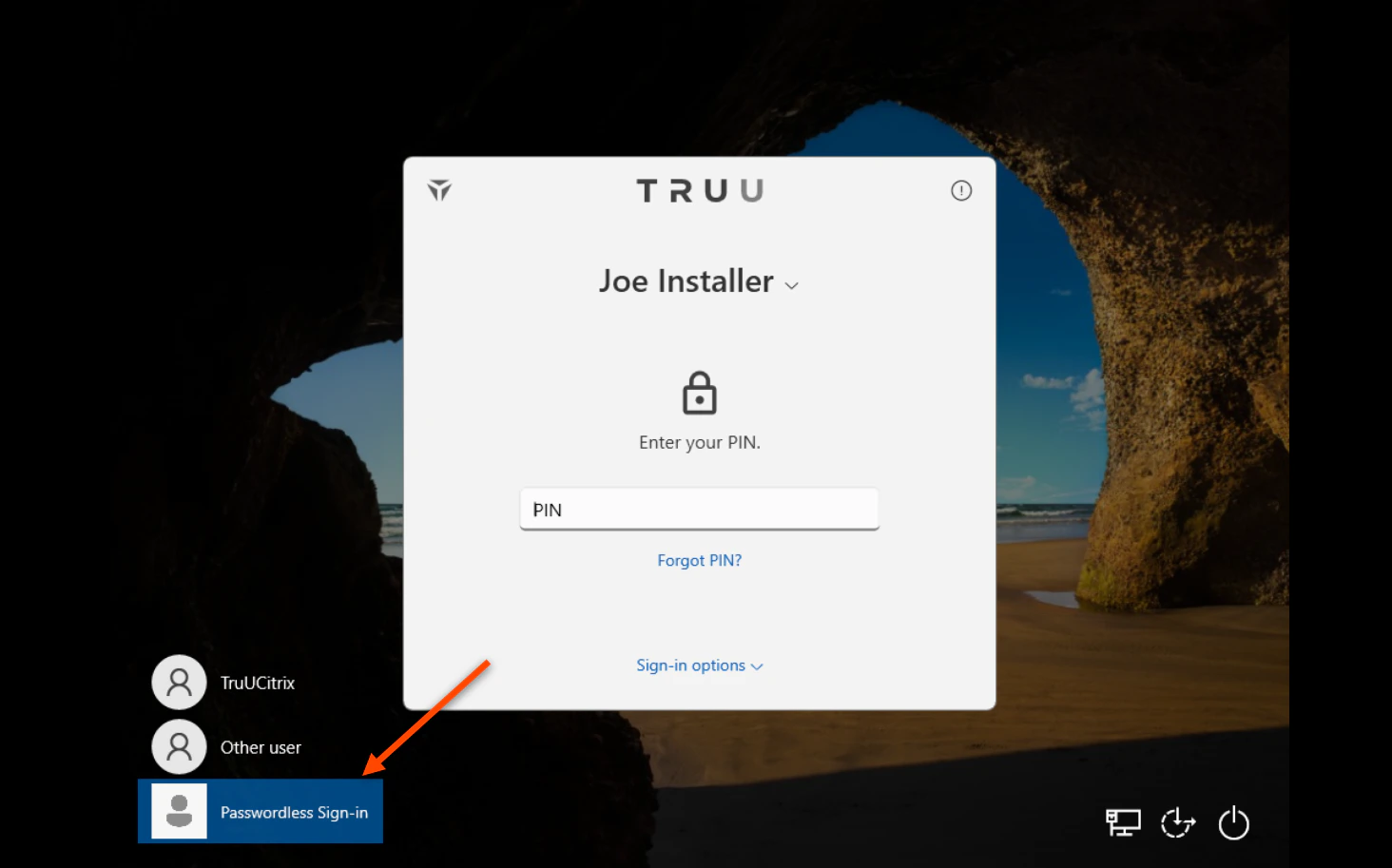 2. Enter your TruU PIN (or scan your registered biometrics).
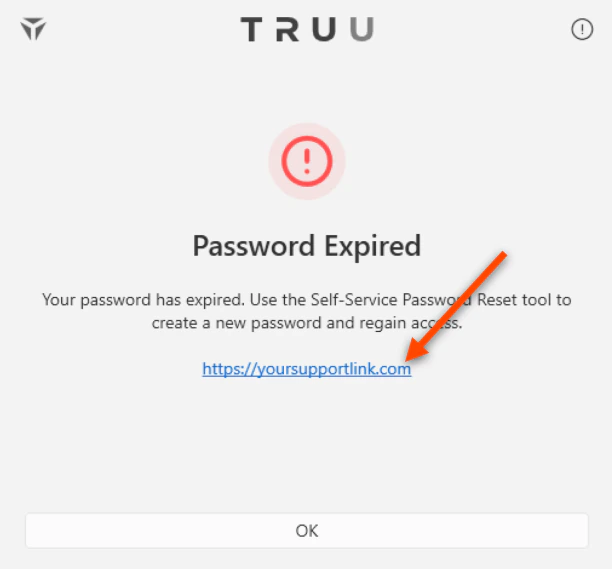
 3. Below shows the **Password Expired** dialog when a user's password has expired. Click the link initiate the password reset process.
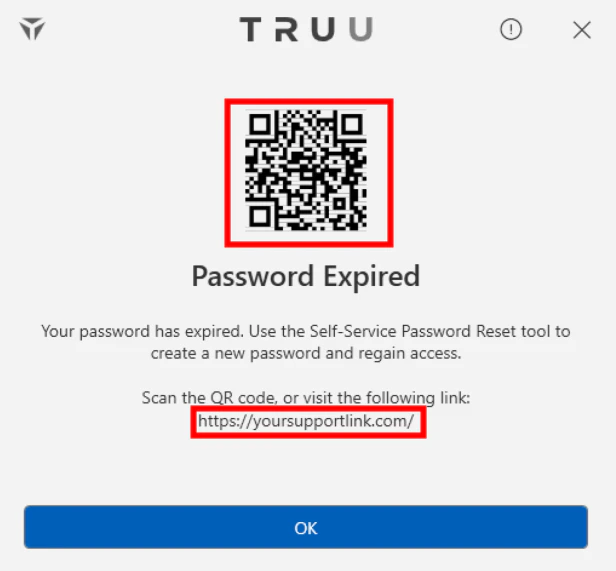
 4. You will be directed to the following screen. Use your mobile device to either scan the QR code presented on the screen (which will direct you to your company's password reset link) **OR** manually enter the link and complete the password reset steps.
 5. Reset and login to your Windows workstation.
[YouTube embed](//cdn.embedly.com/widgets/media.html?src=https%3A%2F%2Fwww.youtube.com%2Fembed%2Ff2B_TDPWtJU%3Ffeature%3Doembed\&display_name=YouTube\&url=https%3A%2F%2Fwww.youtube.com%2Fwatch%3Fv%3Df2B_TDPWtJU\&image=https%3A%2F%2Fi.ytimg.com%2Fvi%2Ff2B_TDPWtJU%2Fhqdefault.jpg\&type=text%2Fhtml\&schema=youtube)
# For the Admin, this is Configurable by Config File
1. The admin must set the custom service desk URL in the config file prior to deploying the TruU Windows Desktop agent. In the application.config file, ensure that you add the following values:
```
```
5. Reset and login to your Windows workstation.
[YouTube embed](//cdn.embedly.com/widgets/media.html?src=https%3A%2F%2Fwww.youtube.com%2Fembed%2Ff2B_TDPWtJU%3Ffeature%3Doembed\&display_name=YouTube\&url=https%3A%2F%2Fwww.youtube.com%2Fwatch%3Fv%3Df2B_TDPWtJU\&image=https%3A%2F%2Fi.ytimg.com%2Fvi%2Ff2B_TDPWtJU%2Fhqdefault.jpg\&type=text%2Fhtml\&schema=youtube)
# For the Admin, this is Configurable by Config File
1. The admin must set the custom service desk URL in the config file prior to deploying the TruU Windows Desktop agent. In the application.config file, ensure that you add the following values:
```
```
 ### Registry key - For purposes of testing, a reg key can be set.
1. Find the TruU Credential Provider in the registry. Right-click and create a new string value and name it "ssprUrl" and then set the value to your self service URL.
```
Computer\HKEY_LOCAL_MACHINE\SOFTWARE\Microsoft\Windows\CurrentVersion\Authentication\Credential Providers\{5fd3d285-0dd9-4362-8855-e0abaacd4af6}
```
```
reg string value name = "sspUrl" and value = "yoursspurl.com"
```
2. **Restart the TruUService** in Services.msc.
***
[TruU's Interaction with External Cameras](/docs/external-camera-interaction)
[Network and Port Requirements](/docs/network-and-port-requirements)
### Registry key - For purposes of testing, a reg key can be set.
1. Find the TruU Credential Provider in the registry. Right-click and create a new string value and name it "ssprUrl" and then set the value to your self service URL.
```
Computer\HKEY_LOCAL_MACHINE\SOFTWARE\Microsoft\Windows\CurrentVersion\Authentication\Credential Providers\{5fd3d285-0dd9-4362-8855-e0abaacd4af6}
```
```
reg string value name = "sspUrl" and value = "yoursspurl.com"
```
2. **Restart the TruUService** in Services.msc.
***
[TruU's Interaction with External Cameras](/docs/external-camera-interaction)
[Network and Port Requirements](/docs/network-and-port-requirements)