> ## Documentation Index
> Fetch the complete documentation index at: https://docs.truu.ai/llms.txt
> Use this file to discover all available pages before exploring further.

# Frontline Access Login

> This is a step-by-step guide as to how a frontline access employee can possibly log in to their shared workstation

# Login with Badge+PIN

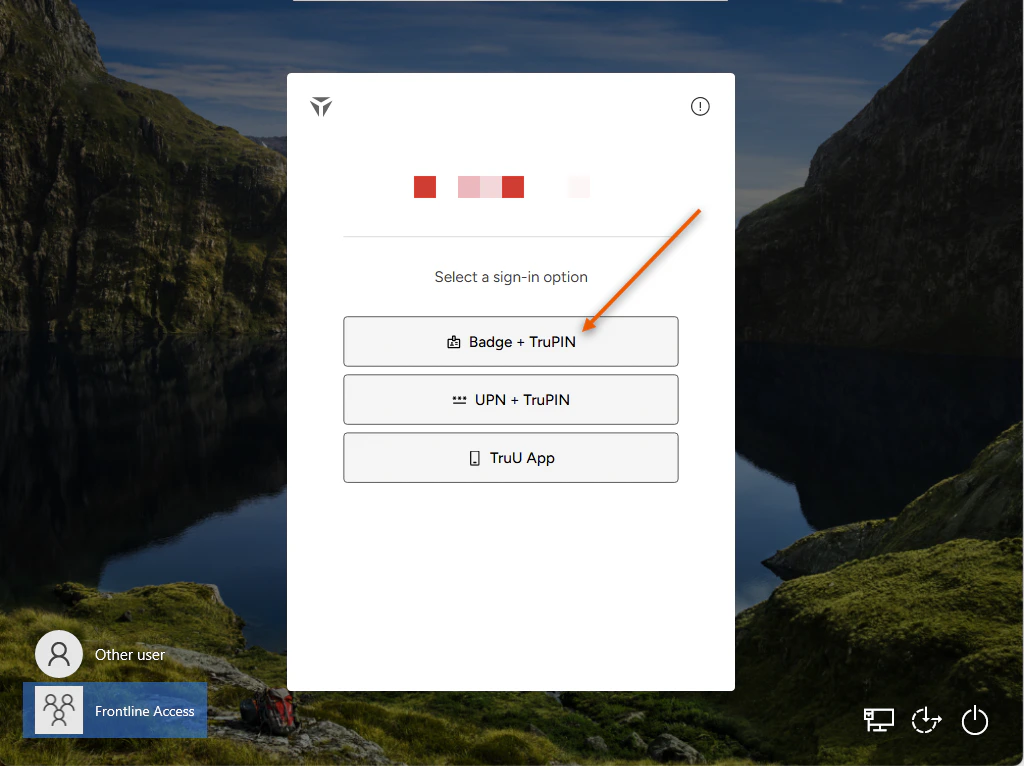
1. Select **Badge + TruPIN** as your Authentication method
<img src="https://mintcdn.com/truu-2/qCK1oWL4jNpZKJ8A/images/docs/914349a3250f931c143680aa08cdd25125abccaeac1a39f31838b25e56c55dc4-image.png?fit=max&auto=format&n=qCK1oWL4jNpZKJ8A&q=85&s=3762b2b1c979c31ff408057adc02a66c" alt="" width="1024" height="766" data-path="images/docs/914349a3250f931c143680aa08cdd25125abccaeac1a39f31838b25e56c55dc4-image.png" />

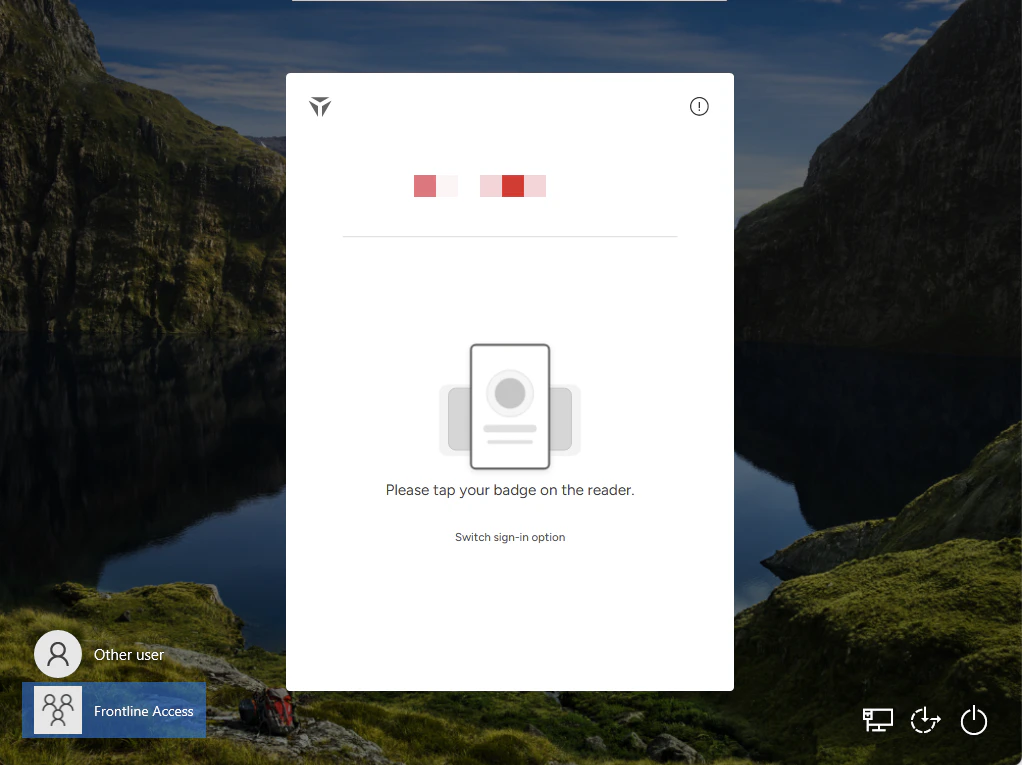
2. Tap your registered **Physical Badge** on the reader attached to the shared workstation
<img src="https://mintcdn.com/truu-2/L38yxuvvUa8uAW5I/images/docs/1cc8ed857a4208e4a10a2077c23209b4f78cb8e18e9b7dc81ac0ca3052edb020-image.png?fit=max&auto=format&n=L38yxuvvUa8uAW5I&q=85&s=dbe455e40448af9433ccac1ef440b10f" alt="" width="1022" height="765" data-path="images/docs/1cc8ed857a4208e4a10a2077c23209b4f78cb8e18e9b7dc81ac0ca3052edb020-image.png" />

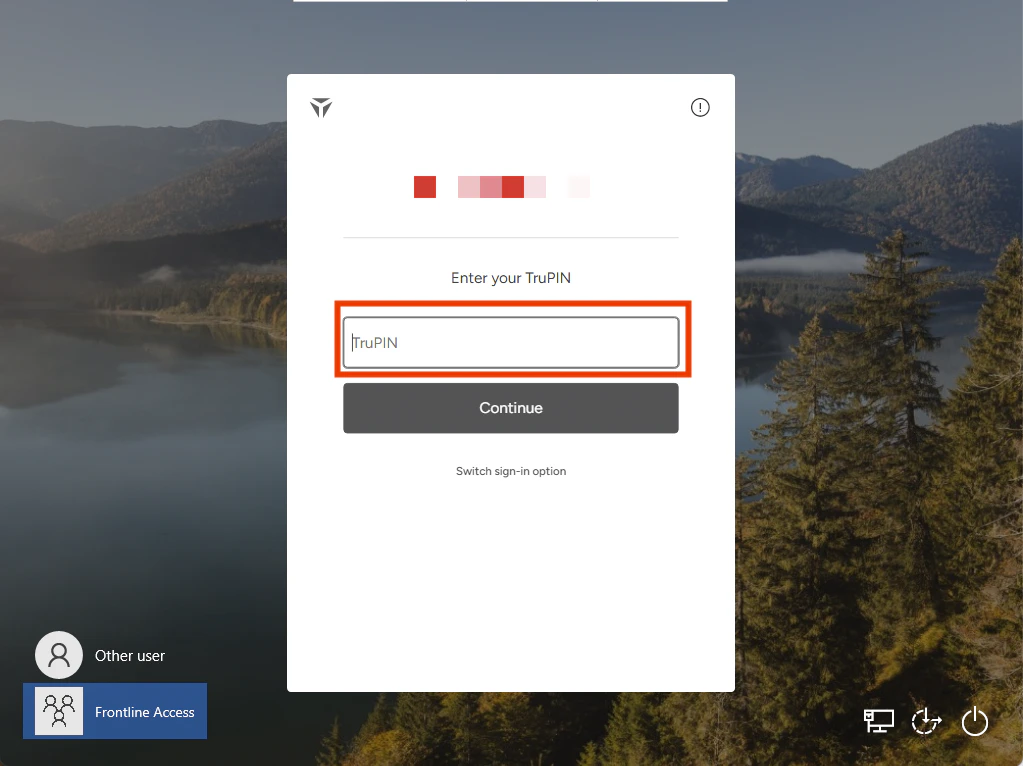
3. Enter the **TruPIN** that you created upon enrollment. Then, click **Continue**
<img src="https://mintcdn.com/truu-2/L38yxuvvUa8uAW5I/images/docs/0feb0410197837b46a24486efe699697285d129adbf4a6eceaee70590d542d1c-image.png?fit=max&auto=format&n=L38yxuvvUa8uAW5I&q=85&s=5e47f356885f9135599db5b815e929b1" alt="" width="1023" height="766" data-path="images/docs/0feb0410197837b46a24486efe699697285d129adbf4a6eceaee70590d542d1c-image.png" />

4. You will be launched into your session

# Login with your UPN + TruPIN

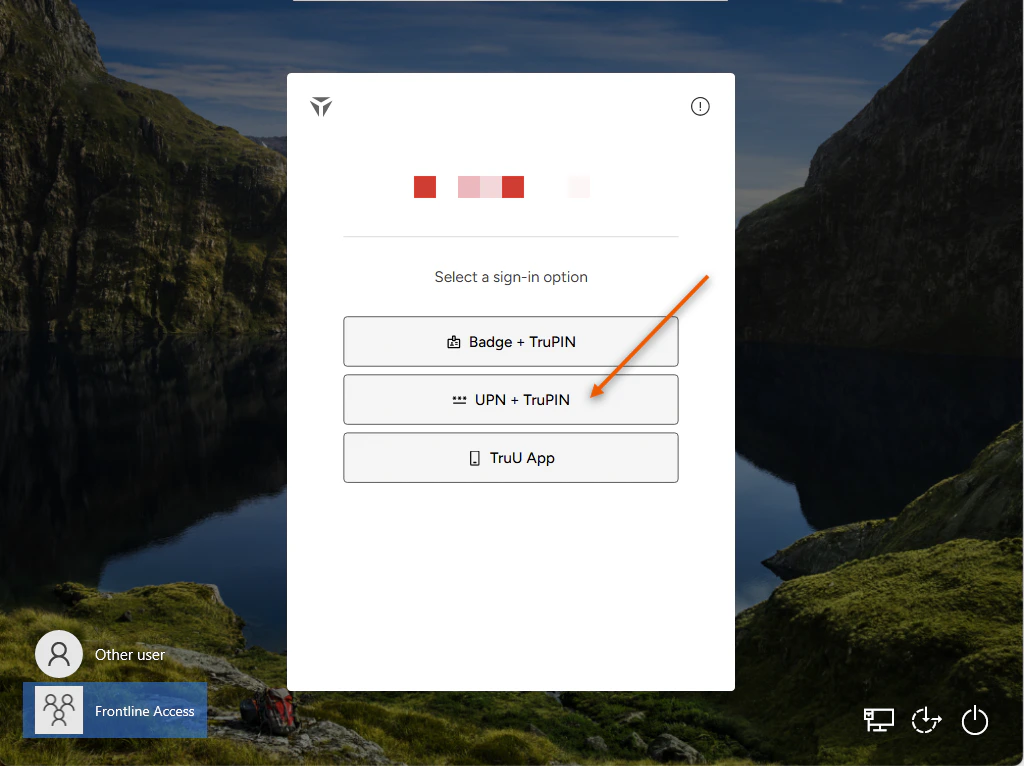
1. Select **UPN + TruPIN** as your Authentication method
<img src="https://mintcdn.com/truu-2/L38yxuvvUa8uAW5I/images/docs/072ac13e3f5f7c226fa9759c8cbcd276a7e96b0a531bdad4560ced78fa5ec538-image.png?fit=max&auto=format&n=L38yxuvvUa8uAW5I&q=85&s=ed28f0d837433831c96fd7e5f2df40b6" alt="" width="1024" height="766" data-path="images/docs/072ac13e3f5f7c226fa9759c8cbcd276a7e96b0a531bdad4560ced78fa5ec538-image.png" />

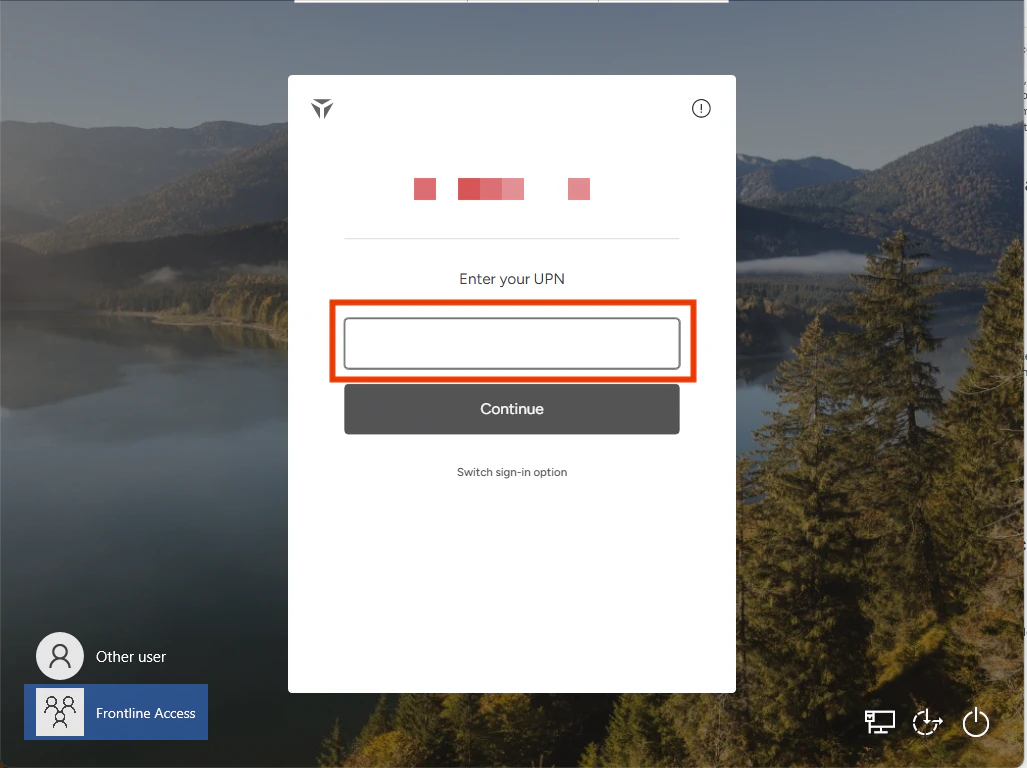
2. Enter your **User Principle Name** in the designated text box
<img src="https://mintcdn.com/truu-2/rjjBxA7Z_Wk_-34G/images/docs/e3ee3f7517939bc6f0f910d9b9bae8da521ebb676452e34d104f3a3b1ba6bb04-image.png?fit=max&auto=format&n=rjjBxA7Z_Wk_-34G&q=85&s=39f95e2307fec5ed88186450498702b6" alt="" width="1027" height="768" data-path="images/docs/e3ee3f7517939bc6f0f910d9b9bae8da521ebb676452e34d104f3a3b1ba6bb04-image.png" />

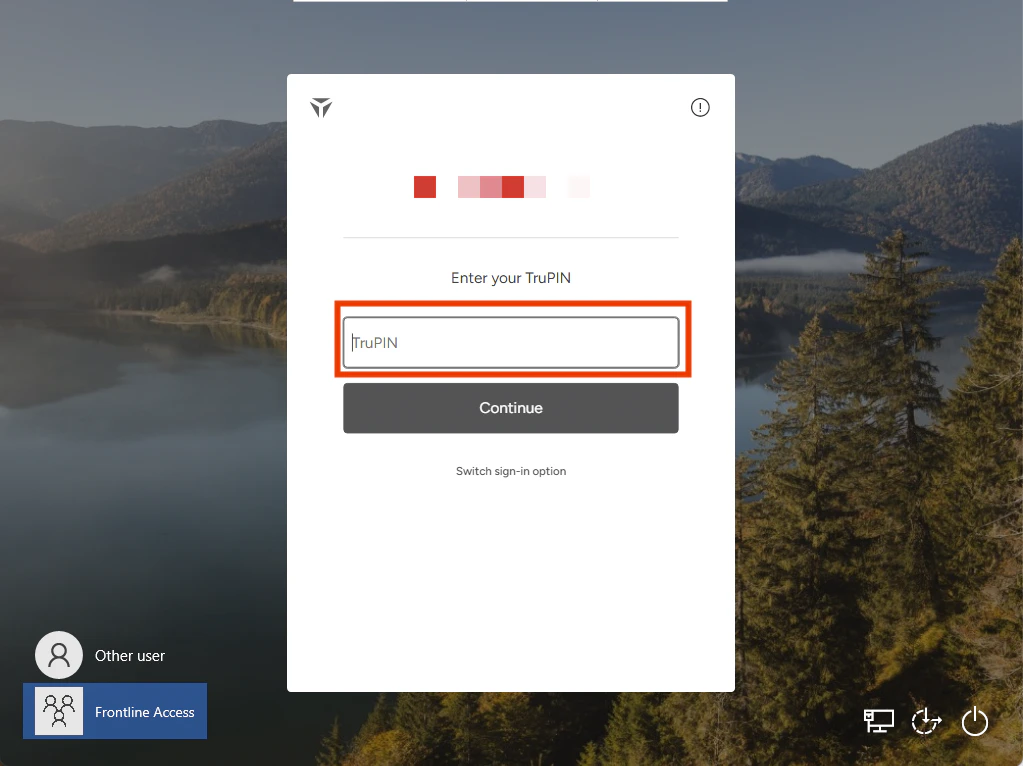
3. Enter the **TruPIN** that you created upon enrollment. Then, click **Continue**
<img src="https://mintcdn.com/truu-2/m22YLP0oXSNG0U3O/images/docs/7cfff8454992f971c1dd53a110f91b149b96868ed0580ad52c4c6523c6a88904-image.png?fit=max&auto=format&n=m22YLP0oXSNG0U3O&q=85&s=82150d05c07b7dea368f885d1ff4410d" alt="" width="1023" height="766" data-path="images/docs/7cfff8454992f971c1dd53a110f91b149b96868ed0580ad52c4c6523c6a88904-image.png" />

4. You will be launched into your session

# Login with your TruU Mobile Authenticator

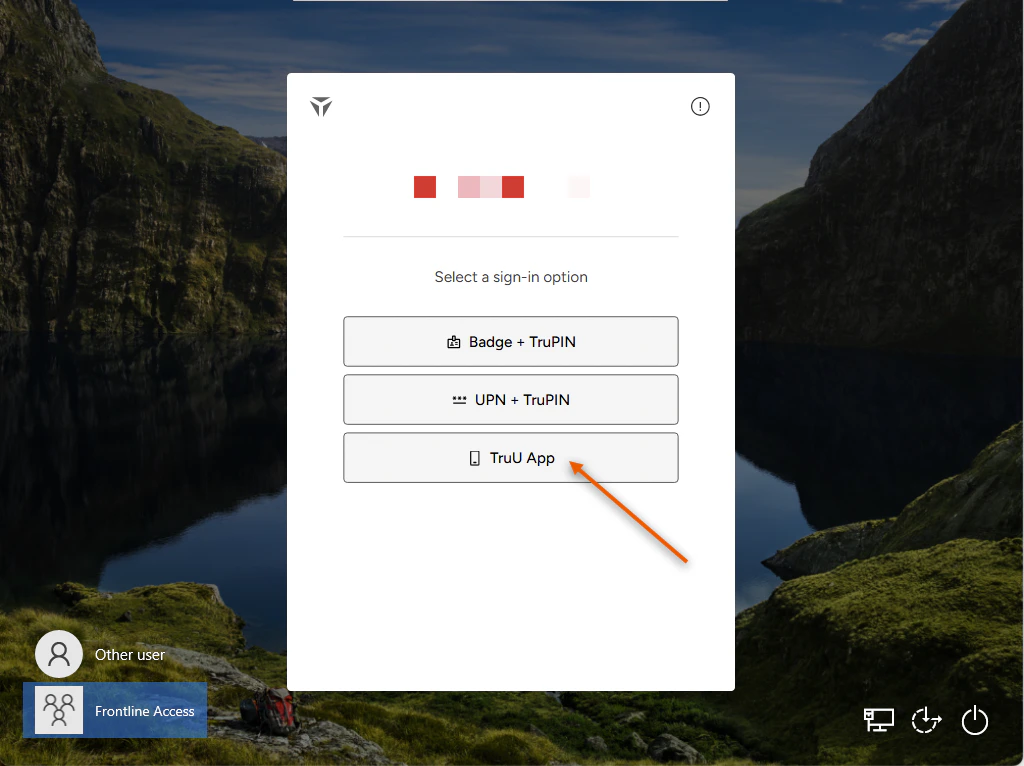
1. Select **TruU App** as your Authentication method
<img src="https://mintcdn.com/truu-2/E6hYbyLPrBHWbQ3m/images/docs/c135896306252c83b26714b7eb79dd17c991d13913e8a9ad8cd03e3e69dfa14e-image.png?fit=max&auto=format&n=E6hYbyLPrBHWbQ3m&q=85&s=1fda6fa792f8bd084db020da0fd355b7" alt="" width="1024" height="766" data-path="images/docs/c135896306252c83b26714b7eb79dd17c991d13913e8a9ad8cd03e3e69dfa14e-image.png" />

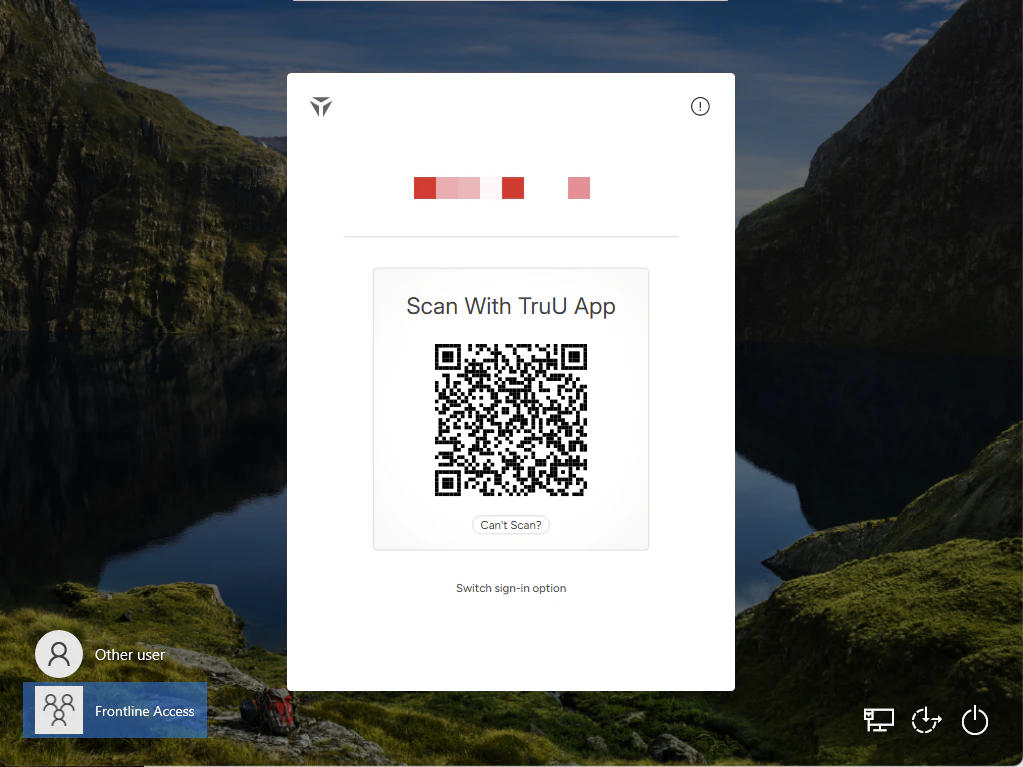
2. On your **TruU Mobile Authenticator**, either scan the presented **QR Code** or enter the generated **Access Code** in the box below
<img src="https://mintcdn.com/truu-2/YlfY4z_3_-uDkBaP/images/docs/4843663dae6b3aab466a26b4e1167db9ab909c10e60ec2951df8d68bf0a18207-image.png?fit=max&auto=format&n=YlfY4z_3_-uDkBaP&q=85&s=3e12177f0d8cf77010e03f02c0bb9a64" width="1023" height="767" data-path="images/docs/4843663dae6b3aab466a26b4e1167db9ab909c10e60ec2951df8d68bf0a18207-image.png" />

<img src="https://mintcdn.com/truu-2/jMF4bYA9yOA_2TKv/images/docs/332cf2da33a42f0ad9a1fb3c09ab3359b3edc98e085a35a00acfd289a904f3e4-image.png?fit=max&auto=format&n=jMF4bYA9yOA_2TKv&q=85&s=9e40a3dad15c0b533e607c94f2fac13b" width="1022" height="765" data-path="images/docs/332cf2da33a42f0ad9a1fb3c09ab3359b3edc98e085a35a00acfd289a904f3e4-image.png" />

3. You will be launched into your session

***

[Frontline Access Enrollment](/docs/frontline-access-enrollment)

[Submitting Logs - Shared Workstation](/docs/submitting-logs-shared-workstation)
