> ## Documentation Index
> Fetch the complete documentation index at: https://docs.truu.ai/llms.txt
> Use this file to discover all available pages before exploring further.
# Submitting Logs - macOS
> See an issue? Share your experience with the TruU support team! In this guide, we'll explore the process of creating a report that compiles desktop logs. These reports are essential for the TruU team, aiding them in troubleshooting and enhancing the your experience.
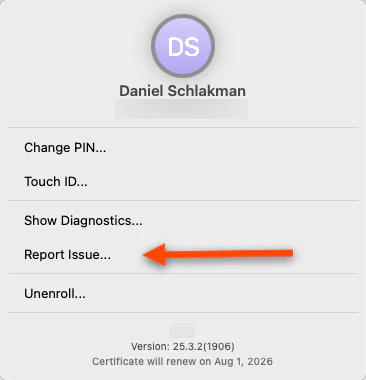
1. Click on **TruU** on the top right of your toolbar
 2. Click **Report Issue**
 3. Click the **Generate Report** button
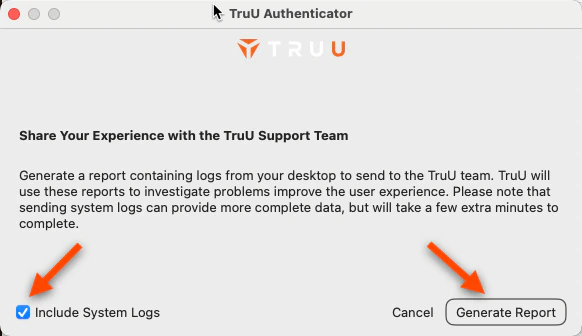 **NOTE**: Always ensure that "System Logs" are included. That way, support will be able to better assist in the discovery process
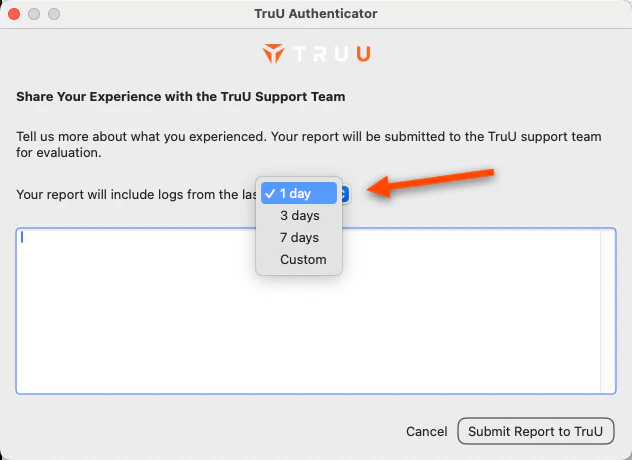
4. Include logs from the days you noticed an issue to capture accurate data
**NOTE**: Always ensure that "System Logs" are included. That way, support will be able to better assist in the discovery process
4. Include logs from the days you noticed an issue to capture accurate data
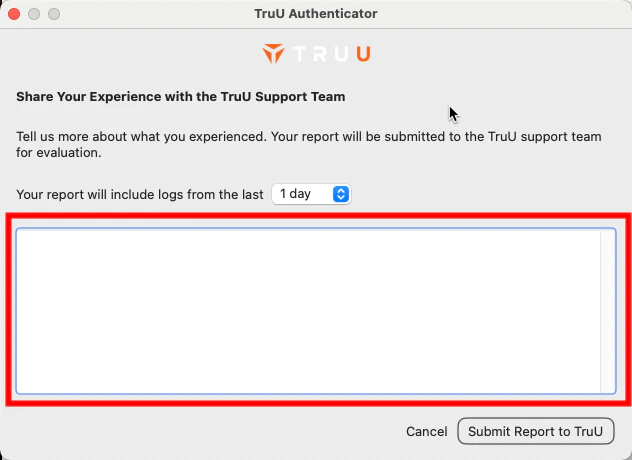
 5. Please provide a detailed description of the problem you encountered in the text box below
 ### Unsure about what to write?
It would greatly assist our support team if you could provide the following information:
1. A concise description of the issue.
2. The timestamp when the issue occurred.
3. Details on whether the issue can be reproduced.
4. The type of device you are using.
5. The version of your operating system.
***
[Passwordless Login to Apps - Mac](/docs/passwordless-login-to-apps-mac)
[Change PIN - Mac](/docs/change-pin-mac)
### Unsure about what to write?
It would greatly assist our support team if you could provide the following information:
1. A concise description of the issue.
2. The timestamp when the issue occurred.
3. Details on whether the issue can be reproduced.
4. The type of device you are using.
5. The version of your operating system.
***
[Passwordless Login to Apps - Mac](/docs/passwordless-login-to-apps-mac)
[Change PIN - Mac](/docs/change-pin-mac)