> ## Documentation Index
> Fetch the complete documentation index at: https://docs.truu.ai/llms.txt
> Use this file to discover all available pages before exploring further.

# TruU User Portal SSO - Entra

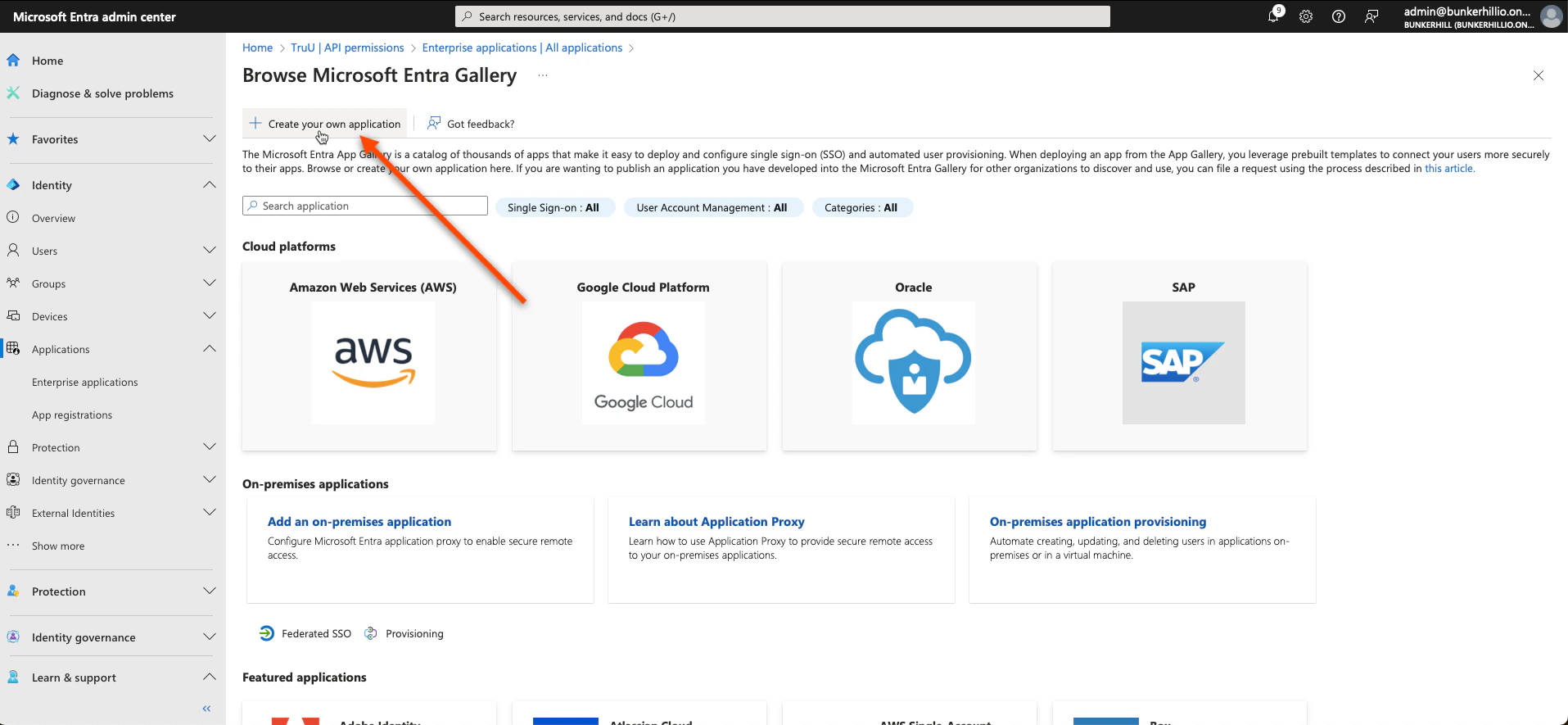
1. For the User Portal, navigate to the Entra ID admin center. Click **Enterprise Applications** under the *"Applications"* tab on and follow the picture prompted steps below.
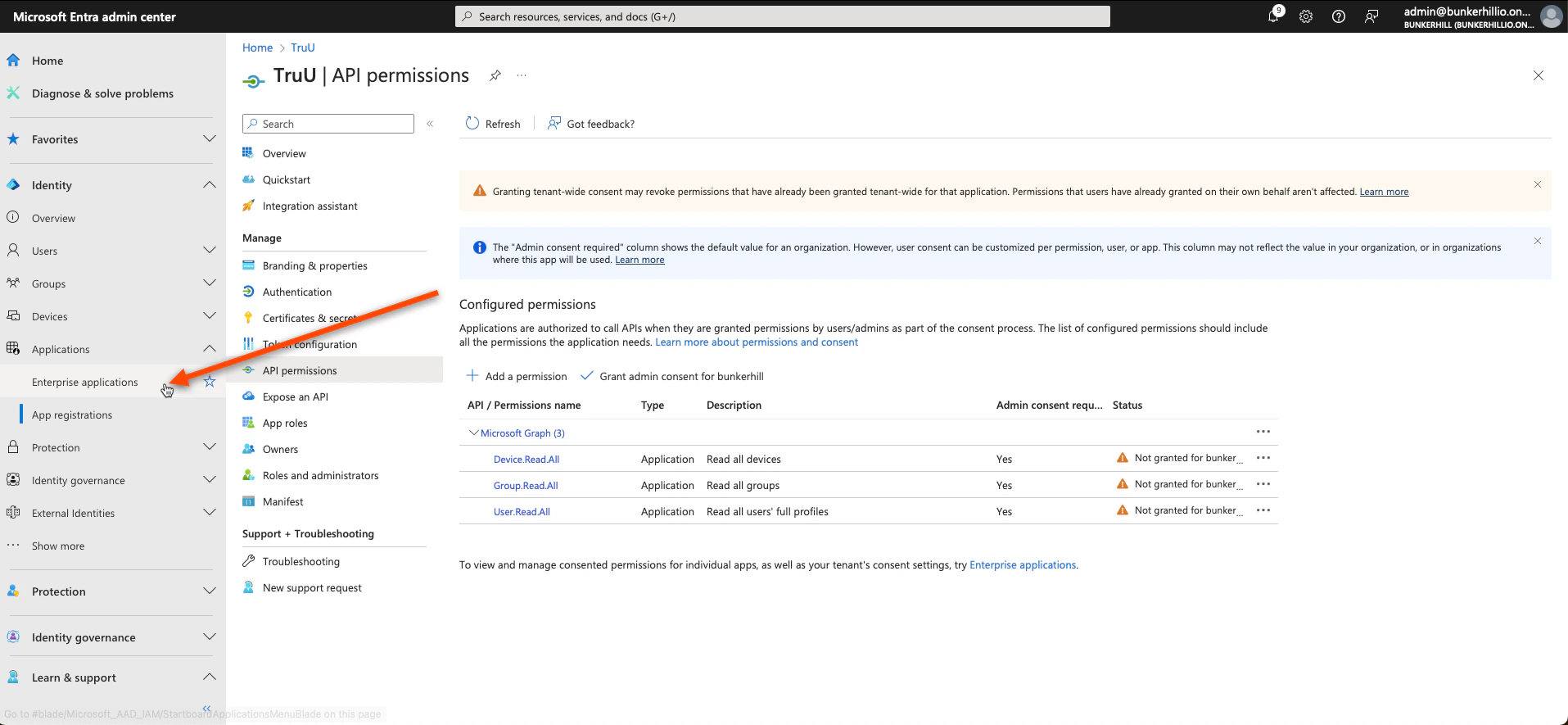
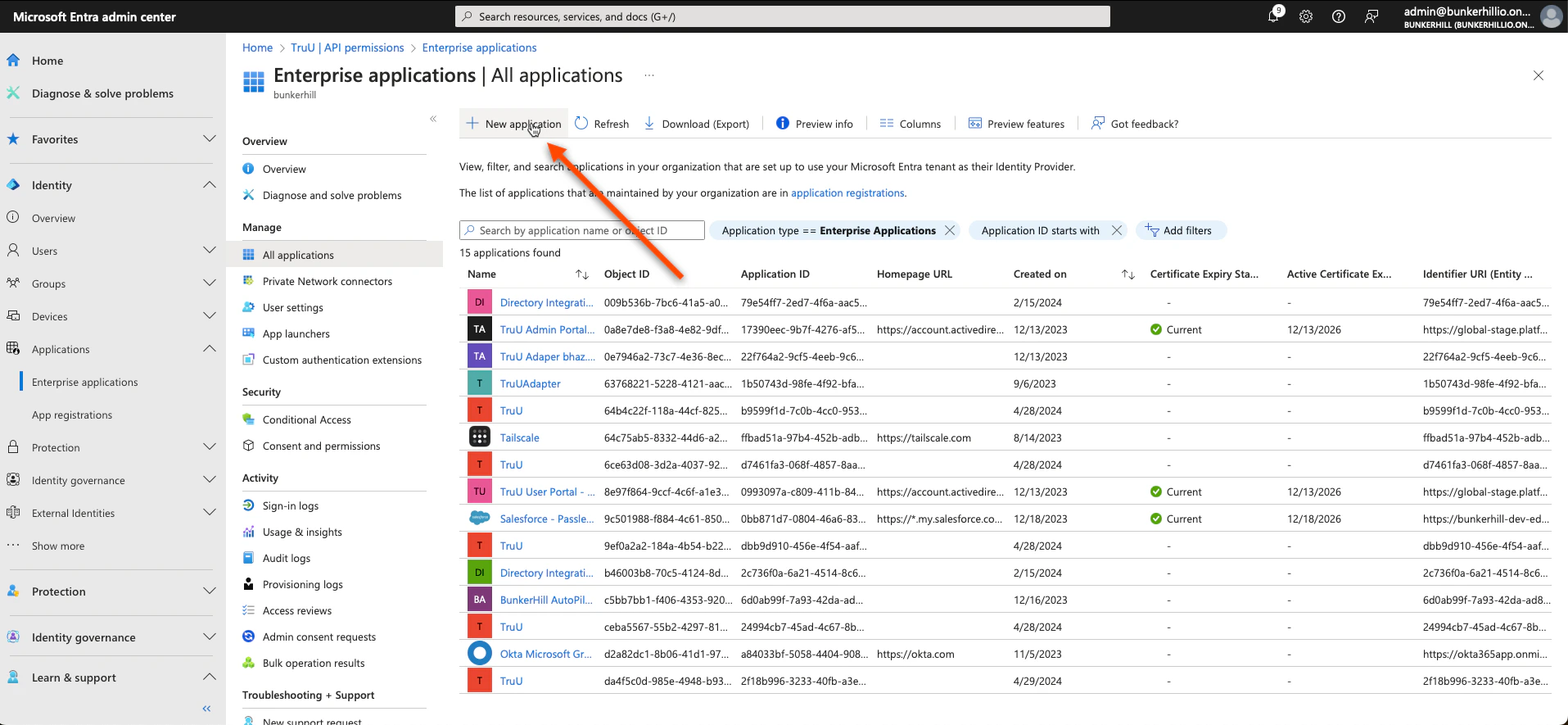
<img src="https://mintcdn.com/truu-2/jJ0QGEHfTe0CfrEY/images/docs/a8cfe83b-31f5-4a65-a045-f9a5073b0415/c86baeb9-9952-4d56-a9f2-607ab56d8048/de50b27f-4bd4-43fb-a188-527eff868b73/images/4ceb9fa1-1b77-440b-8eca-582539c46ce1.png?fit=max&auto=format&n=jJ0QGEHfTe0CfrEY&q=85&s=7fa401aaefbaa37cbc4fb6c17340b5ba" alt="" width="1915" height="885" data-path="images/docs/a8cfe83b-31f5-4a65-a045-f9a5073b0415/c86baeb9-9952-4d56-a9f2-607ab56d8048/de50b27f-4bd4-43fb-a188-527eff868b73/images/4ceb9fa1-1b77-440b-8eca-582539c46ce1.png" />

<img src="https://mintcdn.com/truu-2/jJ0QGEHfTe0CfrEY/images/docs/a8cfe83b-31f5-4a65-a045-f9a5073b0415/c86baeb9-9952-4d56-a9f2-607ab56d8048/de50b27f-4bd4-43fb-a188-527eff868b73/images/3cf4fc81-0ead-439f-a421-e5b78b5548a4.png?fit=max&auto=format&n=jJ0QGEHfTe0CfrEY&q=85&s=51aabf08c46f87b38d9f071119418664" alt="" width="1915" height="885" data-path="images/docs/a8cfe83b-31f5-4a65-a045-f9a5073b0415/c86baeb9-9952-4d56-a9f2-607ab56d8048/de50b27f-4bd4-43fb-a188-527eff868b73/images/3cf4fc81-0ead-439f-a421-e5b78b5548a4.png" />

<img src="https://mintcdn.com/truu-2/jJ0QGEHfTe0CfrEY/images/docs/a8cfe83b-31f5-4a65-a045-f9a5073b0415/c86baeb9-9952-4d56-a9f2-607ab56d8048/de50b27f-4bd4-43fb-a188-527eff868b73/images/33f7036f-a17f-408d-bf06-30da56de05b0.png?fit=max&auto=format&n=jJ0QGEHfTe0CfrEY&q=85&s=30ab11e0a6e3a8eada3016070473b217" alt="" width="1915" height="885" data-path="images/docs/a8cfe83b-31f5-4a65-a045-f9a5073b0415/c86baeb9-9952-4d56-a9f2-607ab56d8048/de50b27f-4bd4-43fb-a188-527eff868b73/images/33f7036f-a17f-408d-bf06-30da56de05b0.png" />

2. Name this ***TruU User Portal***\*.\*
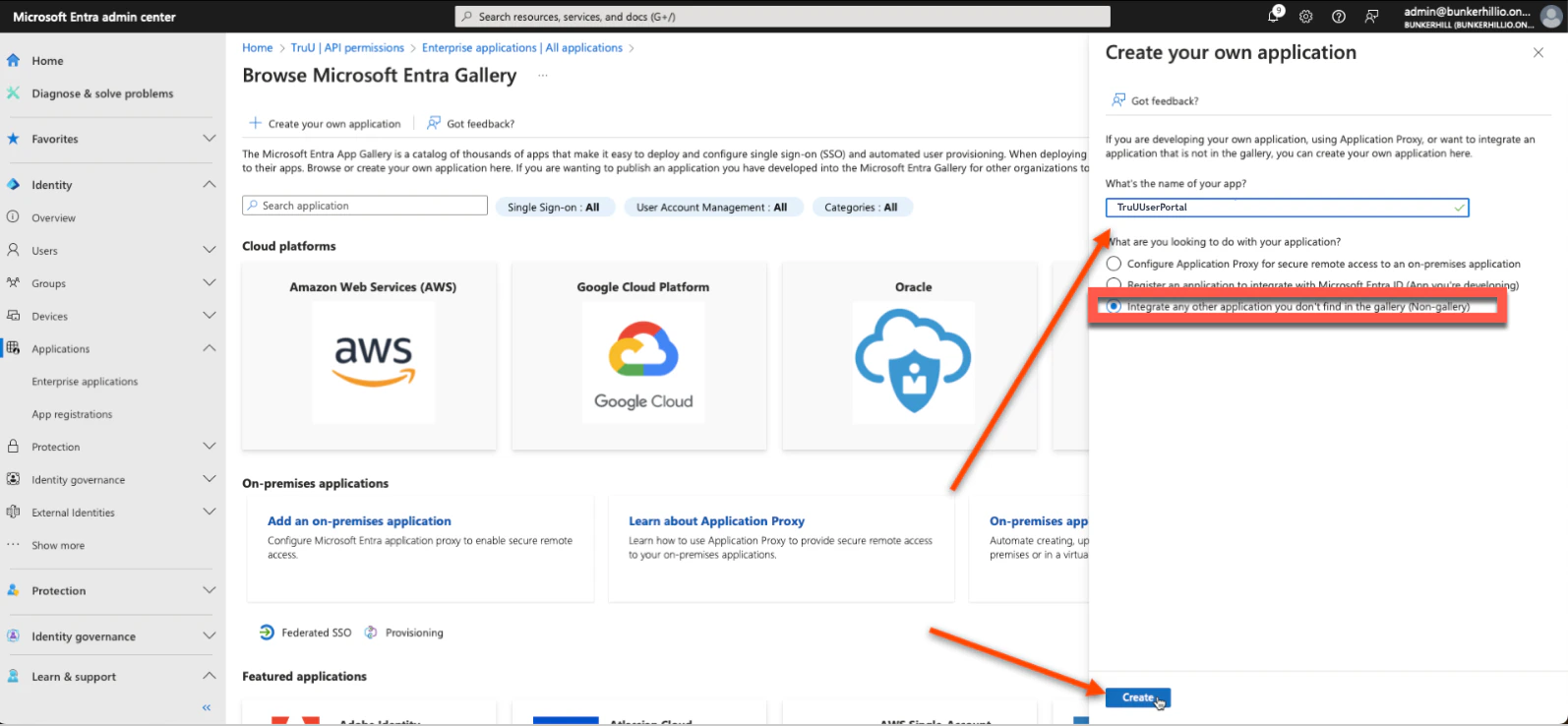
<img src="https://mintcdn.com/truu-2/jMF4bYA9yOA_2TKv/images/docs/2611189-image.png?fit=max&auto=format&n=jMF4bYA9yOA_2TKv&q=85&s=4e1ae8b07d0c901ac2c84f172b43f80a" alt="" width="1594" height="738" data-path="images/docs/2611189-image.png" />

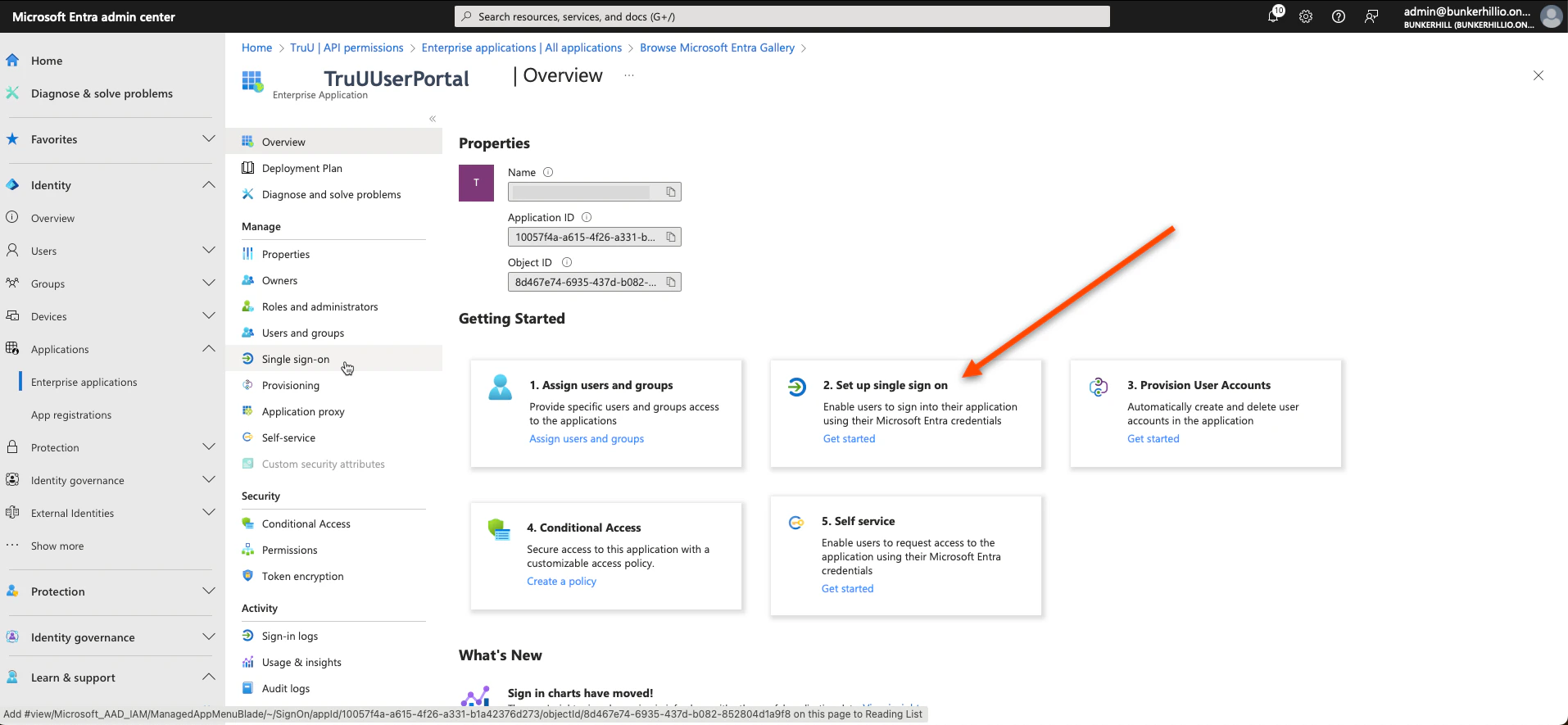
3. Select **Single Sign-on.**

<img src="https://mintcdn.com/truu-2/YlfY4z_3_-uDkBaP/images/docs/4a1a489-image.png?fit=max&auto=format&n=YlfY4z_3_-uDkBaP&q=85&s=d55c4b70aed91a60feef706c8c9a3af0" alt="" width="1914" height="885" data-path="images/docs/4a1a489-image.png" />

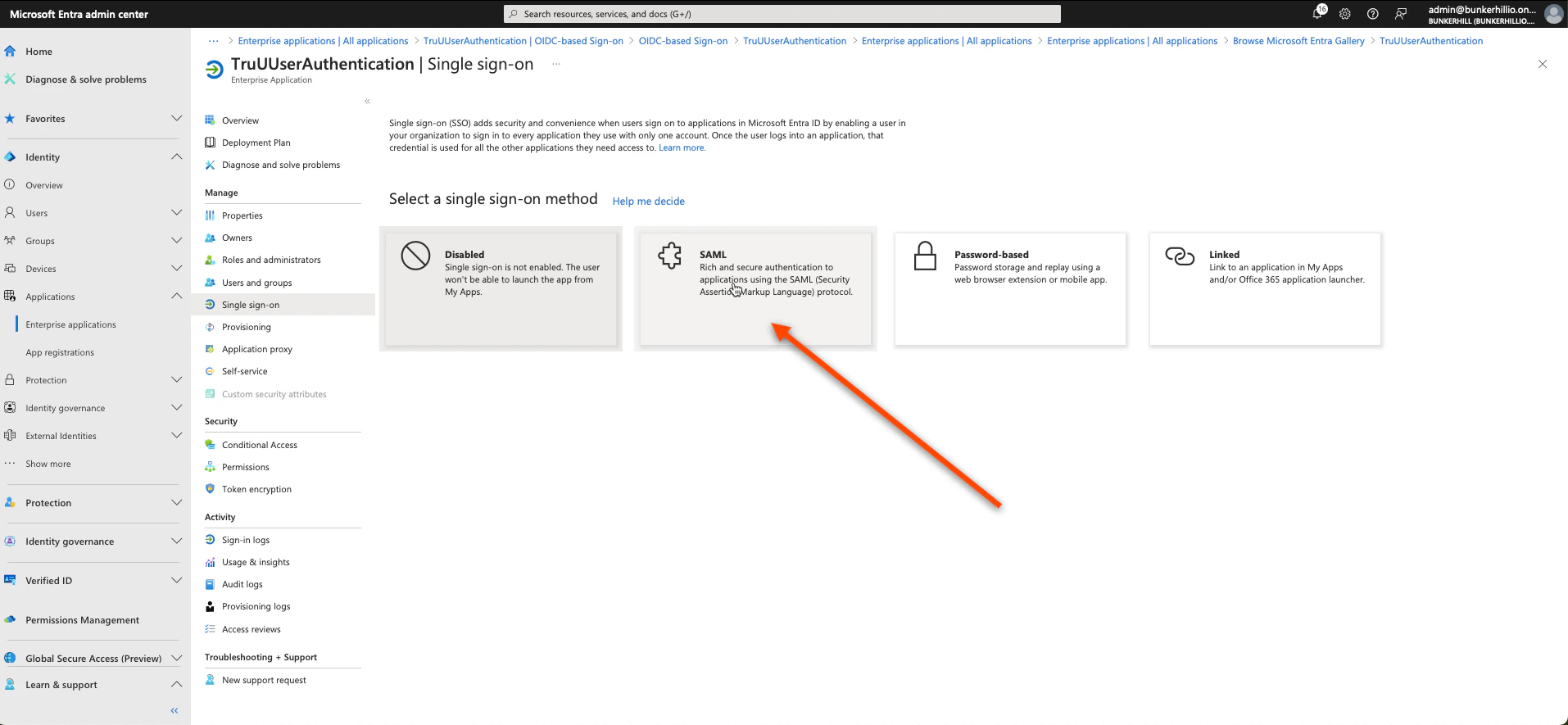
4. Select **SAML.**

<img src="https://mintcdn.com/truu-2/jJ0QGEHfTe0CfrEY/images/docs/a8cfe83b-31f5-4a65-a045-f9a5073b0415/c86baeb9-9952-4d56-a9f2-607ab56d8048/de50b27f-4bd4-43fb-a188-527eff868b73/images/babd79d0-b7af-48ae-845d-ec5a2cb4dfcf.png?fit=max&auto=format&n=jJ0QGEHfTe0CfrEY&q=85&s=fb5e5097a238a033159dbe2552c0af06" alt="" width="1914" height="885" data-path="images/docs/a8cfe83b-31f5-4a65-a045-f9a5073b0415/c86baeb9-9952-4d56-a9f2-607ab56d8048/de50b27f-4bd4-43fb-a188-527eff868b73/images/babd79d0-b7af-48ae-845d-ec5a2cb4dfcf.png" />

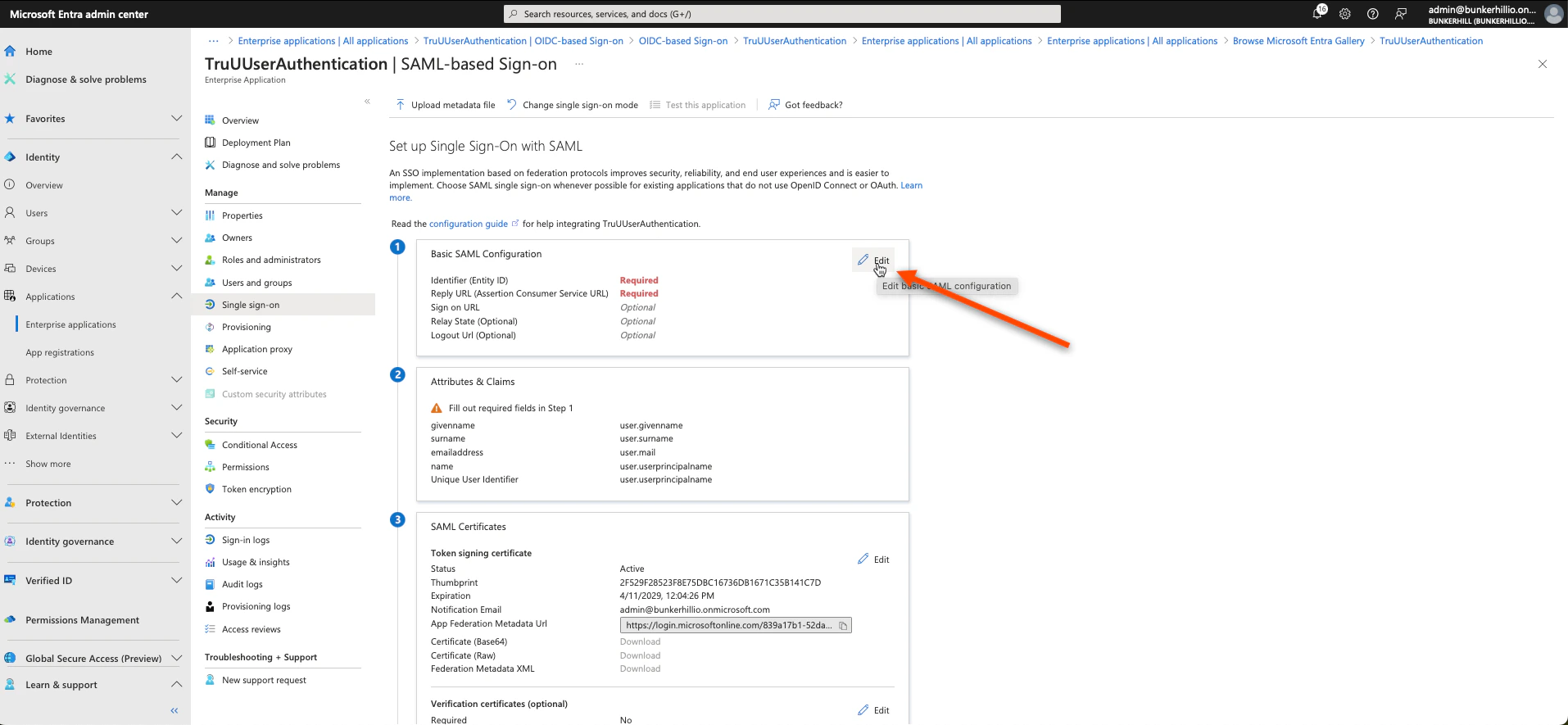
5. Click **Edit** on the first box.

<img src="https://mintcdn.com/truu-2/ehCBQgFdl_pQd0MN/images/docs/adeb955-image.png?fit=max&auto=format&n=ehCBQgFdl_pQd0MN&q=85&s=2b38fbbf688210374b4790469c3315d8" alt="" width="1914" height="885" data-path="images/docs/adeb955-image.png" />

6. Click **Add Identifier** and **Add Reply URL** and follow the steps below to get the values you need.
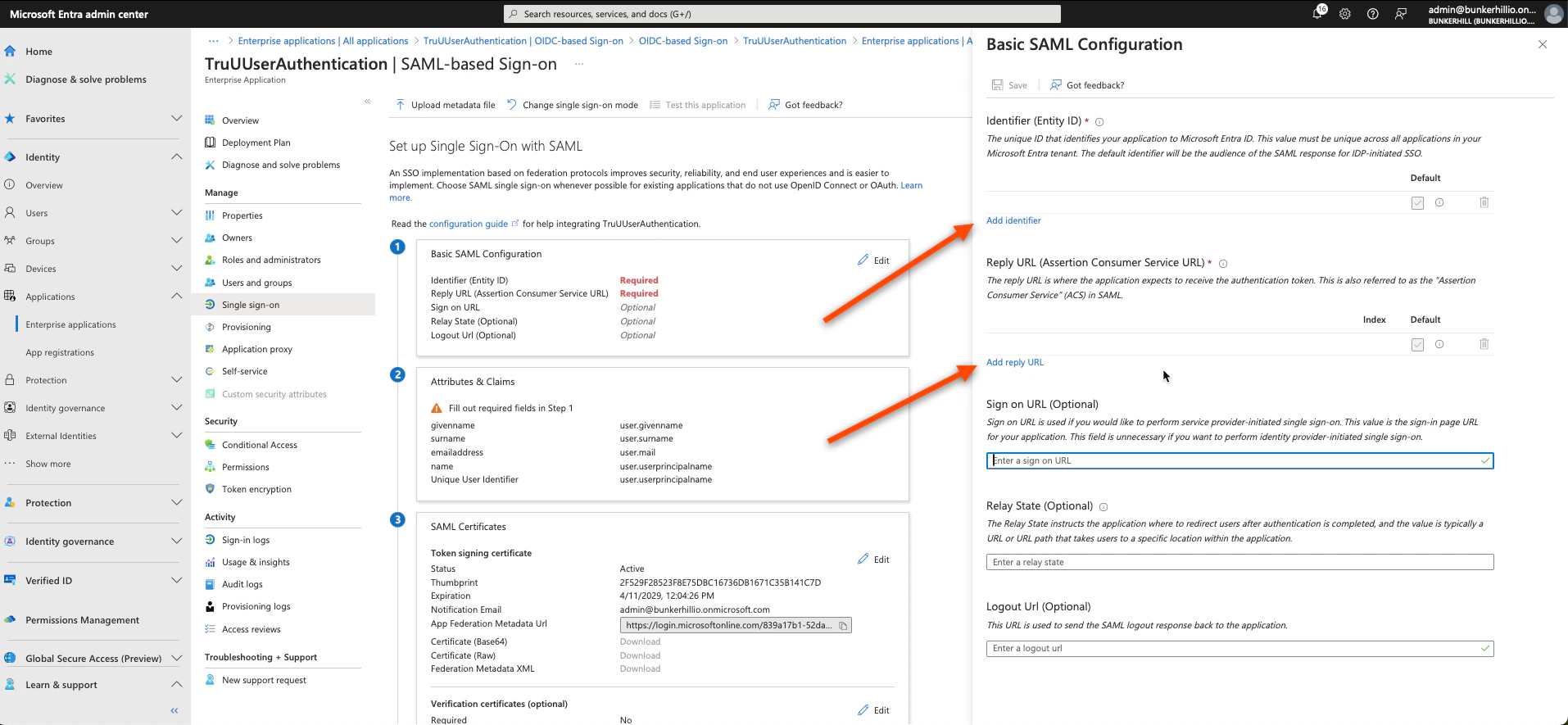
<img src="https://mintcdn.com/truu-2/jJ0QGEHfTe0CfrEY/images/docs/a8cfe83b-31f5-4a65-a045-f9a5073b0415/c86baeb9-9952-4d56-a9f2-607ab56d8048/de50b27f-4bd4-43fb-a188-527eff868b73/images/88d35011-9cbf-45bd-a7cc-92c31475aa28.png?fit=max&auto=format&n=jJ0QGEHfTe0CfrEY&q=85&s=2a8d5f2250c26568076df7f4b6f47102" alt="" width="1914" height="885" data-path="images/docs/a8cfe83b-31f5-4a65-a045-f9a5073b0415/c86baeb9-9952-4d56-a9f2-607ab56d8048/de50b27f-4bd4-43fb-a188-527eff868b73/images/88d35011-9cbf-45bd-a7cc-92c31475aa28.png" />

7. We are interested in the "User Portal SP Metadata" links. Follow the pictures below to copy the required information to the Entra ID console.
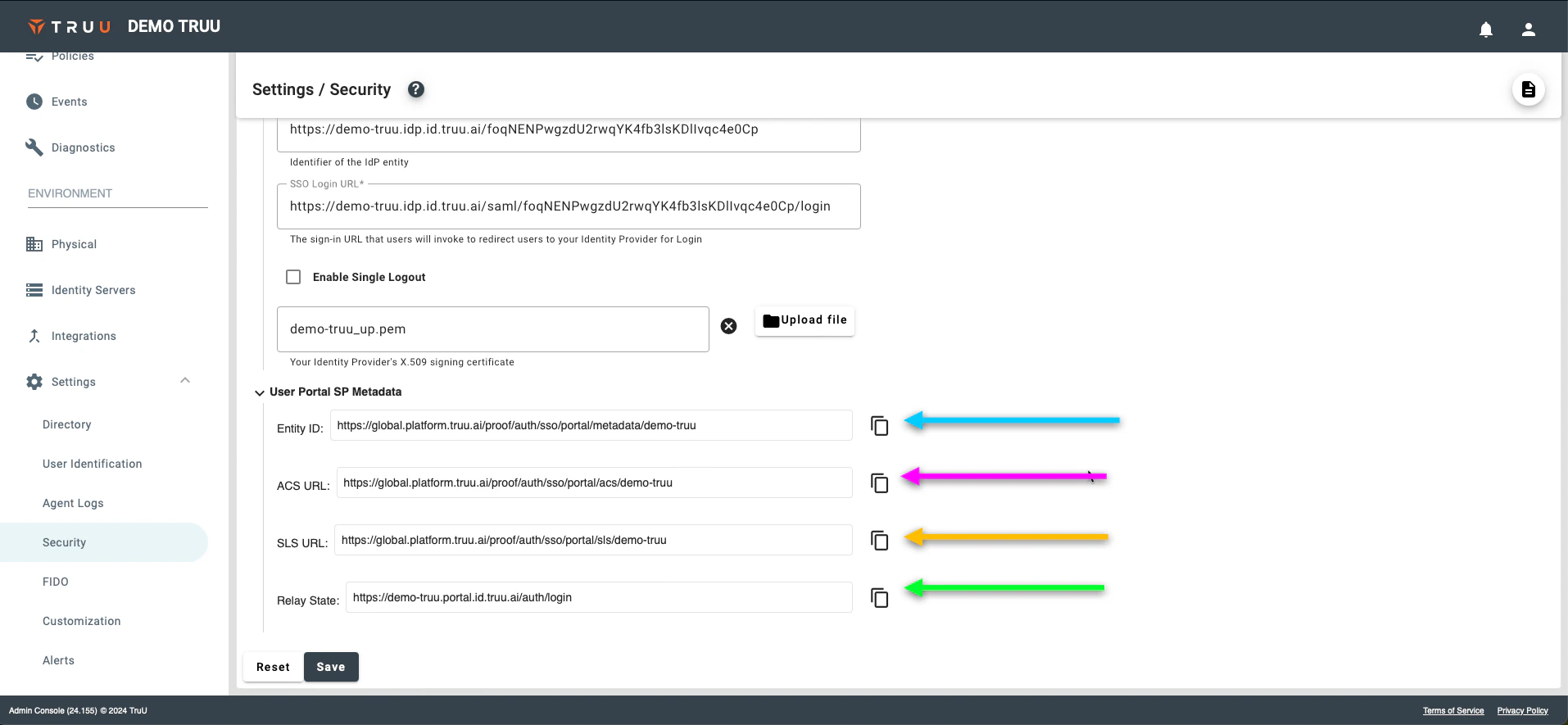
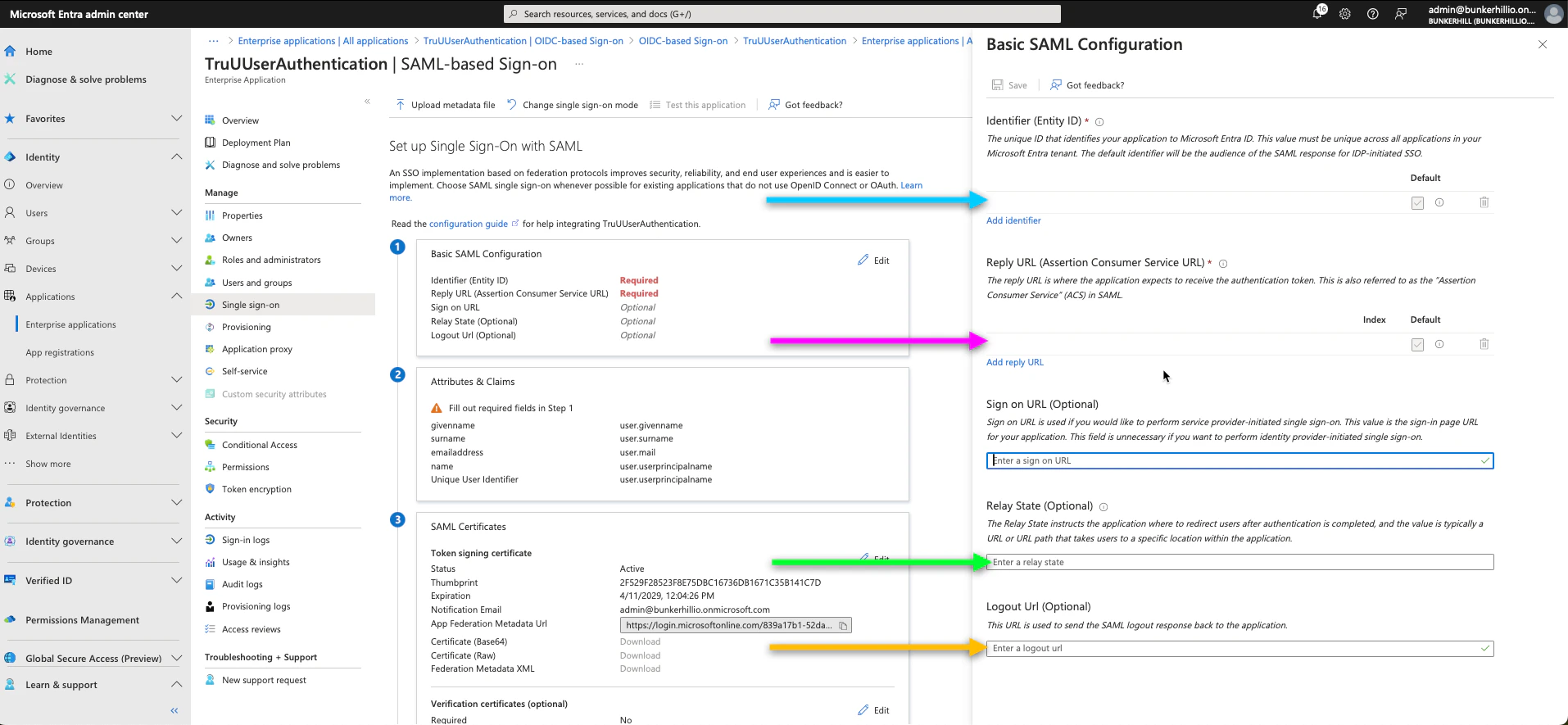
<img src="https://mintcdn.com/truu-2/jJ0QGEHfTe0CfrEY/images/docs/a8cfe83b-31f5-4a65-a045-f9a5073b0415/c86baeb9-9952-4d56-a9f2-607ab56d8048/de50b27f-4bd4-43fb-a188-527eff868b73/images/fffed9fd-6ef6-4cf2-a0c1-34f377297e5e.png?fit=max&auto=format&n=jJ0QGEHfTe0CfrEY&q=85&s=296430a5bc3d46b28deebc9814338428" alt="" width="1914" height="885" data-path="images/docs/a8cfe83b-31f5-4a65-a045-f9a5073b0415/c86baeb9-9952-4d56-a9f2-607ab56d8048/de50b27f-4bd4-43fb-a188-527eff868b73/images/fffed9fd-6ef6-4cf2-a0c1-34f377297e5e.png" />

<img src="https://mintcdn.com/truu-2/jJ0QGEHfTe0CfrEY/images/docs/a8cfe83b-31f5-4a65-a045-f9a5073b0415/c86baeb9-9952-4d56-a9f2-607ab56d8048/de50b27f-4bd4-43fb-a188-527eff868b73/images/4ba98a67-2106-4ce8-adc6-e69d5f143df7.png?fit=max&auto=format&n=jJ0QGEHfTe0CfrEY&q=85&s=a34729fec04c8aa87c842a7666470afd" alt="" width="1914" height="885" data-path="images/docs/a8cfe83b-31f5-4a65-a045-f9a5073b0415/c86baeb9-9952-4d56-a9f2-607ab56d8048/de50b27f-4bd4-43fb-a188-527eff868b73/images/4ba98a67-2106-4ce8-adc6-e69d5f143df7.png" />

8. Click **Save.**
9. Scroll down on this same page to the 3rd and 4th boxes; as we need the Login URL, Microsoft Entra Identifier, and Certificate (Base64).
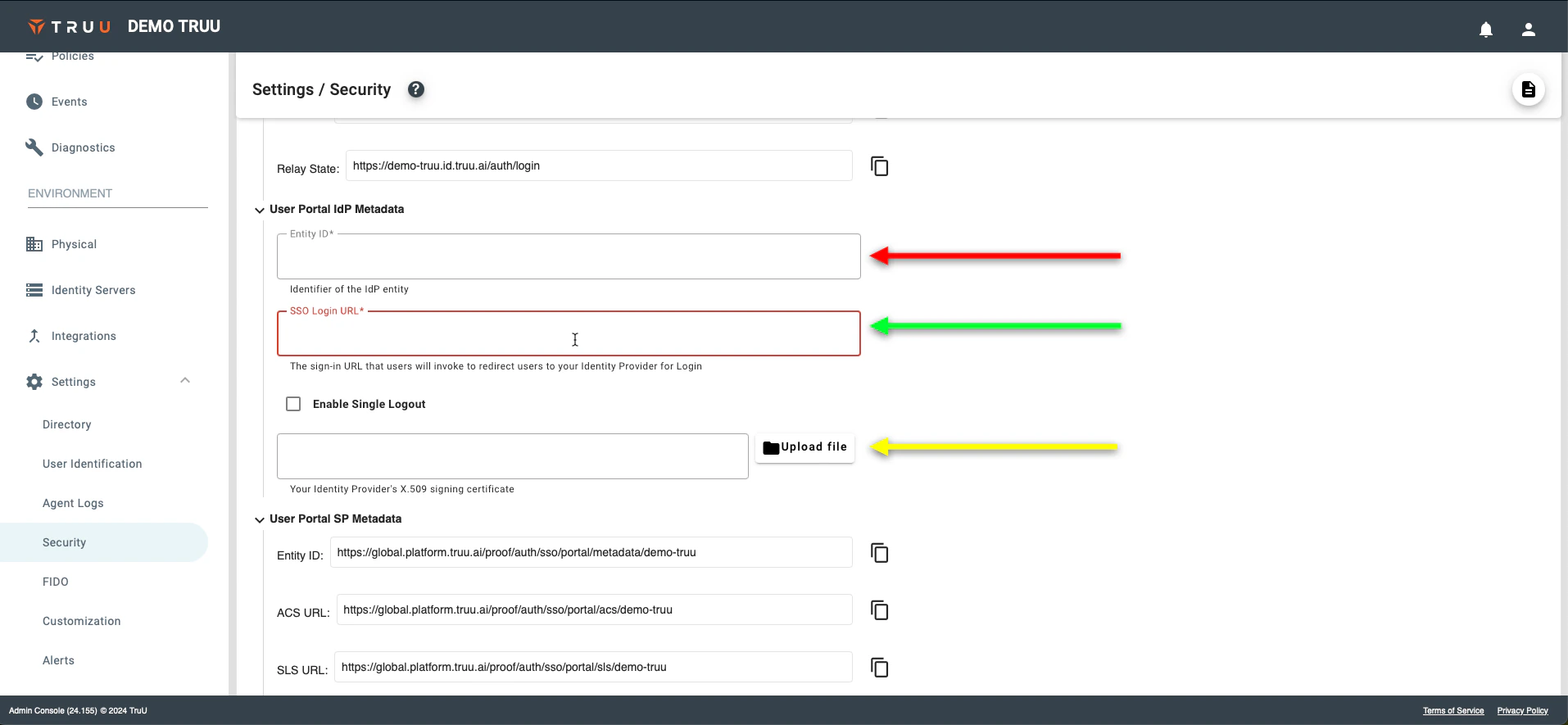
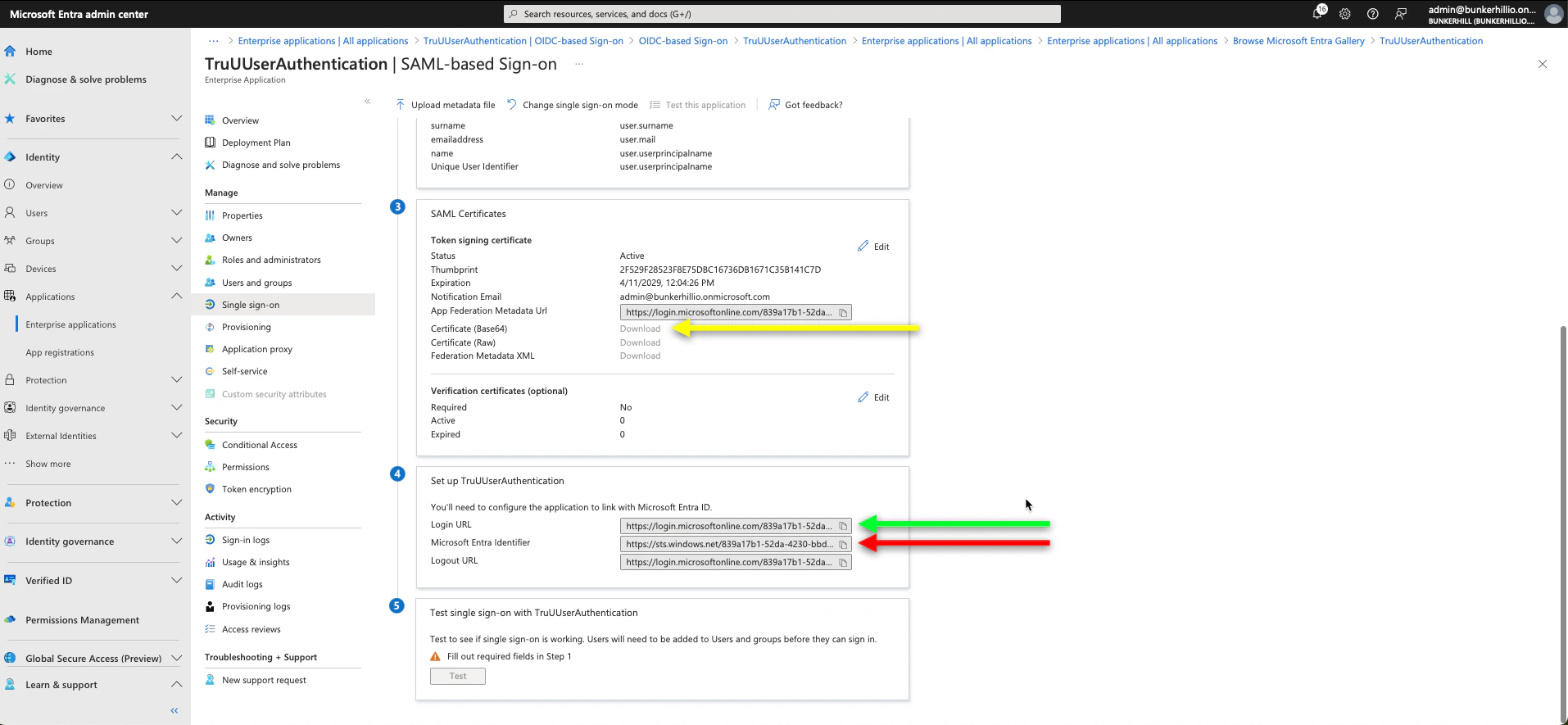
<img src="https://mintcdn.com/truu-2/jJ0QGEHfTe0CfrEY/images/docs/a8cfe83b-31f5-4a65-a045-f9a5073b0415/c86baeb9-9952-4d56-a9f2-607ab56d8048/de50b27f-4bd4-43fb-a188-527eff868b73/images/8b6a60d3-d0c9-4b90-ad6b-1a41177189a7.png?fit=max&auto=format&n=jJ0QGEHfTe0CfrEY&q=85&s=0cb6f0334889cacedcede70a05a990b4" alt="" width="1914" height="885" data-path="images/docs/a8cfe83b-31f5-4a65-a045-f9a5073b0415/c86baeb9-9952-4d56-a9f2-607ab56d8048/de50b27f-4bd4-43fb-a188-527eff868b73/images/8b6a60d3-d0c9-4b90-ad6b-1a41177189a7.png" />

<img src="https://mintcdn.com/truu-2/jJ0QGEHfTe0CfrEY/images/docs/a8cfe83b-31f5-4a65-a045-f9a5073b0415/c86baeb9-9952-4d56-a9f2-607ab56d8048/de50b27f-4bd4-43fb-a188-527eff868b73/images/fc935a83-09da-46dc-802f-ddc779f2ae9d.png?fit=max&auto=format&n=jJ0QGEHfTe0CfrEY&q=85&s=714608b76880a79a203ef39851dd1b18" alt="" width="1914" height="885" data-path="images/docs/a8cfe83b-31f5-4a65-a045-f9a5073b0415/c86baeb9-9952-4d56-a9f2-607ab56d8048/de50b27f-4bd4-43fb-a188-527eff868b73/images/fc935a83-09da-46dc-802f-ddc779f2ae9d.png" />

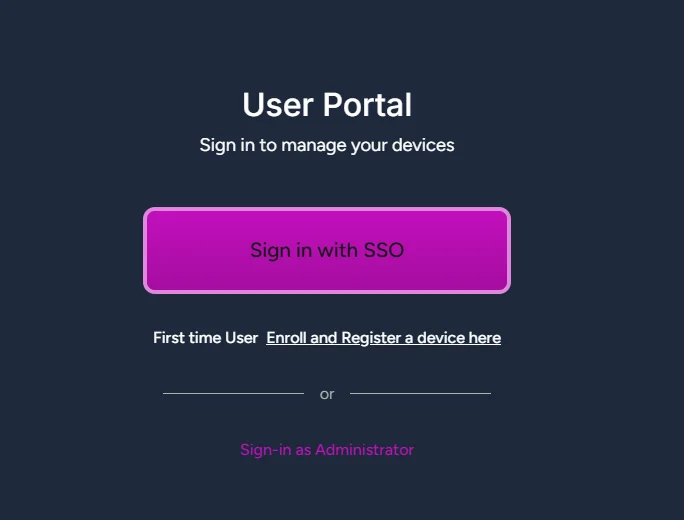
10. To test this, visit the TruU User Portal URL provided by your TruU Rep.  Once you visit the page, it will allow you to logon with Single Sign-On.
    <Frame>
      <img src="https://mintcdn.com/truu-2/B7eN8NAfUG3BAx50/images/image-133.png?fit=max&auto=format&n=B7eN8NAfUG3BAx50&q=85&s=a877e9bcdac409a46dd6f33c791bb3b2" alt="Image" width="684" height="520" data-path="images/image-133.png" />
    </Frame>