> ## Documentation Index
> Fetch the complete documentation index at: https://docs.truu.ai/llms.txt
> Use this file to discover all available pages before exploring further.
# User Management API Guide
> TruU has exposed four user management APIs that enable developers to better integrate TruU to existing technologies in their organization. These APIs enable management of TruU users and devices from an organization’s existing identity governance systems (e.g. SailPoint). Refer to the User Management APIs below:
* **GET User**: API to get TruU user by UPN, Email, GUID or TUID
* **DELETE User**: API to delete TruU user by GUID
* **GET Device**: API to get TruU user by UPN, Email, GUID or TUID and device by device ID
* **DELETE Device**: API to delete device by TruU user GUID and device ID
In addition, (with platform version 24.153) TruU has created two data APIs to query the platform for information about:
* Users: The Users API will return the users and their enrolled devices
* Assets: The Assets API will return the workstations and the enrolled accounts on those workstations (including user information)
At a high level, the User Management APIs require the Admin to do the following:
1. Create and OAuth Client through the Admin Console
2. Obtain a Bearer token using the OAuth credentials
3. Use the Bearer token in the authentication header when calling TruU APIs
NOTE: the APIs discussed in this guide are for user management only. If you are looking for documentation on using TruU APIs for authentication, please refer to the [Custom SSO Adapter Guide](https://docs.truu.ai/docs/custom-sso-adapter#/)
### **Step 1: Creating OAuth Clients**
We will start by adding a “User Operations” OAuth Client in the Admin Console. This will create a new OAuth credential pair (a client ID and secret) that will be needed to access the API
1. Navigate to the "Integrations/OAuth Clients" tab on the TruU Admin Console
2. Click the **(+)** button
3. Select “User Operations”
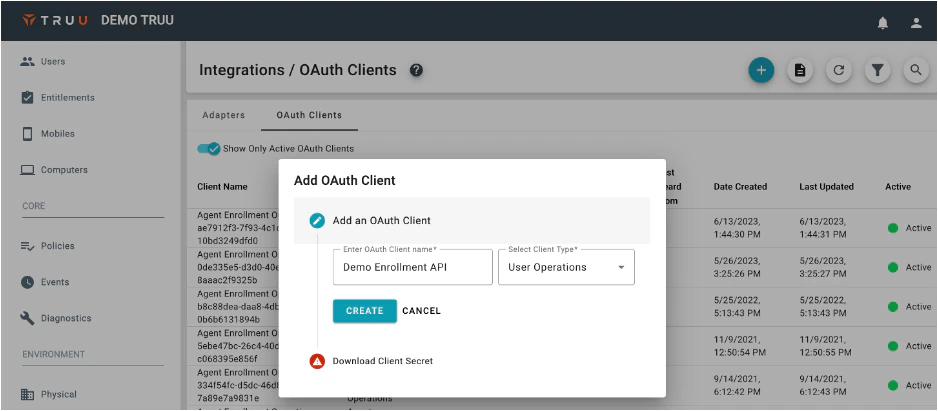 4. Name the OAuth Client (e.g., Enrollment API)
5. Click **Create**
6. Click **Download And Finish**
### **Step 2: Use the OAuth Client to Call the API**
As mentioned above, the User Operations API can be used to GET and DELETE Users and Devices. The example below explains how to use the Enrolled Users API
**Retrieving an OAuth Token**
Use the details from the configuration file downloaded when you provisioned a “User Operations” OAuth Client from your TruU admin console in order to retrieve a bearer token
```
POST [https://global.platform.truu.ai/oauth/token](https://global.platform.truu.ai/oauth/token)
```
The content-type for this POST request should be application/x-www-form-urlencoded
**Data**
```
grant_type=client_credentials&scope=tenant-management-api-user&client_id=&client_secret=
```
**Curl Example**
```
curl https://global.platform.truu.ai/oauth/token -d 'grant_type=client_credentials&scope=tenant-management-api-user&client_id=&client_secret=’
```
**Example Response**
```
\{
"access_token": "eyJ…",
"token_type": "Bearer",
"expires_in": 7199,
"scope": "tenant-management-api-user",
"domain": "4a9de178-8be4-4bb0-aa4b-1239a9695627",
"ver": "2.0",
"jti": "HY6P2g0kHuISYuQylXZ-5Fzt2bE"
}
```
Use the value from the access\_token field as the Bearer token.
**Curl Example**
Assume you have stored the value of access\_token into variable TOKEN you can query for enrolled users as follows:
```
curl [https://global.platform.truu.ai/api/v1/system/enrolled/users/](https://global.platform.truu.ai/api/v1/system/enrolled/users/) -H "Authorization: Bearer ${TOKEN}"
\{
"page": 1,
"next": null,
"previous": null,
"final": 1,
"pageSize": 100,
"count": 4,
"results": [
\{
"tuid": "4aec2a38-9a39-4df1-96fb-557c35e0dc3d",
"guid": "56aaedb0-4a8c-452b-ab61-a59b5db037bd",
"displayName": "User Name",
"userPrincipal": "[email protected]",
"email": "[email protected]",
"lastSynced": "2024-01-06T07:13:54.805219Z",
"created": "2020-10-21T17:53:06.246723Z"
},
...
]
}
```
**Enrolled Users API**
API Endpoint = [https://global.platform.truu.ai/api/v1/system/enrolled/users/](https://global.platform.truu.ai/api/v1/system/enrolled/users/)
The Enrolled Users API returns all users enrolled in your TruU tenant. These results include anyone who has enrolled a device (mobile application, desktop client, or FIDO2 hardware key) even if those devices have since been deleted (meaning a user must also be deleted from your TruU admin console to be excluded from the results of this API). Results are paginated and the API supports optional query parameters to filter by Email, User Principal Name, GUID, and/or TUID
NOTE: the trailing slash must be included in the URL when querying this endpoint. Failing to do so will result in a 301 redirect HTTP response code with no results
**Supported HTTP Methods**
* GET
**Optional Query Parameters**
* upn
* User Principal NameFull matching only
* Case insensitive
* email
* Email addressFull matching only
* Case insensitive
* guid
* User identifier from directory
* Active directory: objectGUID
* Entra ID: id
* Okta: id
* Full matching only
* Case insensitive
* tuid
* TruU user ID
* Full matching only
* Case insensitive
**Pagination Query Parameters**
* page
* Include this query parameter to fetch a specific page of results
* Page 1 will be returned by default if omitted
Query parameters may be combined as in the following example:
```
/api/v1/system/enrolled/users/?email=[[email protected]](mailto:[email protected])\&upn=[[email protected]](mailto:[email protected])
```
**Required Authorization Header**
* Authorization: Bearer \
**Response Content Type**
* application/json
**Response Status Codes**
* 200
**Parsing API Responses**
The response contains a count field that describes how many users (0 or more) were found among enrolled users with the optional query parameter filters applied. If you wish to determine if a user is enrolled, you may simply query the endpoint with an appropriate query parameter filter and then refer to the count from the response
**Examples**
Retrieve all enrolled users
```
GET https://global.platform.truu.ai/api/v1/system/enrolled/users/
{
"page": 1,
"next": 2,
"previous": null,
"final": 2,
"pageSize": 100,
"count": 117,
"results": [
{
"tuid": "ebcd0728-8fe7-4d1a-ad51-314692f49153",
"guid": "30cbe1fe-4f92-42ba-9c29-eea2a23d707d",
"displayName": "User One",
"userPrincipal": "[email protected]",
"email": "[email protected]",
"lastSynced": "2024-01-11T16:56:40.313923Z",
"created": "2023-11-01T06:16:40.297704Z"
},
{
"tuid": "75e7cae5-ab2c-40e7-832e-97293a0b5d0d",
"guid": "92e0286b-a435-4422-9aa1-5967c1db12ff",
"displayName": "User Two",
"userPrincipal": "[email protected]",
"email": "[email protected]",
"lastSynced": "2024-01-11T17:00:15.024443Z",
"created": "2022-03-31T18:24:18.397688Z"
},
...
]
}
```
Retrieve the 2nd page of all enrolled users
```
GET https://global.platform.truu.ai/api/v1/system/enrolled/users/?page=2
{
"page": 2,
"next": null,
"previous": 1,
"final": 2,
"pageSize": 100,
"count": 117,
"results": [
{
"tuid": "4801df0d-c1cf-4fca-9034-653d8519f09a",
"guid": "f29c03fb-f0c9-4083-8816-437e5408a85e",
"displayName": "User X",
"userPrincipal": "[email protected]",
"email": "[email protected]",
"lastSynced": "2022-12-08T18:31:35.655807Z",
"created": "2022-10-17T19:37:19.519701Z"
},
{
"tuid": "661b1cc1-87c2-4e77-bb06-7746418fb715",
"guid": "107663d5-02f6-4eb5-87c8-953c58950ad8",
"displayName": "User Y",
"userPrincipal": "[email protected]",
"email": "[email protected]",
"lastSynced": "2022-11-24T14:50:26.347020Z",
"created": "2022-01-21T18:40:28.644791Z"
},
...
]
}
```
Query by email address
```
GET https://global.platform.truu.ai/api/v1/system/enrolled/users/[email protected]
{
"page": 1,
"next": null,
"previous": null,
"final": 1,
"pageSize": 100,
"count": 2,
"results": [
{
"tuid": "6fdf91d0-95f0-4175-96f2-257cd7b8474d",
"guid": "b10857e1-e8c0-40ee-85b7-30af22704096",
"displayName": "User Name",
"userPrincipal": "[email protected]",
"email": "[email protected]",
"lastSynced": "2024-01-03T17:05:42.254193Z",
"created": "2018-07-16T21:04:29.182948Z"
},
{
"tuid": "c74e61b4-2b95-4777-8ddf-b30e486bedc2",
"guid": "2e39d8c7-7ae1-4dfc-a2d5-e3acfb1ca539",
"displayName": "User Name - Admin",
"userPrincipal": "[email protected]",
"email": "[email protected]",
"lastSynced": "2024-01-03T17:10:32.371213Z",
"created": "2022-05-26T04:03:26.397433Z"
}
]
}
```
### **Device Management API**
**API Endpoint** = [https://global.platform.truu.ai/api/v1/system/devices/](https://global.platform.truu.ai/api/v1/system/devices/)
The TruU Device Management API retrieves information about enrolled devices and associated users.
**Supported HTTP Methods**
* GET
**Required Authorization Header**
* Authorization: Bearer \
**Response Content Type**
* application/json
**Response Status Codes**
* 200
**Parsing API Responses**
The response contains a count field that describes how many enrolled devices were found.
Examples
```
GET https://global.platform.truu.ai/api/v1/system/devices/
{
"page": 1,
"next": 2,
"previous": null,
"final": 33,
"pageSize": 25,
"count": 825,
"results": [
{
"deviceId": "a43674e1-850c-5f87-a5ef-83d66f699faa",
"deviceName": "MacBook Air",
"appVersion": "23.4.0(673)",
"sdkVersion": "1.0",
"lastHeardFrom": 1705327828000,
"softwareIdentifier": "Version 13.6.3 (Build 22G436)",
"notificationId": null,
"appId": "com.truu.LoginHost",
"type": "MAC_TPM",
"active": true,
"created": "2024-01-12T16:02:54.066886Z",
"user": {
"tuid": "323619f2-db00-45db-8c40-71f833f1a47d",
"guid": "ef8e112f-fd1e-4010-b1b8-2913e472c982",
"displayName": "User Name",
"userPrincipal": "[email protected]",
"email": "[email protected]",
"lastSynced": "2024-01-12T16:27:31.064376Z",
"created": "2023-01-02T13:11:57.920966Z"
},
"domain": {
"key": "dbcc2f1d-aed8-4453-8f75-3542f722a752",
"name": "Tenant Name",
"domain": "domain"
}
},
...
]
}
```
### User Management API
**API Endpoint** = [https://global.platform.truu.ai/api/v1/system/domainusers/\/](https://global.platform.truu.ai/api/v1/system/domainusers/%3Cguid%3E/)
The TruU User Management API supports user and device deletion.
**Supported HTTP Methods**
* GET / DELETE
**Required Path Value**
* guid
* User identifier from directory
* Active Directory: objectGUIDEntra ID: idOkta: id Full matching only
* Case sensitive
**Required Authorization Header**
* Authorization: Bearer \
**Response Content Type**
* application/json
**Response Status Codes**
* 200 / 204
Examples
**Retrieve a specific user by GUID**
```
GET https://global.platform.truu.ai/api/v1/system/domainusers/ef8e112f-fd1e-4010-b1b8-2913e472c982/
{
"tuid": "323619f2-db00-45db-8c40-71f833f1a47d",
"guid": "ef8e112f-fd1e-4010-b1b8-2913e472c982",
"displayName": "User Name",
"userPrincipal": "[email protected]",
"email": "[email protected]",
"lastSynced": "2024-01-12T16:27:31.064376Z",
"created": "2023-01-02T13:11:57.920966Z",
"domain": {
"key": "dbcc2f1d-aed8-4453-8f75-3542f722a752",
"name": "Tenant Name",
"domain": "domain"
}
}
```
**Retrieve a specific device for a user using the user’s GUID and device ID**
```
GET https://global.platform.truu.ai/api/v1/system/domainusers/ef8e112f-fd1e-4010-b1b8-2913e472c982/devices/a43674e1-850c-5f87-a5ef-83d66f699faa/
{
"deviceId": "a43674e1-850c-5f87-a5ef-83d66f699faa",
"deviceName": "MacBook Air",
"appVersion": "23.4.0(673)",
"sdkVersion": "1.0",
"lastHeardFrom": 1705327828000,
"softwareIdentifier": "Version 13.6.3 (Build 22G436)",
"notificationId": null,
"appId": "com.truu.LoginHost",
"type": "MAC_TPM",
"active": true,
"created": "2024-01-12T16:02:54.066886Z",
"user": {
"tuid": "323619f2-db00-45db-8c40-71f833f1a47d",
"guid": "ef8e112f-fd1e-4010-b1b8-2913e472c982",
"displayName": "User Name",
"userPrincipal": "[email protected]",
"email": "[email protected]",
"lastSynced": "2024-01-12T16:27:31.064376Z",
"created": "2023-01-02T13:11:57.920966Z"
},
"domain": {
"key": "dbcc2f1d-aed8-4453-8f75-3542f722a752",
"name": "Tenant Name",
"domain": "domain"
}
}
```
**Delete a specific user device**
```
DELETE https://global.platform.truu.ai/api/v1/system/domainusers/b10857e1-e8c0-40ee-85b7-30af22704096/devices/29d57fd7-7064-47cd-90f3-3a8a899a8644/
{
"deviceId": "29d57fd7-7064-47cd-90f3-3a8a899a8644",
"deviceName": "Pixel 5",
"appVersion": "23.142.0",
"sdkVersion": "23.142.0",
"lastHeardFrom": 1704525233732,
"softwareIdentifier": "34",
"notificationId": "ezy_O305TSmpwu1JOhOuEA:APA91bGtnkdYQlhG3TsfHHJsC24a1kU4AVR1u-hn2-awucHnc8Zr9LOuyqg5ZIGJuEahGaU88G7mn05PmxTA4G7c1HhVvBEW1q6gFdYuc62LicIZUGs1u8dDNyVEqcA1fOj0TYaYdHd0",
"appId": "com.truu.android.app",
"type": "ANDROID",
"active": false,
"created": "2023-08-10T04:00:51.407853Z",
"user": {
"tuid": "6fdf91d0-95f0-4175-96f2-257cd7b8474d",
"guid": "b10857e1-e8c0-40ee-85b7-30af22704096",
"displayName": "User Name",
"userPrincipal": "[email protected]",
"email": "[email protected]",
"lastSynced": "2024-01-06T07:13:56.077245Z",
"created": "2018-07-16T21:04:29.182948Z"
},
"domain": {
"key": "dbcc2f1d-aed8-4453-8f75-3542f722a752",
"name": "Tenant Name",
"domain": "domain"
}
}
```
NOTE: the DELETE API response the active value is now false
**Delete a user and all associated devices**
```
DELETE https://global.platform.truu.ai/api/v1/system/domainusers/2e39d8c7-7ae1-4dfc-a2d5-e3acfb1ca539/
```
The response will have HTTP status code 204 with no body.
**Users Data API**
**API Endpoint** = [https://global.platform.truu.ai/data/api/v1/users/](https://global.platform.truu.ai/data/api/v1/users/)
The Users API will return the users and their enrolled devices
NOTE: the trailing slash must be included in the URL when querying this endpoint. Failing to do so will result in a 301 redirect HTTP response code with no results
* When using this API with no query parameters, all users will be returned and paginated at 25 users per page. The supported parameters for Users are:
* **page**: this is an integer which can be used to select which page you want to receive. (Note: if you enter a page that does not exist, the query will return an error.)
* **userPrincipals**: we support any number of UPNs (and are case insensitive in our search)
* **emails**: we support any number of email (and are case insensitive in our search)
* **guids**: we support any number of guids (and are case insensitive in our search)
* NOTE: when using a single parameter (e.g., emails, you can include many emails) the query will be run as an OR. If you mix parameters, (e.g. emails and guids) the query will be run as an AND.
**Supported HTTP Methods**
* GET
**Required Authorization Header**
* Authorization: Bearer \
**Response Content Type**
* application/json
**Response Status Codes**
* 200
**Examples**
Retrieve a set of users and their devices by GUIDs
```
GET https://global.platform.truu.ai/data/api/v1/users/?guids=bd0a51a1-dd1d-43bb-af80-d37126aea466&guids=066eefab-dec4-48a8-83bf-b585f93f20ad
{
"page": 1,
"next": null,
"previous": null,
"final": 1,
"pageSize": 25,
"count": 2,
"results": [
{
"tuid": "93ebf78d-7878-4b95-86b3-0858e744758e",
"guid": "bd0a51a1-dd1d-43bb-af80-d37126aea466",
"displayName": "Barbara Taylor",
"userPrincipal": "[email protected]",
"email": "[email protected]",
"lastSynced": "2024-03-18T14:54:42.329656Z",
"created": "2023-09-24T14:54:42.329492Z",
"devices": [
{
"deviceId": "59602811",
"notificationsEnabled": false,
"deviceName": "Barbara Taylor's MAC_TPM",
"appVersion": "1.0.2",
"type": "MAC_TPM",
"lastHeardFrom": "2024-03-18T14:54:37.231000Z",
"assuranceLevel": 100,
"active": true
}
]
},
{
"tuid": "7470d1cb-2d7a-4758-a5db-88f1335efa8e",
"guid": "066eefab-dec4-48a8-83bf-b585f93f20ad",
"displayName": "Deborah Jackson",
"userPrincipal": "[email protected]",
"email": "[email protected]",
"lastSynced": "2024-03-18T14:54:42.618366Z",
"created": "2023-09-14T14:54:42.618207Z",
"devices": [
{
"deviceId": "60957733",
"notificationsEnabled": true,
"deviceName": "Deborah Jackson's WINDOWS_TPM",
"appVersion": "1.0.2",
"type": "WINDOWS_TPM",
"lastHeardFrom": "2024-03-18T14:54:36.954000Z",
"assuranceLevel": 100,
"active": true
}
]
}
]
}
```
NOTE: if you are using this API to determine the Assurance Level of the user’s device, the assurance level response will be a numeric value with the following mappings:
* 100 = Basic
* 300 = Trusted
* 500 = Certified
### Assets Data API
**API Endpoint** = [https://global.platform.truu.ai/data/api/v1/assets/](https://global.platform.truu.ai/data/api/v1/assets/)
The Assets API will return the workstation and the enrolled accounts on that workstation (including user information)
NOTE: the trailing slash must be included in the URL when querying this endpoint. Failing to do so will result in a 301 redirect HTTP response code with no results
* When using this API with no query parameters, all assets will be returned and paginated at 25 assets per page. The supported parameters for Assets are:
* page: this is an integer which can be used to select which page you want to receive. (Note: if you enter a page that does not exist, the query will return an error.)
* ipAddresses: we support any number of IP addresses
* macAddresses: we support any number of MAC addresses
NOTE: when using a single parameter (e.g., ipAddresses, you can include many IPs) the query will be run as an OR. If you mix parameters, (e.g. ipAddresses and macAddresses) the query will be run as an AND.
**Supported HTTP Methods**
* GET
**Required Authorization Header**
* Authorization: Bearer \
**Response Content Type**
* application/json
**Response Status Codes**
* 200
**Examples**
Retrieve a set of users and their devices by GUIDs
```
GET https://global.platform.truu.ai/data/api/v1/assets/?ipAddresses=218.43.33.64&ipAddresses=24.237.68.37
{
"page": 1,
"next": null,
"previous": null,
"final": 1,
"pageSize": 25,
"count": 2,
"results": [
{
"machineName": "testNewData",
"displayName": "Test new Data",
"type": "MAC_AGENT",
"hardware": {
"serialNumber": "exampleSerialNumber",
"manufacturer": "Apple",
"model": "Macbook Pro 16",
"processor": "Intel i9",
"biosVersion": "2"
},
"network": {
"ipAddresses": [
"145.202.33.77",
"80.157.0.17",
"230.241.152.3",
"24.237.68.37",
"106.44.74.9",
"11.66.133.31"
],
"macAddresses": [
"b4:4a:8a.64:71:e8",
"a5:e6:f2:ea:77:14",
"83:c0:73:57:8b:d3",
"70:9e:ba:fa:22:0c",
"37:61:42:63:1d:35"
]
},
"lastHeardFrom": null,
"devices": []
},
{
"machineName": "fd1c5d98-6793-4c7a-b88f-07a198d35b56",
"displayName": "Christopher Mitchell's Computer",
"type": "WINDOWS_AGENT",
"hardware": {
"serialNumber": "5384",
"model": "Surface Pro",
"processor": "Intel i9",
"biosVersion": "N22ET33W"
},
"network": {
"ipAddresses": [
"218.43.33.64",
"246.64.33.170",
"117.227.84.146",
"205.231.96.164"
],
"macAddresses": [
"3b:f0:6f:a2:c8:fa",
"48:f4:37:ee:ca:10",
"b3:24:b1:c7:d3:7d",
"64:f6:33:f1:d9:02",
"5c:21:65:31:b3:3f"
]
},
"lastHeardFrom": null,
"devices": [
{
"deviceId": "33922867",
"notificationsEnabled": false,
"deviceName": "Sharon Johnston's WINDOWS_TPM",
"appVersion": "1.0.8",
"type": "WINDOWS_TPM",
"lastHeardFrom": "2024-03-18T14:54:38.948000Z",
"assuranceLevel": 100,
"active": true,
"user": {
"tuid": "ad6b25e5-7a7b-4491-88b6-3b06c6072c1e",
"guid": "61f8951d-abc1-4f2c-bcad-0c3caca65419",
"displayName": "Sharon Johnston",
"userPrincipal": "[email protected]",
"email": "[email protected]",
"lastSynced": "2024-03-18T14:54:41.717521Z",
"created": "2023-11-14T14:54:41.717351Z"
}
},
{
"deviceId": "40499772",
"notificationsEnabled": true,
"deviceName": "Carol Stewart's WINDOWS_TPM",
"appVersion": "1.0.7",
"type": "WINDOWS_TPM",
"lastHeardFrom": "2024-03-18T14:54:38.378000Z",
"assuranceLevel": 100,
"active": true,
"user": {
"tuid": "70404917-1dd0-4582-a11b-0732f64a7345",
"guid": "863e8d62-885a-406e-a29e-122823817123",
"displayName": "Carol Stewart",
"userPrincipal": "[email protected]",
"email": "[email protected]",
"lastSynced": "2024-03-18T14:54:41.936112Z",
"created": "2022-11-07T14:54:41.935926Z"
}
},
{
"deviceId": "32917093",
"notificationsEnabled": true,
"deviceName": "Mary Diaz's WINDOWS_TPM",
"appVersion": "1.0.8",
"type": "WINDOWS_TPM",
"lastHeardFrom": "2024-03-18T14:54:38.054000Z",
"assuranceLevel": 100,
"active": true,
"user": {
"tuid": "b7d4d174-8368-4642-954e-80f70c3f9e07",
"guid": "770e45d6-04a7-4398-8e6c-ff76c210fcc6",
"displayName": "Mary Diaz",
"userPrincipal": "[email protected]",
"email": "[email protected]",
"lastSynced": "2024-03-18T14:54:42.165055Z",
"created": "2022-08-10T14:54:42.164891Z"
}
}
]
}
]
}
```
NOTE: if you are using this API to determine the Assurance Level of the Asset, the assurance level response will be a numeric value with the following mappings:
* 100 = Basic
* 300 = Trusted
* 500 = Certified.
NOTE: the Asset may have multiple enrollments (e.g. a shared machine with 2 enrolled users). The Assurance Level is not for the device but for the user account on the device
***
[How to Determine Whether Agent is using FIDO2 or Cert based login](/docs/how-to-determine-whether-agent-is-using-fido2-or-cert-based-login)
[MacOS Local Account Creation Control for ADE](/docs/macos-local-account-creation-control-for-ade)
4. Name the OAuth Client (e.g., Enrollment API)
5. Click **Create**
6. Click **Download And Finish**
### **Step 2: Use the OAuth Client to Call the API**
As mentioned above, the User Operations API can be used to GET and DELETE Users and Devices. The example below explains how to use the Enrolled Users API
**Retrieving an OAuth Token**
Use the details from the configuration file downloaded when you provisioned a “User Operations” OAuth Client from your TruU admin console in order to retrieve a bearer token
```
POST [https://global.platform.truu.ai/oauth/token](https://global.platform.truu.ai/oauth/token)
```
The content-type for this POST request should be application/x-www-form-urlencoded
**Data**
```
grant_type=client_credentials&scope=tenant-management-api-user&client_id=&client_secret=
```
**Curl Example**
```
curl https://global.platform.truu.ai/oauth/token -d 'grant_type=client_credentials&scope=tenant-management-api-user&client_id=&client_secret=’
```
**Example Response**
```
\{
"access_token": "eyJ…",
"token_type": "Bearer",
"expires_in": 7199,
"scope": "tenant-management-api-user",
"domain": "4a9de178-8be4-4bb0-aa4b-1239a9695627",
"ver": "2.0",
"jti": "HY6P2g0kHuISYuQylXZ-5Fzt2bE"
}
```
Use the value from the access\_token field as the Bearer token.
**Curl Example**
Assume you have stored the value of access\_token into variable TOKEN you can query for enrolled users as follows:
```
curl [https://global.platform.truu.ai/api/v1/system/enrolled/users/](https://global.platform.truu.ai/api/v1/system/enrolled/users/) -H "Authorization: Bearer ${TOKEN}"
\{
"page": 1,
"next": null,
"previous": null,
"final": 1,
"pageSize": 100,
"count": 4,
"results": [
\{
"tuid": "4aec2a38-9a39-4df1-96fb-557c35e0dc3d",
"guid": "56aaedb0-4a8c-452b-ab61-a59b5db037bd",
"displayName": "User Name",
"userPrincipal": "[email protected]",
"email": "[email protected]",
"lastSynced": "2024-01-06T07:13:54.805219Z",
"created": "2020-10-21T17:53:06.246723Z"
},
...
]
}
```
**Enrolled Users API**
API Endpoint = [https://global.platform.truu.ai/api/v1/system/enrolled/users/](https://global.platform.truu.ai/api/v1/system/enrolled/users/)
The Enrolled Users API returns all users enrolled in your TruU tenant. These results include anyone who has enrolled a device (mobile application, desktop client, or FIDO2 hardware key) even if those devices have since been deleted (meaning a user must also be deleted from your TruU admin console to be excluded from the results of this API). Results are paginated and the API supports optional query parameters to filter by Email, User Principal Name, GUID, and/or TUID
NOTE: the trailing slash must be included in the URL when querying this endpoint. Failing to do so will result in a 301 redirect HTTP response code with no results
**Supported HTTP Methods**
* GET
**Optional Query Parameters**
* upn
* User Principal NameFull matching only
* Case insensitive
* email
* Email addressFull matching only
* Case insensitive
* guid
* User identifier from directory
* Active directory: objectGUID
* Entra ID: id
* Okta: id
* Full matching only
* Case insensitive
* tuid
* TruU user ID
* Full matching only
* Case insensitive
**Pagination Query Parameters**
* page
* Include this query parameter to fetch a specific page of results
* Page 1 will be returned by default if omitted
Query parameters may be combined as in the following example:
```
/api/v1/system/enrolled/users/?email=[[email protected]](mailto:[email protected])\&upn=[[email protected]](mailto:[email protected])
```
**Required Authorization Header**
* Authorization: Bearer \
**Response Content Type**
* application/json
**Response Status Codes**
* 200
**Parsing API Responses**
The response contains a count field that describes how many users (0 or more) were found among enrolled users with the optional query parameter filters applied. If you wish to determine if a user is enrolled, you may simply query the endpoint with an appropriate query parameter filter and then refer to the count from the response
**Examples**
Retrieve all enrolled users
```
GET https://global.platform.truu.ai/api/v1/system/enrolled/users/
{
"page": 1,
"next": 2,
"previous": null,
"final": 2,
"pageSize": 100,
"count": 117,
"results": [
{
"tuid": "ebcd0728-8fe7-4d1a-ad51-314692f49153",
"guid": "30cbe1fe-4f92-42ba-9c29-eea2a23d707d",
"displayName": "User One",
"userPrincipal": "[email protected]",
"email": "[email protected]",
"lastSynced": "2024-01-11T16:56:40.313923Z",
"created": "2023-11-01T06:16:40.297704Z"
},
{
"tuid": "75e7cae5-ab2c-40e7-832e-97293a0b5d0d",
"guid": "92e0286b-a435-4422-9aa1-5967c1db12ff",
"displayName": "User Two",
"userPrincipal": "[email protected]",
"email": "[email protected]",
"lastSynced": "2024-01-11T17:00:15.024443Z",
"created": "2022-03-31T18:24:18.397688Z"
},
...
]
}
```
Retrieve the 2nd page of all enrolled users
```
GET https://global.platform.truu.ai/api/v1/system/enrolled/users/?page=2
{
"page": 2,
"next": null,
"previous": 1,
"final": 2,
"pageSize": 100,
"count": 117,
"results": [
{
"tuid": "4801df0d-c1cf-4fca-9034-653d8519f09a",
"guid": "f29c03fb-f0c9-4083-8816-437e5408a85e",
"displayName": "User X",
"userPrincipal": "[email protected]",
"email": "[email protected]",
"lastSynced": "2022-12-08T18:31:35.655807Z",
"created": "2022-10-17T19:37:19.519701Z"
},
{
"tuid": "661b1cc1-87c2-4e77-bb06-7746418fb715",
"guid": "107663d5-02f6-4eb5-87c8-953c58950ad8",
"displayName": "User Y",
"userPrincipal": "[email protected]",
"email": "[email protected]",
"lastSynced": "2022-11-24T14:50:26.347020Z",
"created": "2022-01-21T18:40:28.644791Z"
},
...
]
}
```
Query by email address
```
GET https://global.platform.truu.ai/api/v1/system/enrolled/users/[email protected]
{
"page": 1,
"next": null,
"previous": null,
"final": 1,
"pageSize": 100,
"count": 2,
"results": [
{
"tuid": "6fdf91d0-95f0-4175-96f2-257cd7b8474d",
"guid": "b10857e1-e8c0-40ee-85b7-30af22704096",
"displayName": "User Name",
"userPrincipal": "[email protected]",
"email": "[email protected]",
"lastSynced": "2024-01-03T17:05:42.254193Z",
"created": "2018-07-16T21:04:29.182948Z"
},
{
"tuid": "c74e61b4-2b95-4777-8ddf-b30e486bedc2",
"guid": "2e39d8c7-7ae1-4dfc-a2d5-e3acfb1ca539",
"displayName": "User Name - Admin",
"userPrincipal": "[email protected]",
"email": "[email protected]",
"lastSynced": "2024-01-03T17:10:32.371213Z",
"created": "2022-05-26T04:03:26.397433Z"
}
]
}
```
### **Device Management API**
**API Endpoint** = [https://global.platform.truu.ai/api/v1/system/devices/](https://global.platform.truu.ai/api/v1/system/devices/)
The TruU Device Management API retrieves information about enrolled devices and associated users.
**Supported HTTP Methods**
* GET
**Required Authorization Header**
* Authorization: Bearer \
**Response Content Type**
* application/json
**Response Status Codes**
* 200
**Parsing API Responses**
The response contains a count field that describes how many enrolled devices were found.
Examples
```
GET https://global.platform.truu.ai/api/v1/system/devices/
{
"page": 1,
"next": 2,
"previous": null,
"final": 33,
"pageSize": 25,
"count": 825,
"results": [
{
"deviceId": "a43674e1-850c-5f87-a5ef-83d66f699faa",
"deviceName": "MacBook Air",
"appVersion": "23.4.0(673)",
"sdkVersion": "1.0",
"lastHeardFrom": 1705327828000,
"softwareIdentifier": "Version 13.6.3 (Build 22G436)",
"notificationId": null,
"appId": "com.truu.LoginHost",
"type": "MAC_TPM",
"active": true,
"created": "2024-01-12T16:02:54.066886Z",
"user": {
"tuid": "323619f2-db00-45db-8c40-71f833f1a47d",
"guid": "ef8e112f-fd1e-4010-b1b8-2913e472c982",
"displayName": "User Name",
"userPrincipal": "[email protected]",
"email": "[email protected]",
"lastSynced": "2024-01-12T16:27:31.064376Z",
"created": "2023-01-02T13:11:57.920966Z"
},
"domain": {
"key": "dbcc2f1d-aed8-4453-8f75-3542f722a752",
"name": "Tenant Name",
"domain": "domain"
}
},
...
]
}
```
### User Management API
**API Endpoint** = [https://global.platform.truu.ai/api/v1/system/domainusers/\/](https://global.platform.truu.ai/api/v1/system/domainusers/%3Cguid%3E/)
The TruU User Management API supports user and device deletion.
**Supported HTTP Methods**
* GET / DELETE
**Required Path Value**
* guid
* User identifier from directory
* Active Directory: objectGUIDEntra ID: idOkta: id Full matching only
* Case sensitive
**Required Authorization Header**
* Authorization: Bearer \
**Response Content Type**
* application/json
**Response Status Codes**
* 200 / 204
Examples
**Retrieve a specific user by GUID**
```
GET https://global.platform.truu.ai/api/v1/system/domainusers/ef8e112f-fd1e-4010-b1b8-2913e472c982/
{
"tuid": "323619f2-db00-45db-8c40-71f833f1a47d",
"guid": "ef8e112f-fd1e-4010-b1b8-2913e472c982",
"displayName": "User Name",
"userPrincipal": "[email protected]",
"email": "[email protected]",
"lastSynced": "2024-01-12T16:27:31.064376Z",
"created": "2023-01-02T13:11:57.920966Z",
"domain": {
"key": "dbcc2f1d-aed8-4453-8f75-3542f722a752",
"name": "Tenant Name",
"domain": "domain"
}
}
```
**Retrieve a specific device for a user using the user’s GUID and device ID**
```
GET https://global.platform.truu.ai/api/v1/system/domainusers/ef8e112f-fd1e-4010-b1b8-2913e472c982/devices/a43674e1-850c-5f87-a5ef-83d66f699faa/
{
"deviceId": "a43674e1-850c-5f87-a5ef-83d66f699faa",
"deviceName": "MacBook Air",
"appVersion": "23.4.0(673)",
"sdkVersion": "1.0",
"lastHeardFrom": 1705327828000,
"softwareIdentifier": "Version 13.6.3 (Build 22G436)",
"notificationId": null,
"appId": "com.truu.LoginHost",
"type": "MAC_TPM",
"active": true,
"created": "2024-01-12T16:02:54.066886Z",
"user": {
"tuid": "323619f2-db00-45db-8c40-71f833f1a47d",
"guid": "ef8e112f-fd1e-4010-b1b8-2913e472c982",
"displayName": "User Name",
"userPrincipal": "[email protected]",
"email": "[email protected]",
"lastSynced": "2024-01-12T16:27:31.064376Z",
"created": "2023-01-02T13:11:57.920966Z"
},
"domain": {
"key": "dbcc2f1d-aed8-4453-8f75-3542f722a752",
"name": "Tenant Name",
"domain": "domain"
}
}
```
**Delete a specific user device**
```
DELETE https://global.platform.truu.ai/api/v1/system/domainusers/b10857e1-e8c0-40ee-85b7-30af22704096/devices/29d57fd7-7064-47cd-90f3-3a8a899a8644/
{
"deviceId": "29d57fd7-7064-47cd-90f3-3a8a899a8644",
"deviceName": "Pixel 5",
"appVersion": "23.142.0",
"sdkVersion": "23.142.0",
"lastHeardFrom": 1704525233732,
"softwareIdentifier": "34",
"notificationId": "ezy_O305TSmpwu1JOhOuEA:APA91bGtnkdYQlhG3TsfHHJsC24a1kU4AVR1u-hn2-awucHnc8Zr9LOuyqg5ZIGJuEahGaU88G7mn05PmxTA4G7c1HhVvBEW1q6gFdYuc62LicIZUGs1u8dDNyVEqcA1fOj0TYaYdHd0",
"appId": "com.truu.android.app",
"type": "ANDROID",
"active": false,
"created": "2023-08-10T04:00:51.407853Z",
"user": {
"tuid": "6fdf91d0-95f0-4175-96f2-257cd7b8474d",
"guid": "b10857e1-e8c0-40ee-85b7-30af22704096",
"displayName": "User Name",
"userPrincipal": "[email protected]",
"email": "[email protected]",
"lastSynced": "2024-01-06T07:13:56.077245Z",
"created": "2018-07-16T21:04:29.182948Z"
},
"domain": {
"key": "dbcc2f1d-aed8-4453-8f75-3542f722a752",
"name": "Tenant Name",
"domain": "domain"
}
}
```
NOTE: the DELETE API response the active value is now false
**Delete a user and all associated devices**
```
DELETE https://global.platform.truu.ai/api/v1/system/domainusers/2e39d8c7-7ae1-4dfc-a2d5-e3acfb1ca539/
```
The response will have HTTP status code 204 with no body.
**Users Data API**
**API Endpoint** = [https://global.platform.truu.ai/data/api/v1/users/](https://global.platform.truu.ai/data/api/v1/users/)
The Users API will return the users and their enrolled devices
NOTE: the trailing slash must be included in the URL when querying this endpoint. Failing to do so will result in a 301 redirect HTTP response code with no results
* When using this API with no query parameters, all users will be returned and paginated at 25 users per page. The supported parameters for Users are:
* **page**: this is an integer which can be used to select which page you want to receive. (Note: if you enter a page that does not exist, the query will return an error.)
* **userPrincipals**: we support any number of UPNs (and are case insensitive in our search)
* **emails**: we support any number of email (and are case insensitive in our search)
* **guids**: we support any number of guids (and are case insensitive in our search)
* NOTE: when using a single parameter (e.g., emails, you can include many emails) the query will be run as an OR. If you mix parameters, (e.g. emails and guids) the query will be run as an AND.
**Supported HTTP Methods**
* GET
**Required Authorization Header**
* Authorization: Bearer \
**Response Content Type**
* application/json
**Response Status Codes**
* 200
**Examples**
Retrieve a set of users and their devices by GUIDs
```
GET https://global.platform.truu.ai/data/api/v1/users/?guids=bd0a51a1-dd1d-43bb-af80-d37126aea466&guids=066eefab-dec4-48a8-83bf-b585f93f20ad
{
"page": 1,
"next": null,
"previous": null,
"final": 1,
"pageSize": 25,
"count": 2,
"results": [
{
"tuid": "93ebf78d-7878-4b95-86b3-0858e744758e",
"guid": "bd0a51a1-dd1d-43bb-af80-d37126aea466",
"displayName": "Barbara Taylor",
"userPrincipal": "[email protected]",
"email": "[email protected]",
"lastSynced": "2024-03-18T14:54:42.329656Z",
"created": "2023-09-24T14:54:42.329492Z",
"devices": [
{
"deviceId": "59602811",
"notificationsEnabled": false,
"deviceName": "Barbara Taylor's MAC_TPM",
"appVersion": "1.0.2",
"type": "MAC_TPM",
"lastHeardFrom": "2024-03-18T14:54:37.231000Z",
"assuranceLevel": 100,
"active": true
}
]
},
{
"tuid": "7470d1cb-2d7a-4758-a5db-88f1335efa8e",
"guid": "066eefab-dec4-48a8-83bf-b585f93f20ad",
"displayName": "Deborah Jackson",
"userPrincipal": "[email protected]",
"email": "[email protected]",
"lastSynced": "2024-03-18T14:54:42.618366Z",
"created": "2023-09-14T14:54:42.618207Z",
"devices": [
{
"deviceId": "60957733",
"notificationsEnabled": true,
"deviceName": "Deborah Jackson's WINDOWS_TPM",
"appVersion": "1.0.2",
"type": "WINDOWS_TPM",
"lastHeardFrom": "2024-03-18T14:54:36.954000Z",
"assuranceLevel": 100,
"active": true
}
]
}
]
}
```
NOTE: if you are using this API to determine the Assurance Level of the user’s device, the assurance level response will be a numeric value with the following mappings:
* 100 = Basic
* 300 = Trusted
* 500 = Certified
### Assets Data API
**API Endpoint** = [https://global.platform.truu.ai/data/api/v1/assets/](https://global.platform.truu.ai/data/api/v1/assets/)
The Assets API will return the workstation and the enrolled accounts on that workstation (including user information)
NOTE: the trailing slash must be included in the URL when querying this endpoint. Failing to do so will result in a 301 redirect HTTP response code with no results
* When using this API with no query parameters, all assets will be returned and paginated at 25 assets per page. The supported parameters for Assets are:
* page: this is an integer which can be used to select which page you want to receive. (Note: if you enter a page that does not exist, the query will return an error.)
* ipAddresses: we support any number of IP addresses
* macAddresses: we support any number of MAC addresses
NOTE: when using a single parameter (e.g., ipAddresses, you can include many IPs) the query will be run as an OR. If you mix parameters, (e.g. ipAddresses and macAddresses) the query will be run as an AND.
**Supported HTTP Methods**
* GET
**Required Authorization Header**
* Authorization: Bearer \
**Response Content Type**
* application/json
**Response Status Codes**
* 200
**Examples**
Retrieve a set of users and their devices by GUIDs
```
GET https://global.platform.truu.ai/data/api/v1/assets/?ipAddresses=218.43.33.64&ipAddresses=24.237.68.37
{
"page": 1,
"next": null,
"previous": null,
"final": 1,
"pageSize": 25,
"count": 2,
"results": [
{
"machineName": "testNewData",
"displayName": "Test new Data",
"type": "MAC_AGENT",
"hardware": {
"serialNumber": "exampleSerialNumber",
"manufacturer": "Apple",
"model": "Macbook Pro 16",
"processor": "Intel i9",
"biosVersion": "2"
},
"network": {
"ipAddresses": [
"145.202.33.77",
"80.157.0.17",
"230.241.152.3",
"24.237.68.37",
"106.44.74.9",
"11.66.133.31"
],
"macAddresses": [
"b4:4a:8a.64:71:e8",
"a5:e6:f2:ea:77:14",
"83:c0:73:57:8b:d3",
"70:9e:ba:fa:22:0c",
"37:61:42:63:1d:35"
]
},
"lastHeardFrom": null,
"devices": []
},
{
"machineName": "fd1c5d98-6793-4c7a-b88f-07a198d35b56",
"displayName": "Christopher Mitchell's Computer",
"type": "WINDOWS_AGENT",
"hardware": {
"serialNumber": "5384",
"model": "Surface Pro",
"processor": "Intel i9",
"biosVersion": "N22ET33W"
},
"network": {
"ipAddresses": [
"218.43.33.64",
"246.64.33.170",
"117.227.84.146",
"205.231.96.164"
],
"macAddresses": [
"3b:f0:6f:a2:c8:fa",
"48:f4:37:ee:ca:10",
"b3:24:b1:c7:d3:7d",
"64:f6:33:f1:d9:02",
"5c:21:65:31:b3:3f"
]
},
"lastHeardFrom": null,
"devices": [
{
"deviceId": "33922867",
"notificationsEnabled": false,
"deviceName": "Sharon Johnston's WINDOWS_TPM",
"appVersion": "1.0.8",
"type": "WINDOWS_TPM",
"lastHeardFrom": "2024-03-18T14:54:38.948000Z",
"assuranceLevel": 100,
"active": true,
"user": {
"tuid": "ad6b25e5-7a7b-4491-88b6-3b06c6072c1e",
"guid": "61f8951d-abc1-4f2c-bcad-0c3caca65419",
"displayName": "Sharon Johnston",
"userPrincipal": "[email protected]",
"email": "[email protected]",
"lastSynced": "2024-03-18T14:54:41.717521Z",
"created": "2023-11-14T14:54:41.717351Z"
}
},
{
"deviceId": "40499772",
"notificationsEnabled": true,
"deviceName": "Carol Stewart's WINDOWS_TPM",
"appVersion": "1.0.7",
"type": "WINDOWS_TPM",
"lastHeardFrom": "2024-03-18T14:54:38.378000Z",
"assuranceLevel": 100,
"active": true,
"user": {
"tuid": "70404917-1dd0-4582-a11b-0732f64a7345",
"guid": "863e8d62-885a-406e-a29e-122823817123",
"displayName": "Carol Stewart",
"userPrincipal": "[email protected]",
"email": "[email protected]",
"lastSynced": "2024-03-18T14:54:41.936112Z",
"created": "2022-11-07T14:54:41.935926Z"
}
},
{
"deviceId": "32917093",
"notificationsEnabled": true,
"deviceName": "Mary Diaz's WINDOWS_TPM",
"appVersion": "1.0.8",
"type": "WINDOWS_TPM",
"lastHeardFrom": "2024-03-18T14:54:38.054000Z",
"assuranceLevel": 100,
"active": true,
"user": {
"tuid": "b7d4d174-8368-4642-954e-80f70c3f9e07",
"guid": "770e45d6-04a7-4398-8e6c-ff76c210fcc6",
"displayName": "Mary Diaz",
"userPrincipal": "[email protected]",
"email": "[email protected]",
"lastSynced": "2024-03-18T14:54:42.165055Z",
"created": "2022-08-10T14:54:42.164891Z"
}
}
]
}
]
}
```
NOTE: if you are using this API to determine the Assurance Level of the Asset, the assurance level response will be a numeric value with the following mappings:
* 100 = Basic
* 300 = Trusted
* 500 = Certified.
NOTE: the Asset may have multiple enrollments (e.g. a shared machine with 2 enrolled users). The Assurance Level is not for the device but for the user account on the device
***
[How to Determine Whether Agent is using FIDO2 or Cert based login](/docs/how-to-determine-whether-agent-is-using-fido2-or-cert-based-login)
[MacOS Local Account Creation Control for ADE](/docs/macos-local-account-creation-control-for-ade)