> ## Documentation Index
> Fetch the complete documentation index at: https://docs.truu.ai/llms.txt
> Use this file to discover all available pages before exploring further.
# Windows FAQs
> Frequently asked Questions about TruU's Windows agent.
**What happens when I send logs to TruU?**
* You do not need to send logs to TruU. Sometimes, however, when we have an issue, we may be asked by IT Support to send our TruU logs for investigation. When you send logs to TruU, they will be reviewed by the TruU support team. Sending logs helps the TruU team gain insights into any potential issues and aids in resolving them efficiently. Refer to the [Submitting Logs - Windows Guide](https://docs.truu.ai/docs/submitting-logs)
**If I forget my PIN, what is the process to reset it?**
* Please follow the [Pin Recovery - Windows Guide](https://docs.truu.ai/docs/pin-recovery). Essentially, users will need to re-enroll to reset their PIN
**I am getting a message that says please connect to your organization's network, what does this mean?**
* You need to be connected to the VPN, or the company's network (or in office) to enroll your Windows Workstation
**How many chances do I have to enter my PIN before my account gets locked?**
* With the Windows Authenticator, we protect the PIN by disallowing its use after too many wrong attempts. The default value for this is 8 allows incorrect attempts
**Does my PIN expire and will I be required to change my PIN?**
* Your PIN does not expire. You will not be required to change your PIN. If you forget your PIN, please follow the [Forgot PIN - Windows Guide](https://docs.truu.ai/docs/pin-recovery). If you want to change your PIN, please follow the [Change PIN - Windows Guide](https://docs.truu.ai/docs/change-pin-windows)
**I am getting a message that says please connect to your organization's network, what does this mean?**
* You need to be connected to the VPN, or the company's network (or in office) to enroll your Windows Workstation
**I am seeing a yellow caution sign when I try to add Biometrics. What is this?**
* This means that your device does not have the biometric hardware to support either fingerprint or face
 **What happens when my account gets locked?**
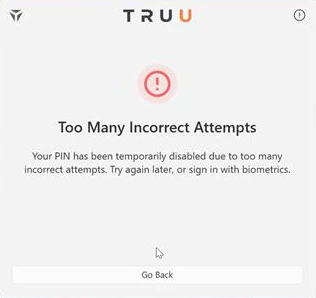
* When the user is locked out, the screen below will appear. The account will be locked for 1 hour. After that, the user gets 8 more tries to enter the correct PIN. The user can also choose to reset the PIN by clicking "Forgot PIN" or re-enroll.
**What happens when my account gets locked?**
* When the user is locked out, the screen below will appear. The account will be locked for 1 hour. After that, the user gets 8 more tries to enter the correct PIN. The user can also choose to reset the PIN by clicking "Forgot PIN" or re-enroll.
 **Can the same person enroll two different accounts with two different fingerprints (left hand and right hand)?**
* Yes, the user can enroll in two different accounts with different fingerprints
**After enrollment, do I need to lock my screen?**
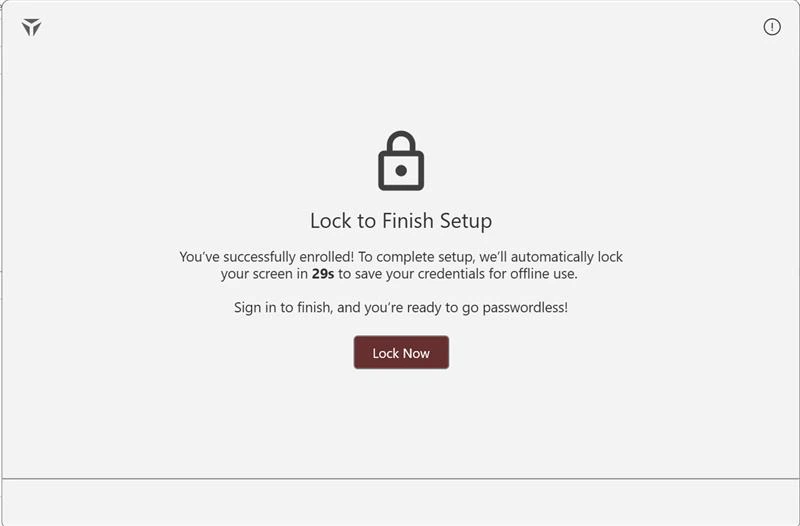
* After you create your PIN, you will be prompted to with the button saying "Lock now". You can either click this button to lock immediately or wait for 40 sec to lock automatically.
**Can the same person enroll two different accounts with two different fingerprints (left hand and right hand)?**
* Yes, the user can enroll in two different accounts with different fingerprints
**After enrollment, do I need to lock my screen?**
* After you create your PIN, you will be prompted to with the button saying "Lock now". You can either click this button to lock immediately or wait for 40 sec to lock automatically.
 ***
[Enrollment FAQs](/docs/enrollment)
[macOS FAQs](/docs/macos-faqs)
***
[Enrollment FAQs](/docs/enrollment)
[macOS FAQs](/docs/macos-faqs)