> ## Documentation Index
> Fetch the complete documentation index at: https://docs.truu.ai/llms.txt
> Use this file to discover all available pages before exploring further.
# Predict Card
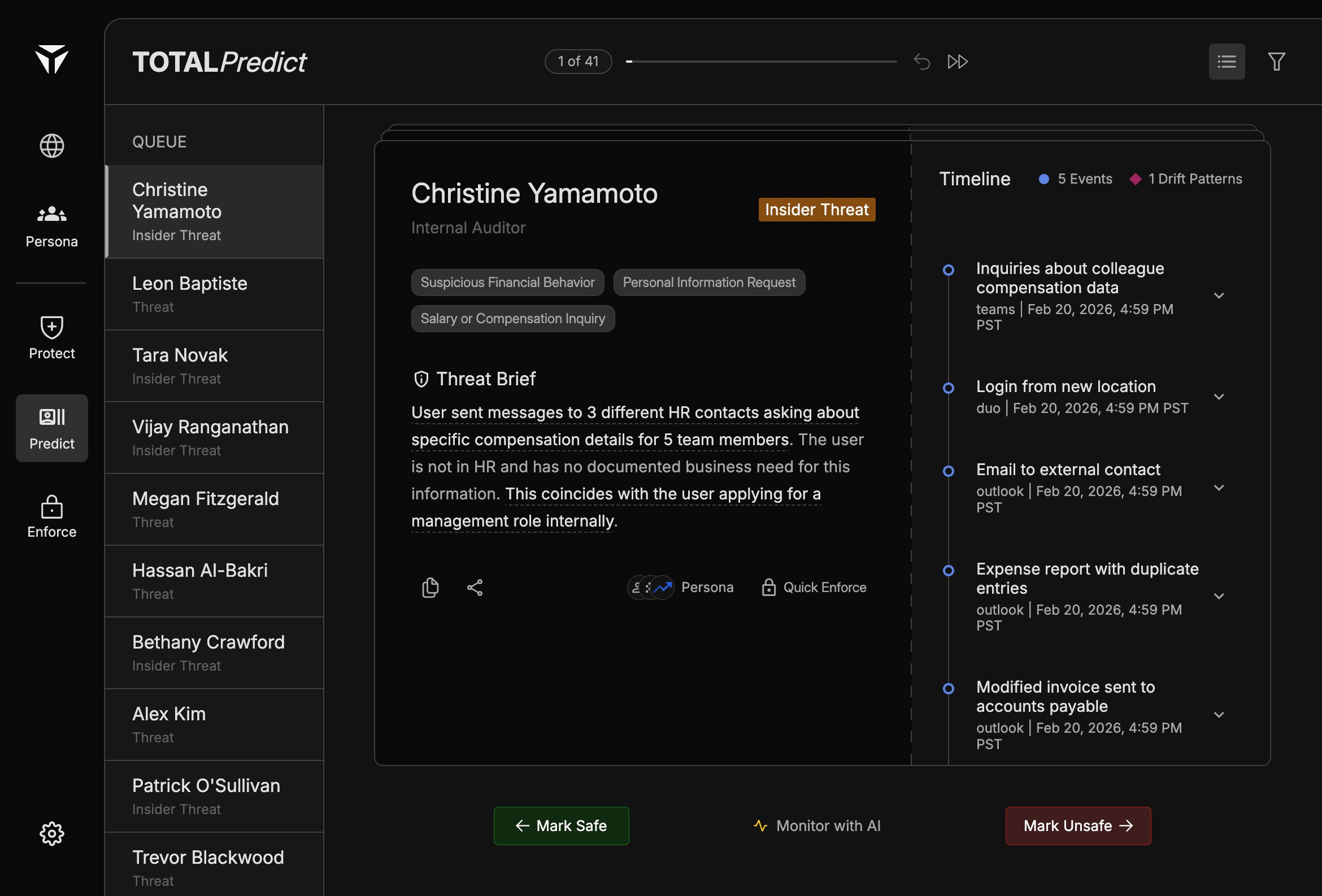
The Predict card is the main panel in Predict triage. It surfaces who is at risk, how they are classified, which categories apply, and an AI-written summary you can act on from one place.
 ## Overview
The card sits between the [Triage Queue](/triage-queue) and the [Timeline](/timeline). It is scoped to the case you have selected in the queue. Everything on the card updates when you move to another person.
## Card Header
The header shows the person’s **name** and **title** so you can confirm you are reviewing the right identity. A **threat type** badge indicates whether the case is labeled **Threat** or **Insider Threat**, matching how the person appears in the queue.
## Category Tags
Tags summarize **why** the case surfaced—for example suspicious financial behavior, requests for personal information, or salary or compensation–related inquiries. Use them to skim severity and theme before you read the full [Threat Brief](/threat-brief).
## Threat Brief
The Threat Brief is an AI-generated narrative that ties signals into a short story of concern. Highlighted phrases in the brief act as [Citations](/citations) to specific timeline entries. See [Threat Brief](/threat-brief) for how to read it end to end.
## Action Buttons
### Copy and share
Use **copy** and **share** to pull the brief or case context into tickets, chat, or runbooks without retyping.
### Persona
**Persona** opens the full identity profile for deeper drift, signals, and cluster context. See [Connecting to Personas](/connecting-to-persona).
### Quick Enforce
**Quick Enforce** opens the Case Actions panel so you can apply enforcement, justify the action, and classify the threat in one flow. See [Quick Enforce](/quick-enforce).
Built with [Mintlify](https://mintlify.com).
## Overview
The card sits between the [Triage Queue](/triage-queue) and the [Timeline](/timeline). It is scoped to the case you have selected in the queue. Everything on the card updates when you move to another person.
## Card Header
The header shows the person’s **name** and **title** so you can confirm you are reviewing the right identity. A **threat type** badge indicates whether the case is labeled **Threat** or **Insider Threat**, matching how the person appears in the queue.
## Category Tags
Tags summarize **why** the case surfaced—for example suspicious financial behavior, requests for personal information, or salary or compensation–related inquiries. Use them to skim severity and theme before you read the full [Threat Brief](/threat-brief).
## Threat Brief
The Threat Brief is an AI-generated narrative that ties signals into a short story of concern. Highlighted phrases in the brief act as [Citations](/citations) to specific timeline entries. See [Threat Brief](/threat-brief) for how to read it end to end.
## Action Buttons
### Copy and share
Use **copy** and **share** to pull the brief or case context into tickets, chat, or runbooks without retyping.
### Persona
**Persona** opens the full identity profile for deeper drift, signals, and cluster context. See [Connecting to Personas](/connecting-to-persona).
### Quick Enforce
**Quick Enforce** opens the Case Actions panel so you can apply enforcement, justify the action, and classify the threat in one flow. See [Quick Enforce](/quick-enforce).
Built with [Mintlify](https://mintlify.com).