

Threat events are security-relevant activities detected across your integrated data sources. They appear on the Threat events tab in Protect and help you review potential risk in one place.

Overview

Each row represents a detected event tied to a user and a source application. Use the table to scan recent activity, compare severity, and open a row when you need full context. Threat events complement Enforcement events, which log actions taken in response to policy or workflow—not raw detections.

The Events Table

The table lists events in reverse chronological order. Columns group identity, origin, classification, and severity so you can triage without opening every row.
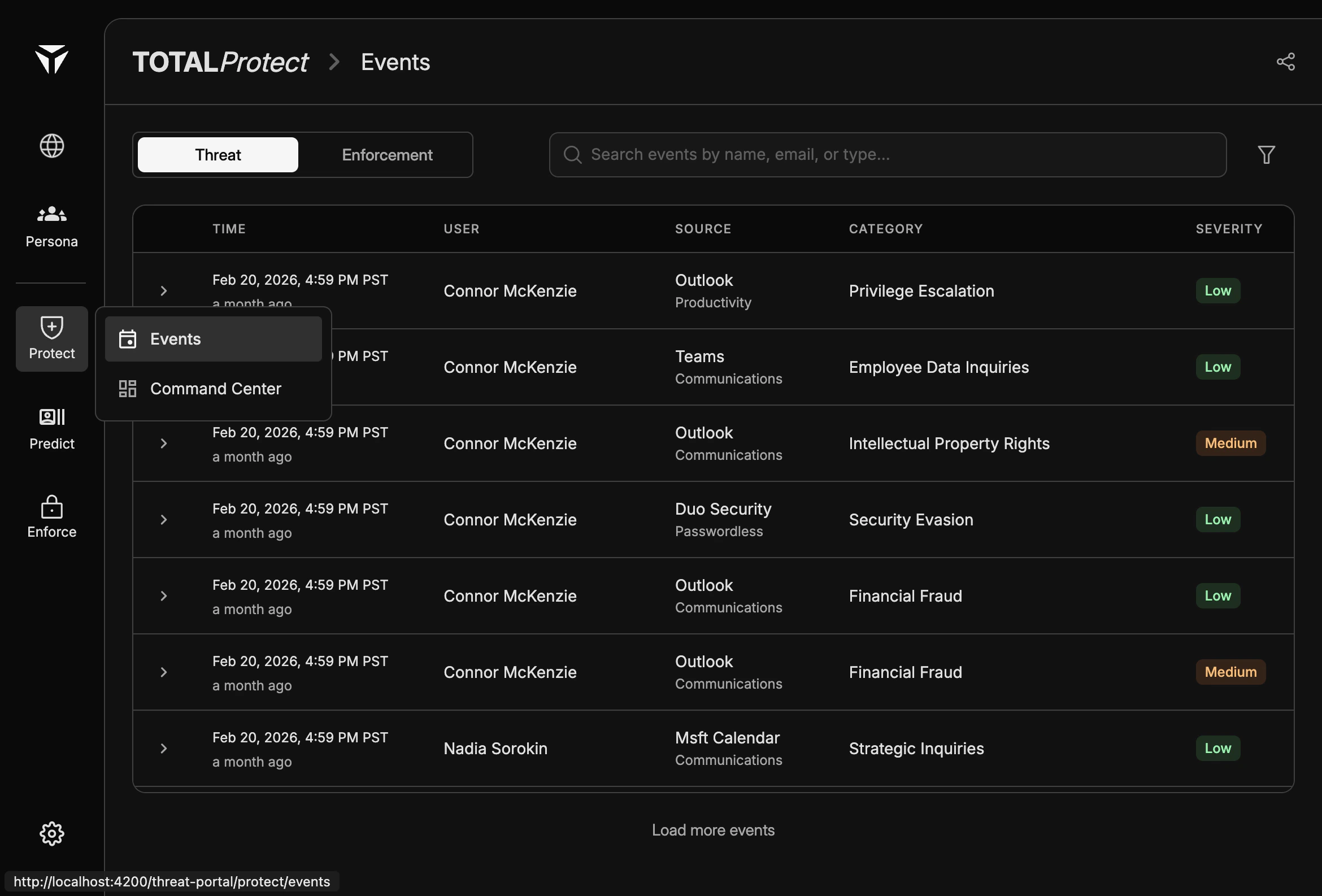
Threat Events 1
ColumnDescription
TimeWhen the event was recorded.
UserThe account or person associated with the activity.
SourceThe integrated application (and subtype where shown) that produced the signal.
CategoryThe threat or behavior type assigned to the event.
SeverityHow serious the event is rated (Low, Medium, or High).

Event Sources

Sources are the systems TOTAL connects to for productivity, communications, and authentication signals. Examples include Outlook and Teams for messaging and collaboration, and Duo Security for passwordless and access-related context. Sub-labels under a source (for example Productivity, Communications, or Passwordless) clarify which product area the event came from. The exact list depends on your organization’s integrations and configuration.

Threat Categories

Categories describe the kind of risk or behavior the detection maps to. Examples you may see include Privilege Escalation, Employee Data Inquiries, Intellectual Property Rights, Security Evasion, Financial Fraud, and Strategic Inquiries. Categories are assigned by detection logic and policies; they are meant for consistent reporting and review, not as a legal or HR determination on their own.

Severity Levels

Low, Medium, and High indicate relative urgency and impact. Badges in the table make severity scannable at a glance. Use severity together with category and source when deciding what to investigate first. High-severity events are not always malicious; they signal that the system rated the activity as more sensitive or risky.

Expanding Event Details

Click a row (or the row’s expand control, if shown) to open detailed fields for that event. Expanded views typically include timestamps, user and source metadata, and any additional context your deployment surfaces for analysts. From detail view you can confirm what happened, correlate with other events, and align with your internal runbooks. For narrowing the list before you expand rows, use Filters.