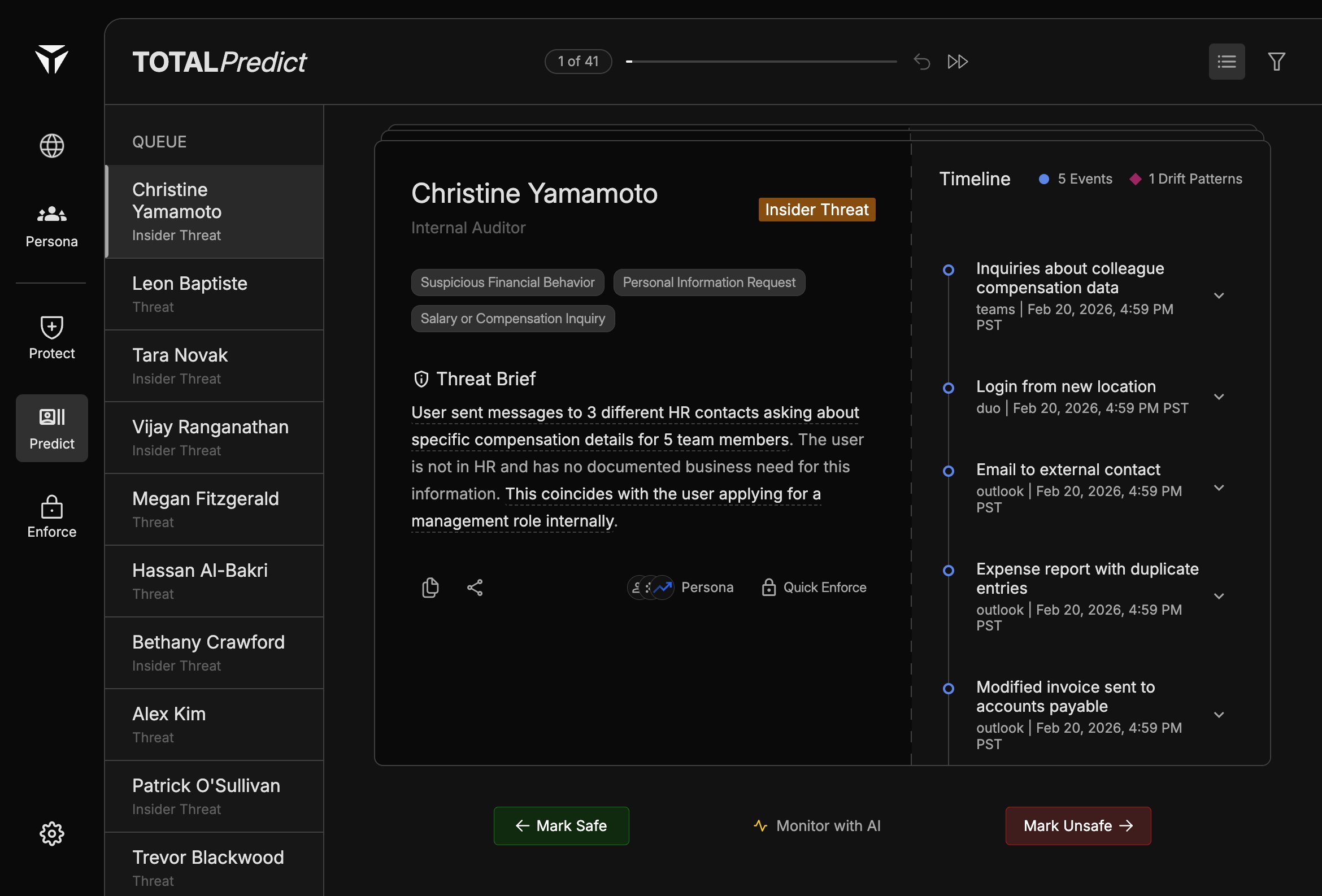
The triage queue is the left sidebar on Predict. It lists open threat cases—people with Threat or Insider Threat labels—so analysts can work through them in order without losing context.
The queue is a prioritized list of threat cases, not a full directory of users. Selecting an item loads that person’s Predict Card, Threat Brief, and Timeline in the main workspace.
Each row shows the person’s name and their threat type (for example “Insider Threat” or “Threat”). Names and labels mirror how cases are represented elsewhere in TOTAL so you can match queue entries to enforcement and Persona workflows.
The top bar shows your position in the queue (1 of N), a slider to jump roughly within the set, and arrow controls to move to the previous or next case. A list view toggle and filter help you change how the queue is presented or narrowed.
Ordering reflects how Predict surfaces cases for review (priority and open-case state). Work through the queue with Swiping Actions when you are ready to dismiss, continue monitoring, or escalate.
Was this page helpful?
Assistant
Responses are generated using AI and may contain mistakes.