

Highlights
- Improved Enrollment UI
- Improved Agent UI
- More Resilient Storage of Enrollment Data
Enhancements
Improved Enrollment UI
- The enrollment wizard has continued to be refined. The updated wizard now uses consistent sizing as the steps in the wizard change, and the loading spinner has been updated to use a more native-looking spinner.
Improved Agent UI
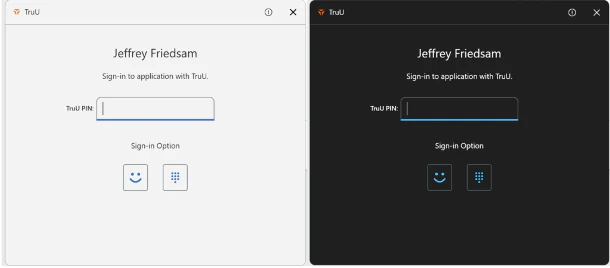
- The agent UI has been updated to provide an improved look and feel and more intuitive use. The title bar has been replaced with a native title bar, and the report issue icon has been updated to use a more intuitive icon. The colors and opacity have been updated to improve the usability of the product. In addition, the agent now supports light and dark modes.
More Resilient Storage of Enrollment Data
- This version of the Windows Authenticator uses a more resilient mechanism for storing enrollment records (e.g. the fact that a user has enrolled). This new mechanism ensures user enrollments do not get lost in the event of a loss of power on the device.
Bug Fixes
- We have fixed an issue that occasionally caused a delay in starting the enrollment wizard.
- We have fixed an issue that prevented user from being able to use an available fingerprint reader to unlock the computer.
- We have fixed an issue that prevented TruU credential provider from loading.
Known Issues
WA 24.5.2 Release Notes WA 24.4.1 Release Notes