

Note This prerequisite will apply to any PKI type whether on premise PKI such as ADCS or hosted. Some hosted examples include (Cloud Trust, CyberArk, Keyfactor, etc). Check with your cloud hosted vendor on how they procure the KDC template for you.Documentation Index
Fetch the complete documentation index at: https://docs.truu.ai/llms.txt
Use this file to discover all available pages before exploring further.
KDC Certificate Issuance confirmation
The (KDC) “Kerberos Authentication” template has the default intended purposes of “Client Authentication” “Server Authentication”, “Smart Card Logon” and “KDC Authentication”. This template is critical and serves as the root of trust for clients authenticating using the TruU agent. Ensure that all the Domain Controllers servicing TruU Agent devices have the template below in the local computer certificate store. To confirm this, follow these steps:- Log in to a domain controller.
- Press Win+R to open the Run prompt and type certlm.msc press Enter.
- In the tree view on the left, navigate to “Certificates (Local Computer)”, then go to “Personal”, then click Certificates.
- Check that the Kerberos Authentication certificate exists in the right pane.

- If you see the Domain Controller or Domain Controller Authentication certificate. We recommend publishing the Kerberos Authentication template to replace these older certificates.
- Refer to this article for how you can setup the (KDC) Kerberos Authentication template and leverage supersedence on these templates so that the Kerberos Authentication template can replace all the older Domain Controller and Domain Controller Authentication templates. https://learn.microsoft.com/en-us/windows/security/identity-protection/hello-for-business/deploy/on-premises-cert-trust
KDC Template Issuance validation
To verify that the Kerberos Key Distribution Center (KDC) certificate is available and working properly:- Log on to a computer within your domain.
- Click Start, point to “All Programs”, click “Accessories”, right-click “Command Prompt”, and then click “Run as administrator”.
- If the User Account Control dialog box appears, confirm that the action it displays is what you want, and then click Continue.
- At the command prompt, type certutil -dcinfo verify, and then press ENTER.
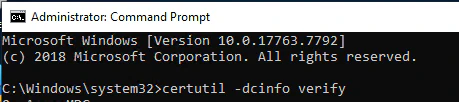
- To confirm the existence of the KDC cert in the local computer store on the DC, review the command prompt results for 2 items. Note: To ensure the KDC cert is installed you must run this on each DC individually.
Scroll to the bottom of the results and it will list the KDC certificates found and the application policies for them: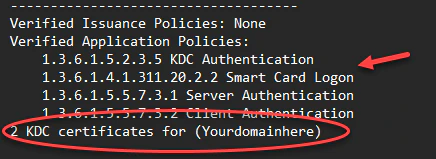
Search through the results for dwErrorStatus is set to zero (0) for the KDC cert found. Anything other than zero should be reviewed for remediation.
- Once successful validation is confirmed, the Kerberos KDC certificate is installed and operating properly.
Domain controller group policy for autoenrollment of the KDC certificate:
Next we recommend enabling the automatic request a of the Domain controller certificate template (KDC). However, domain controllers are unaware of newer certificate templates or superseded configurations on certificate templates. For domain controllers to automatically enroll and renew of certificates, configure a GPO for automatic certificate enrollment, and link it to the Domain Controllers OU. Below are the steps.- On a DC, open the Group Policy Management Console (gpmc.msc).
- Create a GPO and give it a name and link it to your Domain Controllers OU.
- Right-click the new GPO object and select Edit.
- In the navigation pane, expand Computer Configuration > Policies > Windows Settings > Security Settings > Public Key Policies.
- On the root of Public Key Policies look for Certificate Services Client - Auto-Enrollment.
- In the details pane, right-click Certificate Services Client - Auto-Enrollment and select Properties.
- Select Enabled from the Configuration Model list.
- Select the Renew expired certificates, update pending certificates, and remove revoked certificates check box.
- Select the Update certificates that use certificate templates check box. **Select OK **and close the dialog.
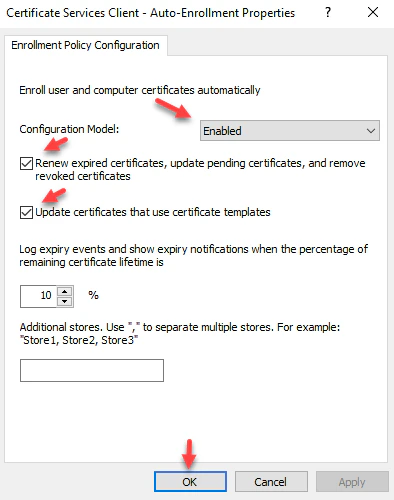
- Test the GPO by running gpupdate /force and make sure the KDC template you created above is issued to the DC.
KDC additional requirement for CA Certificate trust (IMPORTANT):
- This is a reminder that typically the KDC certificate is issued by either a Root or Issuing Certificate Authority typically from an on-prem PKI. Because of this, this certificate has a chain to both the issuing and root CA, therefore you must push by group policy both the Root and Issuing CA certs to the respective Certificate stores (Trusted Root Certificate Authorities and Intermediate Certificate Authorities) on the DC and all workstations so that the KDC cert is trusted by all systems, thereby creating the trust for any smartcards issued to endpoints.
Using Entra ID for SSO On-premises PKI (ADCS)