

The following permissions are required for the Mac Authenticator to function properly:
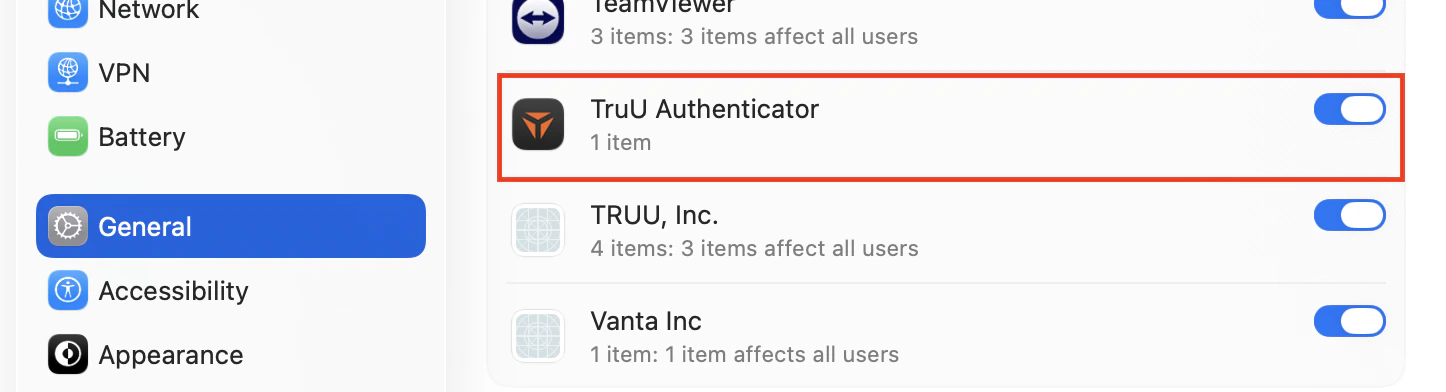
  1. Login Items: This permission is enabled by default; however, you should verify that it remains turned on to ensure the application functions properly.
    1. On your Mac, navigate to Settings>General > Login Items & Extensions, then enable App Background Activity.
    2. If this setting is disabled, TruU will not function correctly.
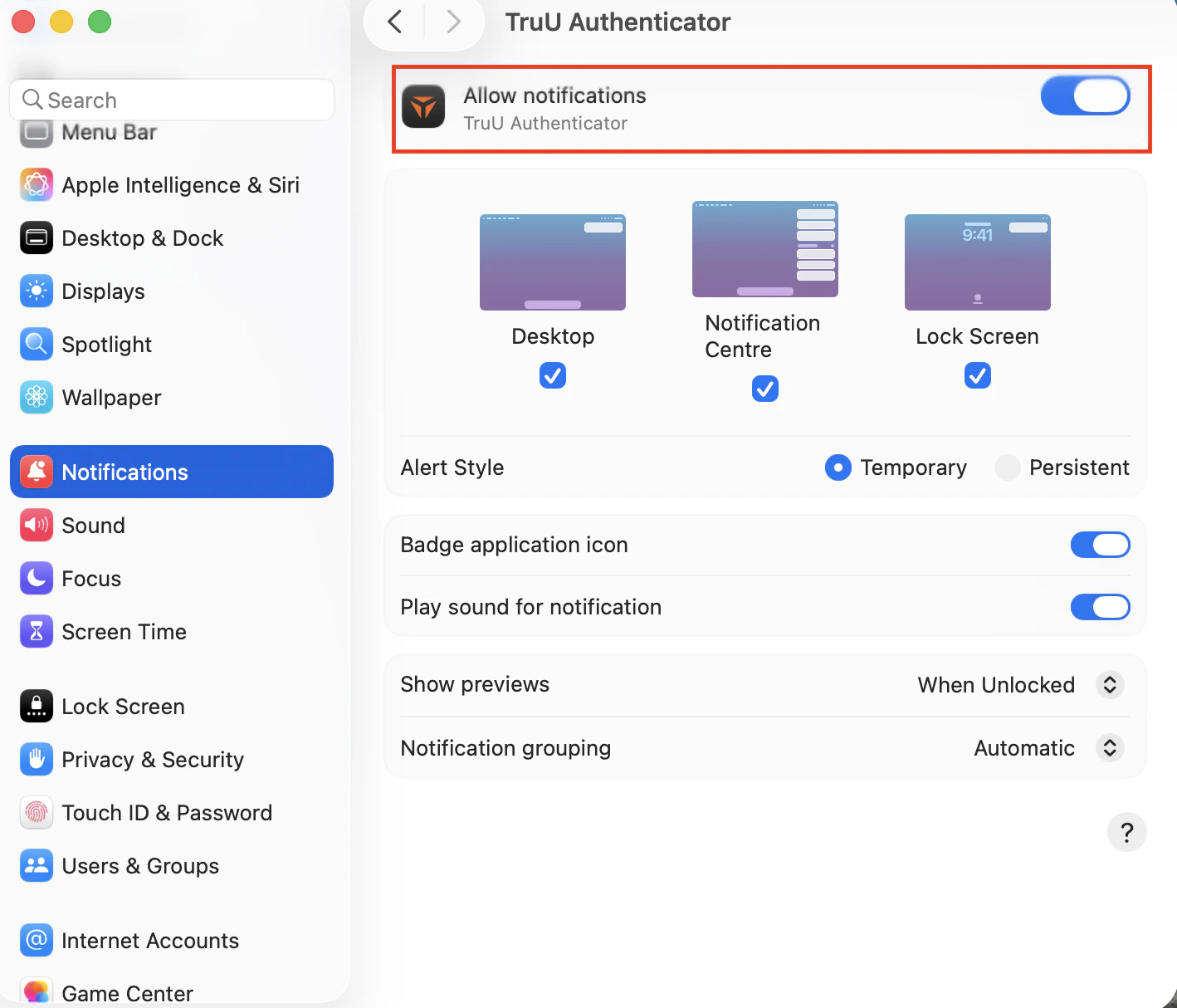
  2. Notifications: Users must allow notifications to stay informed during installation. After TruU is installed, a prompt will appear requesting permission to send notification alerts.
    1. Navigate to Settings>Notifications > Application Notifications, then enable notifications forTruU Authenticator.
    2. Notifications are used for enrollment reminders, unenrollment alerts, password change alerts, and other important updates.
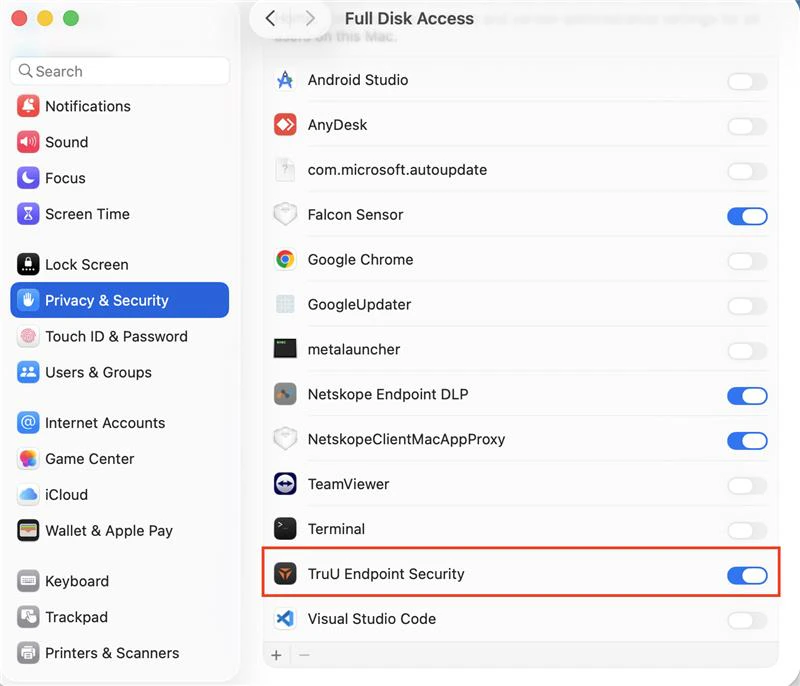
  3. Full Disk Access: This permission must be granted manually by the user to allow the client to monitor additional security events.
    1. Navigate to Settings>Privacy & Security > Full Disk Access, then enable access forTruU Endpoint Security.
NOTE: All of these system settings can be automatically enabled by deploying the attached configuration file to your client devices.
<?xml version="1.0" encoding="UTF-8"?>
<!DOCTYPE plist PUBLIC "-//Apple//DTD PLIST 1.0//EN" "http://www.apple.com/DTDs/PropertyList-1.0.dtd">
<plist version="1.0">
    <dict>
        <key>PayloadDisplayName</key>
        <string>TruU Authenticator Permissions</string>
        <key>PayloadDescription</key>
        <string>Grant needed permissions to TruU</string>
        <key>PayloadIdentifier</key>
        <string>ai.truu.mdm.config.permissions</string>
        <key>PayloadOrganization</key>
        <string>TruU, Inc.</string>
        <key>PayloadRemovalDisallowed</key>
        <true />
        <key>PayloadType</key>
        <string>Configuration</string>
        <key>PayloadUUID</key>
        <string>3A2DC905-72CC-496A-8CE1-BDF201BC7AD0</string>
        <key>PayloadVersion</key>
        <integer>1</integer>
        <key>PayloadScope</key>
        <string>System</string>
        <key>PayloadContent</key>
        <array>
            <dict>
                <key>Rules</key>
                <array>
                    <dict>
                        <key>Comment</key>
                        <string>Prefix</string>
                        <key>RuleType</key>
                        <string>LabelPrefix</string>
                        <key>RuleValue</key>
                        <string>com.truu</string>
                    </dict>
                    <dict>
                        <key>Comment</key>
                        <string>Prefix #2</string>
                        <key>RuleType</key>
                        <string>LabelPrefix</string>
                        <key>RuleValue</key>
                        <string>ai.truu</string>
                    </dict>
                    <dict>
                        <key>Comment</key>
                        <string>Team ID</string>
                        <key>RuleType</key>
                        <string>TeamIdentifier</string>
                        <key>RuleValue</key>
                        <string>VGJPA2G633</string>
                    </dict>
                </array>
                <key>PayloadDisplayName</key>
                <string>Login Items Rules</string>
                <key>PayloadDescription</key>
                <string>Manage the Login Items for TruU Applications</string>
                <key>PayloadIdentifier</key>
                <string>ai.truu.mdm.config.loginitems</string>
                <key>PayloadOrganization</key>
                <string>TruU, Inc.</string>
                <key>PayloadType</key>
                <string>com.apple.servicemanagement</string>
                <key>PayloadUUID</key>
                <string>5E17086F-4599-405A-B7FE-7B9B142870AA</string>
                <key>PayloadVersion</key>
                <integer>1</integer>
            </dict>
            <dict>
                <key>NotificationSettings</key>
                <array>
                    <dict>
                        <key>BundleIdentifier</key>
                        <string>com.truu.LoginHost</string>
                        <key>NotificationsEnabled</key>
                        <true />
                        <key>ShowInNotificationCenter</key>
                        <true />
                        <key>ShowInLockScreen</key>
                        <true />
                        <key>AlertType</key>
                        <integer>1</integer>
                        <key>BadgesEnabled</key>
                        <true />
                        <key>SoundsEnabled</key>
                        <true />
                        <key>GroupingType</key>
                        <integer>0</integer>
                        <key>CriticalAlertEnabled</key>
                        <false />
                    </dict>
                </array>
                <key>PayloadDisplayName</key>
                <string>Notifications</string>
                <key>PayloadDescription</key>
                <string>Manage the notification permission for TruU Applications</string>
                <key>PayloadIdentifier</key>
                <string>ai.truu.mdm.config.notifications</string>
                <key>PayloadOrganization</key>
                <string>TruU, Inc.</string>
                <key>PayloadType</key>
                <string>com.apple.notificationsettings</string>
                <key>PayloadUUID</key>
                <string>713E1FEA-50FA-4FB1-BC40-FF473B46705B</string>
                <key>PayloadVersion</key>
                <integer>1</integer>
            </dict>
            <dict>
                <key>Services</key>
                <dict>
                    <key>SystemPolicySysAdminFiles</key>
                    <array>
                       <dict>
                          <key>Identifier</key>
                          <string>ai.truu.TruUES</string>
                          <key>IdentifierType</key>
                          <string>bundleID</string>
                          <key>CodeRequirement</key>
                          <string>identifier "ai.truu.TruUES"</string>
                          <key>Allowed</key>
                          <true/>
                          <key>Comment</key>
                          <string>Allows specified apps access to some files used by system administrators.</string>
                       </dict>
                    </array>
                    <key>SystemPolicyAllFiles</key>
                    <array>
                       <dict>
                          <key>Identifier</key>
                          <string>ai.truu.TruUES</string>
                          <key>IdentifierType</key>
                          <string>bundleID</string>
                          <key>CodeRequirement</key>
                          <string>identifier "ai.truu.TruUES"</string>
                          <key>Allowed</key>
                          <true/>
                          <key>Comment</key>
                          <string>Allows specified apps access to data like Mail, Messages, Safari, Home, Time Machine backups, and certain administrative settings for all users on the Mac. Get the CodeRequirement with 'codesign -display -r - /usr/bin/mdutil'</string>
                       </dict>
                    </array>
                </dict>
                <key>PayloadDisplayName</key>
                <string>Privacy Preferences Control</string>
                <key>PayloadDescription</key>
                <string>Manage TruU TCC</string>
                <key>PayloadIdentifier</key>
                <string>ai.truu.mdm.config.tcc</string>
                <key>PayloadOrganization</key>
                <string>TruU, Inc.</string>
                <key>PayloadType</key>
                <string>com.apple.TCC.configuration-profile-policy</string>
                <key>PayloadUUID</key>
                <string>9A7D1F18-46AF-4854-BEBC-9DEAB80150CF</string>
                <key>PayloadVersion</key>
                <integer>1</integer>
            </dict>
        </array>
    </dict>
</plist>
The following guide walks you through uploading this configuration file to JAMF.: Computer Configuration Profiles - JAMF Pro Documentation 11.1 6.0
PAM Adapter Setup Guide MA Configuration Options