

As the Mac Authenticator can provide its services to more than one enrolled user on the same macOS device, uninstallation can potentially consist of two steps:
  1. Unenrollment and removal of the related crypto-material e.g. certificates and keys for all enrolled users. (This step has to be processed in the context of each enrolled user, which means each of the enrolled users has to login before the step #2 can proceed.)
  2. Uninstallation of the Mac Authenticator application itself. (This step can be processed once all the crypto-material for each enrolled user is removed.)
The uninstallation is invoked by the command below, but please consider the scenarios that follow:
sh /Library/TruU/uninstall.sh
This applies only if there is one user enrolled into Mac Authenticator on the macOS machine. In this case, the uninstallation process is simple and straightforward after running the code above. The Mac Authenticator will:
  1. a) Unenroll the user b) Remove the related crypto-material
Then
  1. Uninstall Mac Authenticator application itself
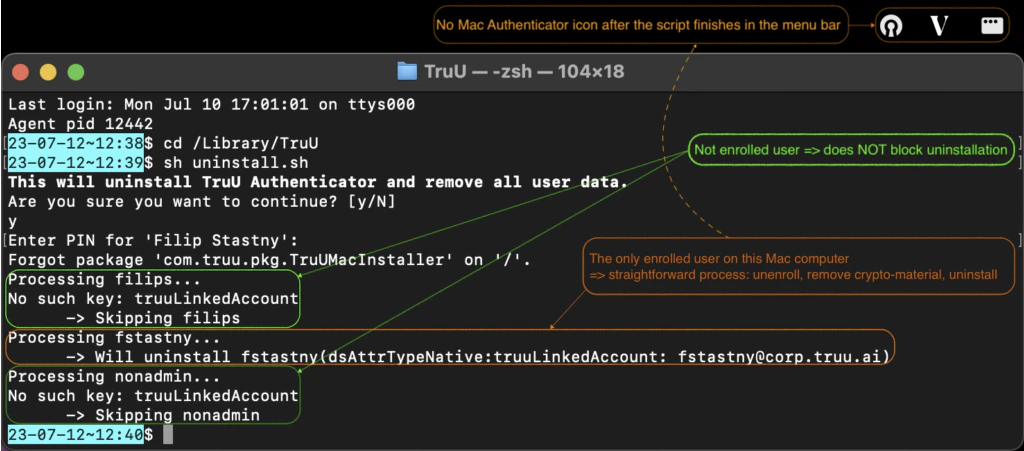
Once the Mac Authenticator is uninstalled, its icon is removed from the menu bar as well. Note: This scenario expects the enrolled user to run the uninstallation script when logged-in under the user’s account.
TruU plist JAMF Install MacOS Resetting a user’s password