

Adding a Custom SSO Adapter

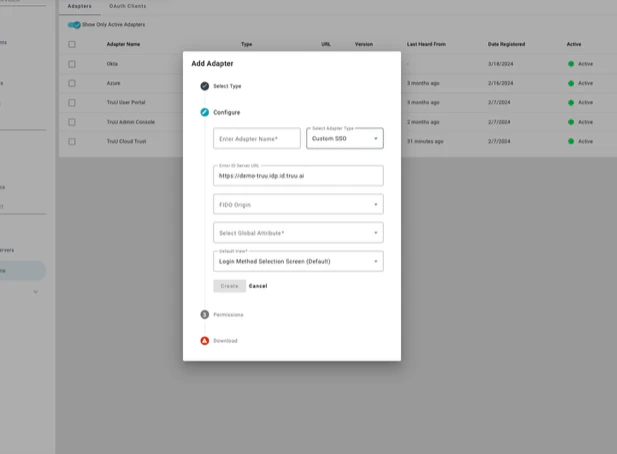
Step 1: Begin by adding a “Custom SSO Adapter” Step 2: Upon adding the adapter, the Platform automatically creates a scoped OAuth client for API use and generates a file with the Client ID and Secret for API calls Creating the Adapter simplifies enabling/disabling the OAuth client and integrates seamlessly with the existing policy engine for clean authentication. Policies can be set for a specific Adapter.
Using TruU Identity APIs

With the OAuth Client ID and Secret generated and downloaded when creating the Custom SSO Adapter, it’s now possible to call the TruU Identity APIs to authenticate users. Here’s an example of an identity request API call:
POST /api/v1/id
{
	"principal": "<username>",
	"principalType": "USER_PRINCIPAL",
	"appName": "User Authentication",
	"enforceBio": false,
	"remoteAddrs": ["10.0.0.1"],
	"clientAgent": "Identity Test",
	"clientAgentType": "BASIC_AGENT",
	"resourceType": "SSO_ADAPTER",
	"resourceName": "SSO Adapter",
	"resourceId": "<Adapter OAuth Client ID>",
	"resourceVersion": "1.0",
	"resourceHostname": “server.domain.com”, 
	“resolvableByInactiveUser”: false
}
By default, TruU doesn’t allow identity requests to be completed by users inactive in the source directory. However, the payload includes the boolean value “resolvableByInactiveUser”. If this value is omitted or false, TruU won’t allow the request to be completed by an inactive user. If this value is included and true, TruU will allow the identity request to be completed by a user marked as inactive in the directory. Here’s an example of the same API request as above that will result in an identity request that can be completed by an inactive user:
POST /api/v1/id
{
	"principal": "<username>",
	"principalType": "USER_PRINCIPAL",
	"appName": "User Authentication",
	"enforceBio": false,
	"remoteAddrs": ["10.0.0.1"],
	"clientAgent": "Identity Test",
	"clientAgentType": "BASIC_AGENT",
	"resourceType": "SSO_ADAPTER",
	"resourceName": "SSO Adapter",
	"resourceId": "<Adapter OAuth Client ID>",
	"resourceVersion": "1.0",
	"resourceHostname": “server.domain.com”, 
	“resolvableByInactiveUser”: true
}

Blocking Request and IN_PROGRESS Response

Here’s an example of a blocking request from the POST:
{
	"deviceId": "<device identifier>",
	"resourceId": "<Adapter OAuth Client ID>",
	"state": "COMPLETED",
	"principalInfo": {
		"domainId": "<tenant ID>",
		"tuid": "<User tuid>",
		"userPrincipal": "<User Principal Name>"
	},
	"authenticatorTypes": [
		"ANDROID_FINGERPRINT"
	],
	"expiration": 1680563104225,
	"notifiedDevices": [
		"<device identifier>"
	],
	"request": "<session ID>",
	"status": "SUCCESS",
	"accessCode": "<secure access code>",
	"processed": "2023-04-03T23:04:10.255209Z"
}
The following POST shows a call for the IN_PROGRESS response for a user:
POST https://[domain].idp.stage.truu.ai/api/v1/id?async=true&duration=300
{
	"principal": "jsmith",
	"principalType": "USER_PRINCIPAL",
	"appName": "User Authentication",
	"enforceBio": false,
	"remoteAddrs": ["10.0.0.1"],
	"clientAgent": "Identity Test",
	"clientAgentType": "BASIC_AGENT",
	"resourceType": "SSO_ADAPTER",
	"resourceName": "SSO Adapter",
	"resourceId": "OvWNVtpQgah46MZdnoajV0CDBFXpdY8q3oop",
	"resourceVersion": "1.0",
	"resourceHostname": "server.domain.com"
}
This returns the following IN_PROGRESS response:
{
	"resourceId": "OvWNVtpQgah46MZdnoajV0CDBFXpdY8q3oop",
	"state": "IN_PROGRESS",
	"principalInfo": {
		"domainId": "e72b19ce-721a-42d1-881d-9d05a32afba3",
		"tuid": "b44bfb88-22b7-4904-8f57-jef2dbd98e3d",
		"userPrincipal": "[email protected]"
	},
	"expiration": 1680565310756,
	"resolutionUrl": "https://stage.m.truu.ai/id/v1/auth?rid=ZPOZ75mrY_Q&did=e72b19ce",
	"adapterId": 465,
	"request": "ZPOZ75mrY_Q",
	"accessCode": "104757",
	"processed": "2023-04-03T23:36:50.762073Z",
	"authenticationTypes": [
		"FIDO",
		"WORKFLOW"
	]
}
The status changes after the user authenticates:
GET https://[domain].idp.stage.truu.ai/api/v1/id/ZPOZ75mrY_Q
{
	"deviceId": "29d57fd7-7064-47cd-90f3-3a8a899a8644",
	"state": "COMPLETED",
	"principalInfo": {
		"domainId": "e72b19ce-721a-42d1-881d-9d05a32afba3",
		"tuid": "b44bfb88-22b7-4904-8f57-jef2dbd98e3d",
		"userPrincipal": "[email protected]"
	},
	"expiration": 1680565310756,
	"adapterId": 465,
	"notifiedDevices": [
		"29d57fd7-7064-47cd-90f3-3a8a899a8644"
	],
	"request": "ZPOZ75mrY_Q",
	"status": "SUCCESS",
	"processed": "2023-04-03T23:38:29.143626Z",
	"authenticationTypes": [
		"FIDO",
		"FIDO2",
		"WORKFLOW"
	]
}

TruU IdP for NetSkope Physical Access Control