


-
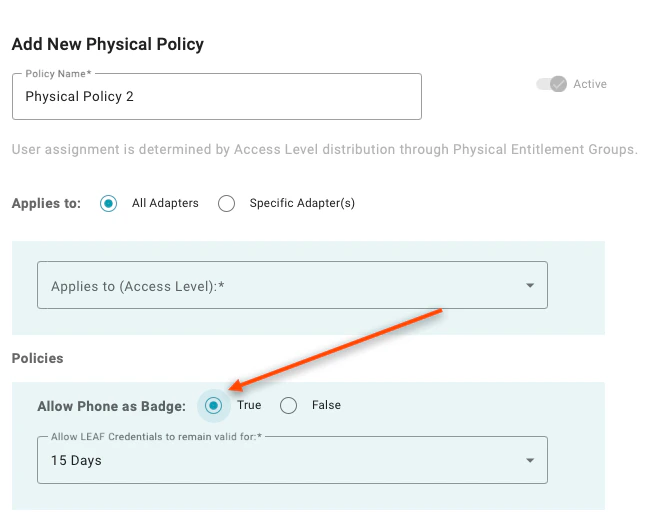
Allow Phone as Badge: Setting to “True” will enable the user’s mobile phone to unlock doors without requiring the user to authenticate. A value of “False” requires additional authentication beyond possession of the phone.
-
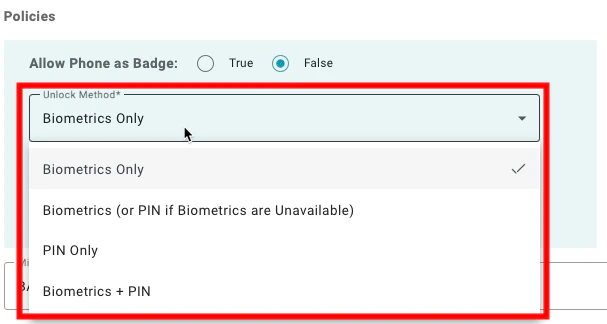
Unlock Method: This is a nested policy that appears when “Allow Phone as Badge” is set to “True”. The available options are:
- Biometrics Only: When this is selected, the user must authenticate using the built-in biometrics from the mobile device. This means, that users who don’t have supported biometrics on their device will not be able to unlock these doors.
- Biometrics (or PIN if Biometrics are Unavailable): When this is selected, the user will be asked to provide biometrics if the device is capable of using biometrics but will accept the application PIN created during enrollment if biometrics are not available.
- PIN Only: When this is selected, the user must provide the application PIN created during enrollment to unlock the doors.
- Biometrics + PIN: When this is selected, the user must provide both the built-in biometrics from the mobile device and the application PIN created during enrollment to unlock the doors.
- Allow LEAF Credential to remain valid for: This policy provides added security for physical access for readers that use the LEAF standard. The policy sets a time to live for an issued LEAF credential so that mobile devices cannot keep a valid credential indefinitely. The policy enables selecting pre-defined periods from 8 hours to 15 days. LEAF credentials are automatically extended when the mobile device is online and checks in (no action required by the user).
-
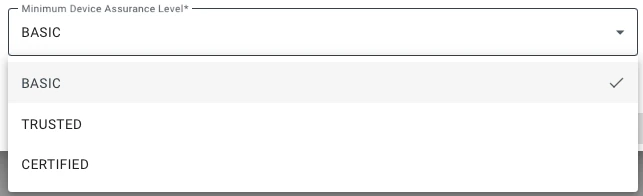
Minimum Device Assurance Level: This setting defines the required assurance level for the authenticating device for the user to access the resource. The available options are:
- Basic: When this is selected, users can unlock doors with any enrolled device. If you are using an enrollment workflow that requires an identity verification step, users will be able to unlock doors under this policy setting before the identity verification step has been completed.
- Trusted: When this is selected, users can unlock doors using a device that has been enrolled using any form of identity verification.
- Certified: When this is selected, access is restricted to users who have performed an in-person identity verification step.
Configuring Application Policies Onboarding Administrators