

- Open the PowerShell Application on your Windows device
- Enter the code below to check for both fingerprint and facial recognition modules, as well as all viable camera devices

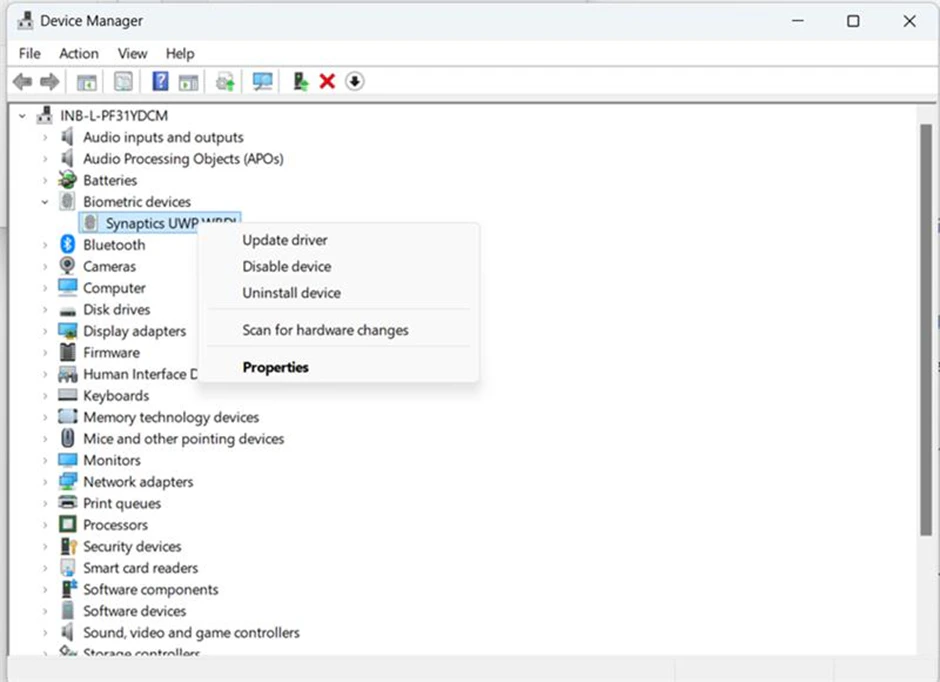
- Open Device Manager by pressing Windows + X and selecting Device Manager.
- Expand the Biometric Devices section.
- Right-click on the biometric device (e.g., “Fingerprint Sensor”).
- Select Update Driver.
- Search automatically for updated driver software: This option will search your computer and online sources for the latest driver version and install it automatically.
- Browse my computer for driver software: If you’ve already downloaded the driver from the manufacturer’s website, you can select this option to manually install it. Once the drivers are upgraded, you should be able to use the fingerprint sensor.
Supported Platforms Use Cases