TruU provides Role Based Access Control for Admins working with the product and includes four pre-built Administrator definitions:
  • Super Admins
  • Read-Only Admins
  • Digital Admins
  • Physical Admins
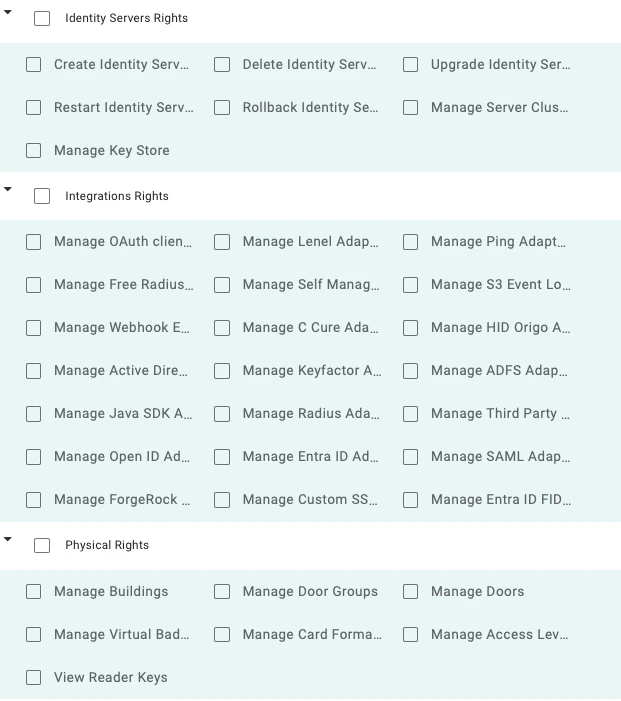
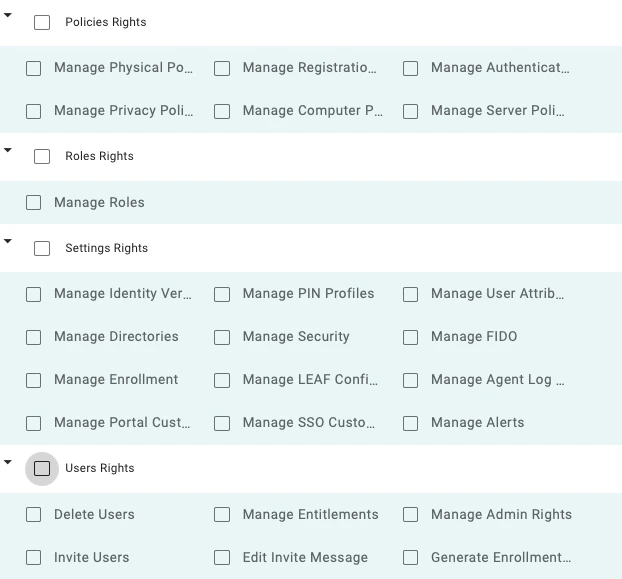
Any “Super Admin” can click into any existing Role to modify the rights that Admins in that Role have, as well as the Adapters that those Admins can manage and/or apply policies to. In addition, Super Admins can create brand new Roles by clicking the (+) button at the top of the page. From here, the Admin can base the new Role on any of the 4 existing templates or any of the custom ones already created in your tenant. Once the Roles are created, they can be assigned to Admin users as needed from the “Users” page or by navigating to the “Users” page on the “TruU Admin Console”, then the “Admins” tab. This gives you the ability to scope administrative rights based on: (i) functional areas, and (ii) specific adapters. These rights are fully enforced through an authorities framework in the TruU back-end and through the UI itself (e.g. if an Admin is only allowed to administer a specific SSO adapter, then he/she can’t select “All Adapters” when applying policies for authentication) Below are all specific rights that you can assign for a custom role:
Onboarding Administrators Configure MS Active Directory Certificate Authority (ADCS) for TOTAL Protect