

- Open a command prompt as an Administrator and navigate to the Downloads folder or location where you have copied the downloaded certificates.
- Execute this command:
- This command will add the TruU Cloud Trust Issuing CA certificate to the NTAuth store of the domain. What this does is add the TruU issuing CA as a trusted issuing certificate authority:
Example:
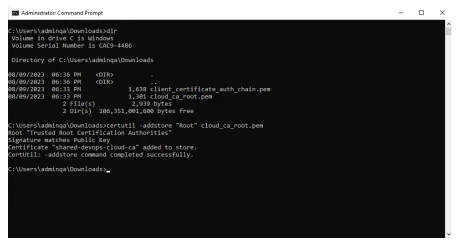
- This command will add the TruU Cloud Trust Issuing CA certificate to the NTAuth store of the domain. What this does is add the TruU issuing CA as a trusted issuing certificate authority:
Validation step
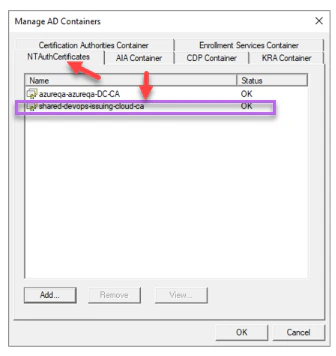
- To check the above succeeded, logon to your Certificate Authority server and go to Start > Run and type pkiview.msc.. Right-click on Enterprise PKI and Select Manage AD Containers.
- On the “NTAuthCertificates” tab, check to ensure now that the Issuing Cloud Trust CA is now listed with Status OK. Click OK.
Downloading Cloud Trust certs from TruU Cloud Add TruU Cloud Trust Certificates Domain Controllers