

Highlights
- Improved Event Details
- Webhook for Event Data
- Magic Link Auditing
- Improved UX for Android Deep Links
- Improved Keyfactor CA Adapter
- Clean-up of Secure Desktop Policy
Enhancements
Improved Event Details
- This enhancement is the first in a series of upgrades we are making to how we present and make Event data available through the Admin Console. With this release, the Event table will now include a carat icon, that if clicked will show an expanded view of the structured data for that event.
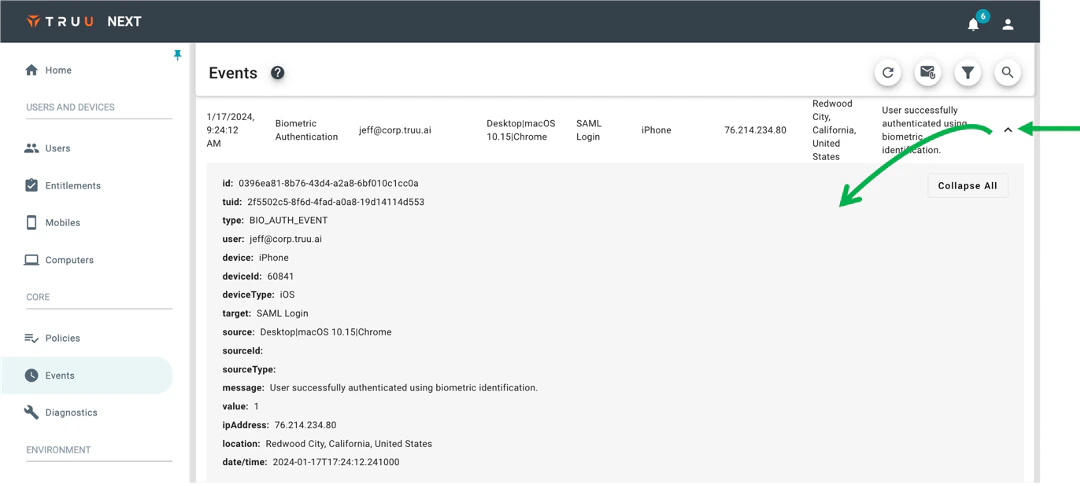
- Most of the data in this expanded view is already included in the standard table view, but there are some additional data elements. This feature is foundational as we will be enriching the data set in future releases.
- You will also see that when the data is expended there is a “Collapse All” button (or “Expand All” depending on the state) that is not functional for this release but gives a glimpse of what is to come. Specifically, as we enrich the structured data, there will be nested objects under specific data elements that can be expanded/collapsed with a standard tree-view.
Webhook for Event Data
- We are happy to announce that we now offer additional options for consuming TruU Event Data, beyond our original S3 Event Logger. Now, if you go to Integrations and choose to Add an Adapter, you will see “Event Logging” as an Adapter Type, and can then choose to use the original “S3 Event Logging”, or select the new “Webhook Event Logging”.
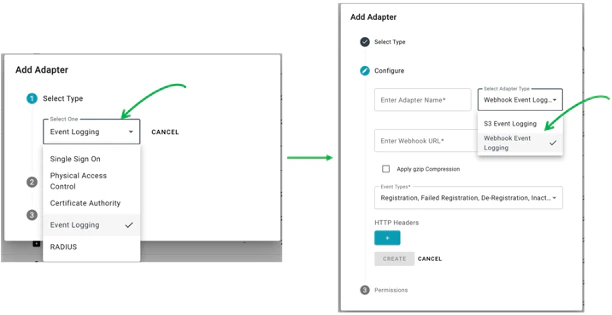
- When choosing the Webhook option, you can choose which event types to include in the Webhook and can optionally choose to add HTTP headers (e.g., if you need to include an API key for integration with a SIEM). One other difference between the two event loggers is that the S3 event logging sends data every 15 minutes, whereas the Webhook sends data every 5 minutes.
Magic Link Auditing
- We have also updated our event data to include auditing for when a “Magic Link” is sent and when it expires as part of a user enrolling using an Identity Verification Workflow. Whereas links sent by the Admin had always been tracked (under “Users > Invitations”), there had not been a record of a user-initiated link being sent until the user enrolls. With this new feature, you will see 2 new Event Types in the Admin Console:
- Magic Link Sent, and
- Magic Link Expired.
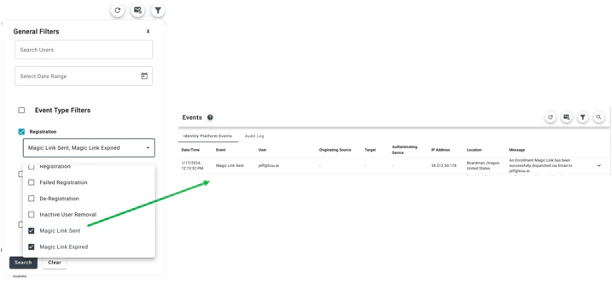
- NOTE: There is a known issue with this feature where the IP Address/location for this Event is being reported as the IP Address/location of where the service is running and not the location of the user. This will be fixed in a future release.
Improved UX for Android Deep Links
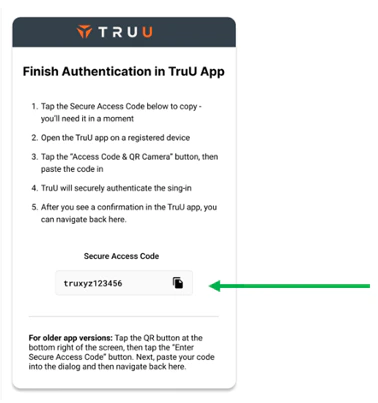
- For deep links in Android (e.g., when using Office 365 apps), we previously copied a code automatically to the phone’s clipboard and would then check the clipboard for that code from the authentication pages. The Android OS then changed, causing users to see a persistent notification that TruU has accessed the clipboard. Our customers did not like this experience and so we have modified it. Now, instead of automatically copying/pasting the code to/from the clipboard, we present a page explaining what needs to be done and provide a button to easily copy the code to the clipboard.
- NOTE: If you have deployed your own Identity Servers, you will need to upgrade your Identity Servers to 24.148 (or higher) for this feature.
Improved Keyfactor CA Adapter
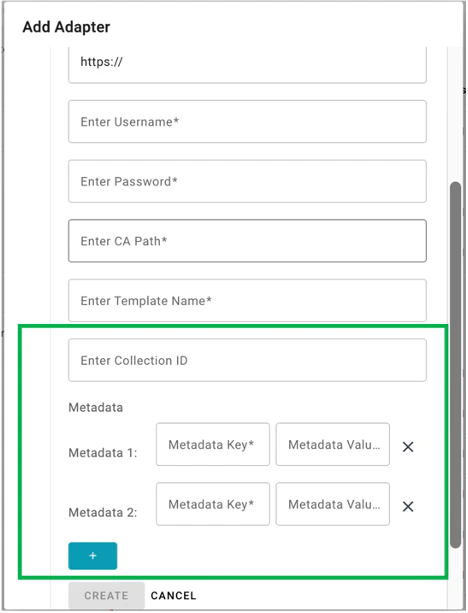
- We have also updated our Keyfactor CA Adapter to better support customers in two ways:
- Added CollectionID to Adapter Integration: this allows you to scope access for Keyfactor based on a collection ID.
- Added Support for Multiple Metadata Key/Value Pairs: we’ve expanded support for metadata key/value pairs. In the prior release, we only supported creating a single metadata key/value pair, whereas in this release we’ve made this extensible so that Admins can create as many metadata key/value pairs as they require.
- NOTE: If you have deployed your own Identity Servers, you will need to upgrade your Identity Servers to 24.148 (or higher) for this feature.
Bug Fixes
- We have fixed an issue where user assignment to Entitlement Groups would not update if the user’s UPN had changed.
- We have fixed an issue where locking a computer account from the Admin Console would not produce an audit event.
- We have fixed an issue where events for Macs would not appear from the Computer>Events page.
- We have fixed an issue where search was not working on the Computers page.
Known Issues
PLAT 24.150 Release Notes Android