

Highlights
- Mobile Branding Support
- Bug Fixes
Enhancements
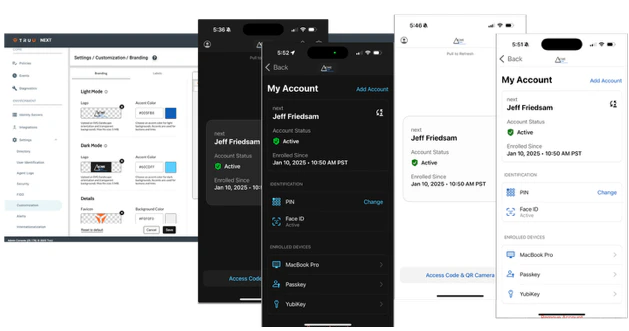
Mobile Branding Support
-
With this release, we are now providing mobile branding support for the iOS app for both light and dark modes. The customization from the Admin Console replaces the logo inside the mobile app and the accent colors for button text, icons and links in the app.
Bug Fixes
- We fixed a UI issue where a black bar would appear at the top of the enrollment window when registering a security key or passkey.
- We fixed an issue where policies could not be applied to directory groups.
- We fixed an issue where the background color used for customization was only applied to SSO pages and did not also get applied to the User Portal.
- We fixed an issue that caused the “User Matching Attribute” list to be empty when configuring an external IdP for SAML Authentication to TruU.
Known Issues
| Ticket Number | Component | Summary |
|---|---|---|
| PLAT-11042 | Event Logging | No event is generated in the Admin Console when a user cancels enrollment. |
| PLAT-9359 | Admin Console | The view of devices does not get updated immediately when dormant settings are modified. If the Admin changes the “Stale Device Handling” configuration under “Settings > Security”, the status for devices (Active / Dormant) may not be accurate for up to 15 minutes as the status is cached and updated every 15 minutes. |
| PLAT-9302 | Admin Console | In rare instances, Admin Console may fail to load. If this happens, refresh the page |
| PLAT-9891 | PIN Reset | If a PIN profile is updated from not requiring PIN rotation to require PIN rotation, already enrolled devices will not honor that policy. Workaround: manually set the enrolled device(s) to require a PIN change. This will force the user to change their PIN on next check-in, and updated PIN profile will be used moving forward. |
PLAT 25.178 Release Notes PLAT 25.174 Release Notes

