

Highlights
- Augmented Computer Data
- Users and Assets APIs
Enhancements
Augmented Computer Data
-
The to be released Desktop Authenticators will collect additional hardware data and share that information with the platform during enrollment and subsequent “heartbeats”. This enriches the context of event data, and the computers drill-down information available in the Admin Console. The enriched data includes:
- MAC Address
- IP Address
- Manufacturer
- Model
- Serial Number
- Processor
- BIOS Version (for macOS we present the EFI as the BIOS).
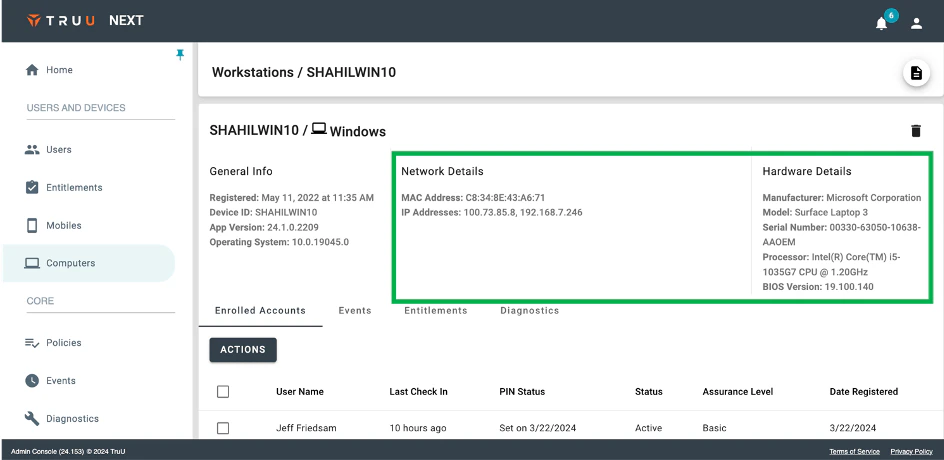
- NOTE: this data will be visible in the Admin Console with Identity Servers running 24.153 (or higher) and requires Windows Authenticator v24.1 (or higher) and Mac Authenticator v24.2 (or higher).
Users and Assets APIs
-
We’ve also updated our user management APIs to include two new data APIs to query the platform for information about:
- Users: The Users API returns users and their enrolled devices.
- Assets: The Assets API returns workstations and the enrolled accounts on those workstations (including user information).
- Refer to the User Management API Guide in the online help for full details on how to use the APIs.
Bug Fixes
-
We have improved experience for SSO deep-link failures on Android. Improvements for this fall-back scenario are as follows:
- Users who have successfully authenticated with that browser in the past, and where the browser supports cookies, will get a push notification to authenticate.
- If the browser does not support cookies, but the IdP provides a login hint, the user will see an action card to approve when they open the app.
- For all other cases, the user will see a more streamlined flow including one less screen and reduced text instructions for how to proceed.
- NOTE: this fix requires 24.153 (or higher) Identity Servers.
- We have fixed an issue which prevented the name of some card readers from appearing as the Target in the Events page for some physical access events.
- We have fixed an issue where deleting a FIDO hardware token from the User Portal would not create a de-registration event in the Admin Console.
- We have fixed an issue which caused some event data to appear with dates in the future.
- We have fixed an issue where changing a device assurance level through the Admin Console and identified the method of verification as “Video Conference” would result in the device appearing with the assurance level of “Certified” where it should have been “Trusted”.
Known Issues
PLAT 24.155 Release Notes PLAT 24.152 Release Notes