

Highlights
- Prevention of OAuth Client Sprawl
Enhancements
Prevention of OAuth Client Sprawl
- Whenever an Admin downloads a Config File for the Windows or Mac Authenticator, a new OAuth client is created that allows the config file to be used to enroll the authenticators. These OAuth clients can be set to inactive to prevent the clients form being used for future enrollments. However, Admins need to remember to invalidate the old clients to prevent further usage when new config files are created. With this release, Admins are presented with choices to invalidate previously downloaded config files.
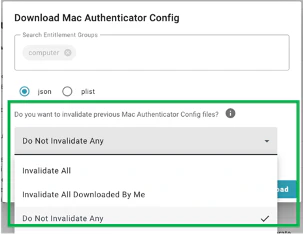
- NOTES: (1) Invalidating existing OAuth clients does not affect already enrolled computers, it just prevents further use of that config file. (2) Only Admins with the “Manage OAuth clients” administrative right will see this option.
Bug Fixes
- We have improved reporting on events in the device drill-down for security keys that have been unenrolled and then re-enrolled. The security key drill-down now shows all events for that device, not just the events for the current enrollment of that device.
- We have improved error handling for embedded browsers that do not support the use of resident keys for authentication. TruU now detects when an embedded browser does not support a resident key flow and provides users with a way to enter their username in this case (in the past the user would see an error and would not be able to proceed).
- We have fixed an issue that prevented Admins from being able to save changes to the SSO Customization page in the Admin Console.
Known Issues
PLAT 24.166 Release Notes PLAT 24.162 Release Notes