

Highlights
- Single Logout Support
- Detailed Events View for User and Device Drill-Down
Enhancements
Single Logout Support
- With this release, we’ve added Single Logout (SLO) support for both the TruU Admin Console and User Portal. With single logout, when the user logs out of any federated app where SLO is enabled the user will be logged out of all other federated apps. TruU supports this for both SP-initiated SLO (e.g. the user logs out of the Admin Console or User Portal, and the IdP is instructed to log the user out of all other federated apps) and IdP-initiated SLO (e.g. the user logs out of the IdP portal, or another federated app and the IdP logs the user out of the Admin Console and User Portal). This feature can be configured under Settings > Security.
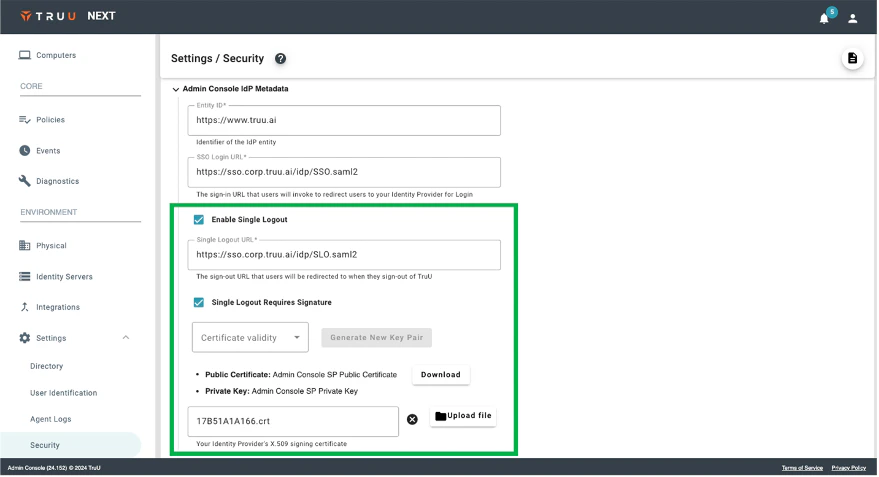
Detailed Events View for User and Device Drill-Down
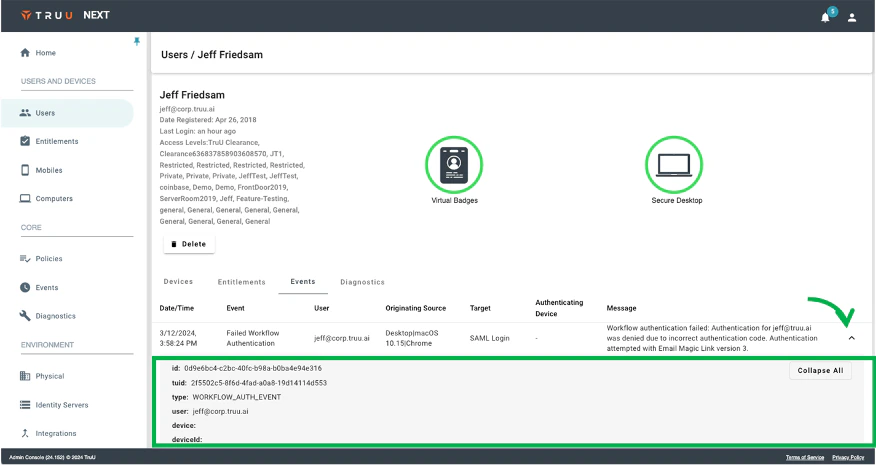
- We’ve added the detail events component to the User and Device drill-down pages. Now, when viewing events from the User or Device pages, you can click drill-in to see the expanded event details.
Bug Fixes
- We’ve fixed an issue where SMS messages would not be sent if the underlying phone record from the directory included extra characters that are not valid characters for a phone number.
Known Issues
PLAT 24.153 Release Notes PLAT 24.151 Release Notes