

Highlights
- Improved Failure Event Reporting
- Improved OAuth Client Management
Enhancements
Improved Failure Event Reporting
- We are pleased to announce that we have further improved our event data to give better insight into failure events. Specifically, we have added a new failure Event Type for “Failed Policy Authentication”. This will give better insight into access failures due to a user not being able to satisfy a policy requirement. For example, if you require users to authenticate with a device using an assurance level of “Certified” but the user attempts to access the resource with a device with the assurance level of “Basic”, that event would be captured and visible in the Admin Console as shown below.
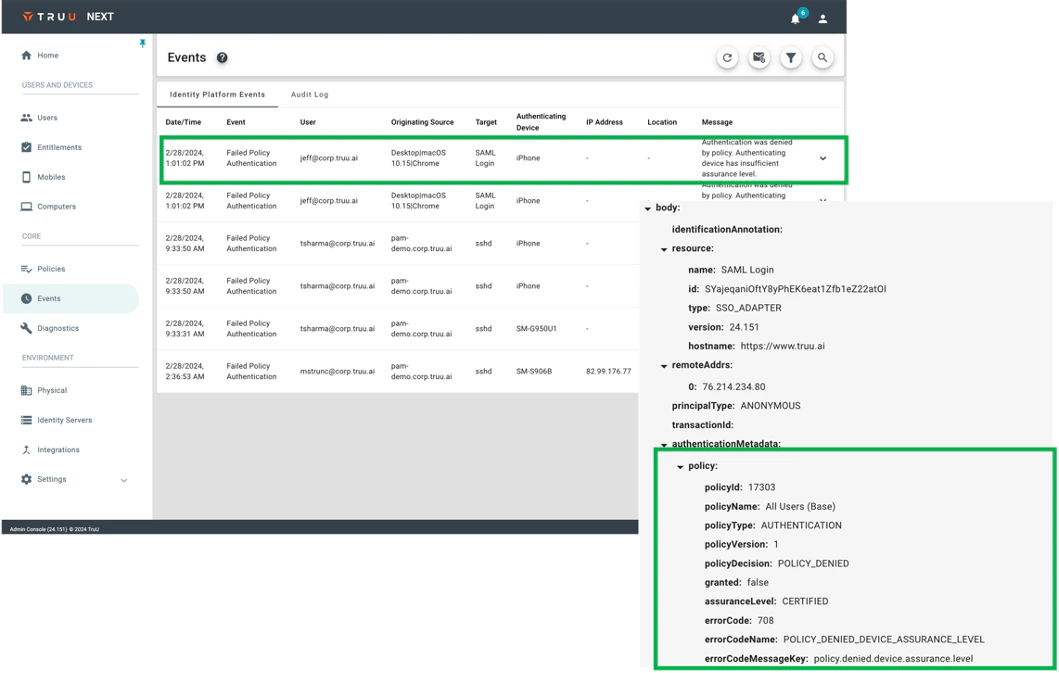
- NOTE: the Event “Body” data is only visible from the Admin Console and is not yet included in data exports.
Improved OAuth Client Management
-
TruU leverages OAuth to ensure that only trusted devices, adapters and integrations can communicate with the TruU platform. When software is downloaded from the Admin Console, Admins can download config files at that time. Whenever a config file is downloaded, a new OAuth client is generated. Over time, customers may find OAuth client sprawl and should clean up, and remove, the old clients. With this release, we’ve made management of clients much simpler by providing the following capabilities in the OAuth Clients page:
- We’ve added a bulk actions capability to set multiple clients to Inactive. (NOTE: this does not affect enrolled agents; it only prevents the config file from being used for further enrollments).
- We’ve added additional filter options to make finding clients to take actions on simpler. The new filter options are:a. Created by: this is the user who created the OAuth Client/downloaded the config file (NOTE: this data is not available for clients that were created in the past, but will be there for all clients created going forward).b. Types: this allows you to select clients for Mac, Windows, PAM and Unspecified (Unspecified will appear for clients created with the “User Operations” scope or for clients created in the past, as type was not tracked when clients were generated in the past). c. Date Created: this allows you to find clients based on when they were generated. d. Last Heard From: this allows you to find clients created for User Operations based on the last time the client was used to call a TruU API.

Bug Fixes
- We have fixed an issue where an Entitlement Group comprised of a directory group with no members would always appear in the “scheduled” state.
- We have fixed an issue where a computer name would not get updated after the name of the computer had been changed on the device.
Known Issues
PLAT 24.152 Release Notes PLAT 24.150 Release Notes